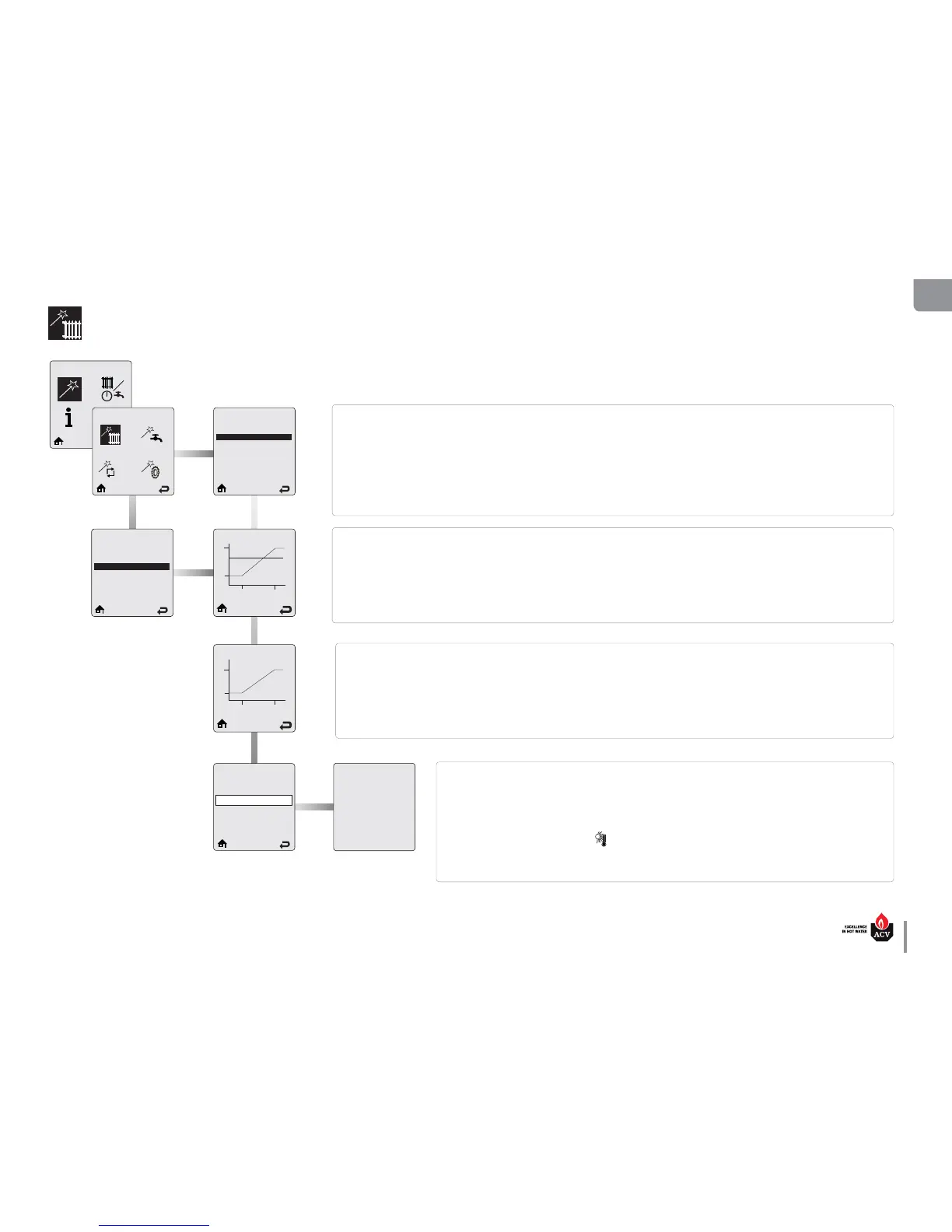
Heating Easy Setup (outdoor sensor connected)
Select CH Demand
Thermostat & Outd. Curve
Constant & Outdoor Curve
Constant & Setpoint
0 - 10 V Modulation Signal
Select CH Demand
Thermostat & Outd. Curve
Constant & Outdoor Curve
Constant & Setpoint
0 - 10 V Modulation Signal
82°C
27°C
18°C
-12°C
Current Settings
Select CH1 Outd. Curve
MAX
60°C
27°C
18°C
-12°C
Current Settings
Select CH2 Outd. Curve
Warm Weather Shutdown
O
O 25°C
EZ Setup Complete
Heating EZ setup is complete.
Additional changes can be made in
the Installer Menu if required.
Press OK to return to EZ Setup Menu
Select CH Demand prompts the installer to select how a CH Demand is generated. There are several Select CH Demand options,
among which the installer must make a selection.
Thermostat & Outd. Curve – This option is only displayed when the outdoor temperature sensor is connected. A central heating
call from a thermostat or zone panel will enable the appliance and the setpoint will vary with the outdoor temperature for central
heating calls.
Constant & Outdoor Curve - This option is only displayed when the outdoor temperature sensor is connected. The HeatMaster will
maintain the setpoint without an external call from a thermostat or zone panel. The setpoint will vary with the outdoor temperature
for central heating calls.
Select CH1 Outd. Curve prompts to select an outdoor curve for a CH1 heating call when an Outdoor Reset option is chosen in Select
CH Demand. Outdoor curve presets are available to cover most applications. The outdoor curve can also be adjusted to any desired
settings in the Installer Menu (refer to Installer’s Handbook).
Press on UP or DOWN button to select the outdoor reset curve appropriate for the type of heating system, then press OK to store
the setting.
Default: Systems with a temperature between 27°C and 82 °C.
Select CH2 Outd. Curve prompts to select an outdoor curve for a CH2 heating call when an Outdoor Reset option is chosen in Select
CH Demand. Outdoor curve presets are available to cover most applications. The outdoor curve can also be adjusted to any desired
settings in the Installer Menu (refer to Installer’s Handbook).
Press on UP or DOWN button to select the outdoor reset curve appropriate for the type of heating system, then press OK to store the
setting.
Default: Systems with a temperature between 27°C and 60 °C
Warm Weather Shutdown allows to enter an optional outdoor temperature at which to disable the central
heating function. The HeatMaster will continue to respond to a domestic hot water call or a 0- 10V Modu-
lation Signal when the outdoor temperature exceeds the Warm Weather Shutdown Temperature setting.
Press the LEFT or RIGHT buttons to adjust the Warm Weather Shutdown Temperature then press the OK
button to store the setting and complete the Heating setting.
The Warm Weather Shutdown icon (
) is displayed on the home screen when the outdoor temperature
reaches the Warm Weather Shutdown preset temperature.
Default: OFF.
EZ Setup
Heating EZ Setup




 To Next Page