
 Need help?
Do you have a question about the Adafruit Audio FX and is the answer not in the manual?
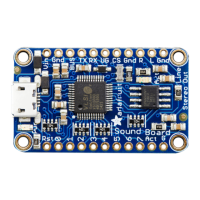
Describes the headphone jack functionality and its limitations for connecting speakers.
Details the integrated class D stereo amplifier and its power output capabilities.
Details the primary input pins for supplying power to the sound board.
Explains the pins used for serial communication and controlling the board via UART.
Describes the two extra input pins for adjusting audio volume in trigger mode.
Details the line-level audio output pins for connecting amplifiers or speakers.
Explains the 11 input pins used to trigger audio playback based on file naming.
Covers auxiliary pins such as Reset (Rst) and Activity (Act).
Details powering the board using a USB power bank via the micro USB port.
Explains connecting battery packs via Vin/GND pins or a JST connector.
Describes playing an audio file once when a trigger pin is momentarily connected to ground.
Explains playing audio continuously while a trigger pin is held down.
Details triggering a loop by pressing a button once to start and again to stop.
Describes triggering multiple audio files sequentially on one pin press.
Explains triggering multiple audio files in a random order on pin press.
Instructions for downloading and installing the Adafruit_Soundboard Arduino library.
Guide to uploading the menu example sketch to an Arduino for serial control.
Lists commands available when no audio is currently playing.
Lists commands available while audio is actively playing.
Discusses storage capacity (2MB/16MB) and typical audio file sizes.
Compares OGG Vorbis (compressed) and WAV (uncompressed) audio formats.
Explains the benefits of using mono audio for single speaker setups.
Recommends bit rates and sample rates for optimal audio quality and size.
Hints for when the sound board does not appear as a drive on the computer.
Guides for diagnosing why no audio plays when trigger pins are activated.
Provides links to disk images for restoring the board's filesystem.
Lists datasheets for the decoder chip and PCB files.
Offers access to the board's schematic and fabrication layout.
 General
| Brand | Adafruit |
|---|---|
| Model | Audio FX |
| Category | Recording Equipment |
| Language | English |

 To Next Page