General Usage
For connections we recommend at a minimum
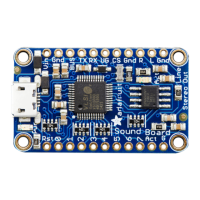
Connect UG to GND (to start the sound board in Uart mode)
Connect RX to the data-output pin
from
the microcontroller into the sound board
Connect TX to the data-output pin
to
the microcontroller from the sound board
Connect RST to another microcontroller pin, when toggled low, it will reset the sound board into a known state
If you want to know when sound is being played, the ACT pin is LOW when audio is playing - this output also controls
the red ACT LED
You can use 3.3V or 5V logic on the RX pin, it has a level shifter. TX is output at 3.3V which can be read from a 3.3V or
5V logic. For the RST pin, it's 3.3V and has a pullup. To reset the board, set the microcontroller pin to low, then an
output, then back to an input like so:
After reset, the sound board will print out a bunch of info
digitalWrite(reset_pin, LOW);
pinMode(reset_pin, OUTPUT);
delay(10);
pinMode(reset_pin, INPUT);
delay(1000); // give a bit of time to 'boot up'


 To Next Page
 Loading...