Triggering Audio
OK finally you are ready to play some audio. You can use the board in two ways, either in 'Trigger mode' (default) or
'Serial mode' (more advanced usages, see the next page)
This page will talk only about using it in trigger mode since that's what we think most people will do.
How many triggers are there?
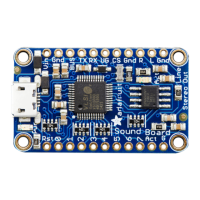
There are eleven trigger pins - named #0 thru #10
You don't have to use them all! We just had lotsa pins so we made them all available.
Each trigger bin is an input that we recommend using with a pushbutton or tactile button or other kind of switch. When
the # pin is connected to GND for more than about 125 milliseconds it will trigger! There is a 100K pull up resistor on
each one, so you do not need any extra resistors or pullups.
Remember, you don't
have
to use a mechanical button or switch - you can use conductive thread, tilt switches, two
pieces of tinfoil, the output from some other electronic thingy, just anything that will send a ground signal to the pin.
How long does it take for audio to play once I've triggered the pin?
Good question! It matters whether you are using WAV or OGG. Compressed audio takes a little more time to get going.
From the moment the SFX board sees a ground level on the pin, it takes ~120ms to play a WAV file and ~200ms to
play an OGG file. These are within 'instant feedback' expectation (https://adafru.it/e4r)
If 'repeating' a file by keeping the button hend down, or doing a latching trigger type, theres a ~20ms delay
(imperceptable) between WAV replays and ~120ms between OGG replays (noticable if the audio is meant to perfectly
loop)

 To Next Page
 Loading...