Using Help | Contents | Index Back 401
Adobe Illustrator Help Windows Shortcuts
Using Help | Contents | Index Back 401
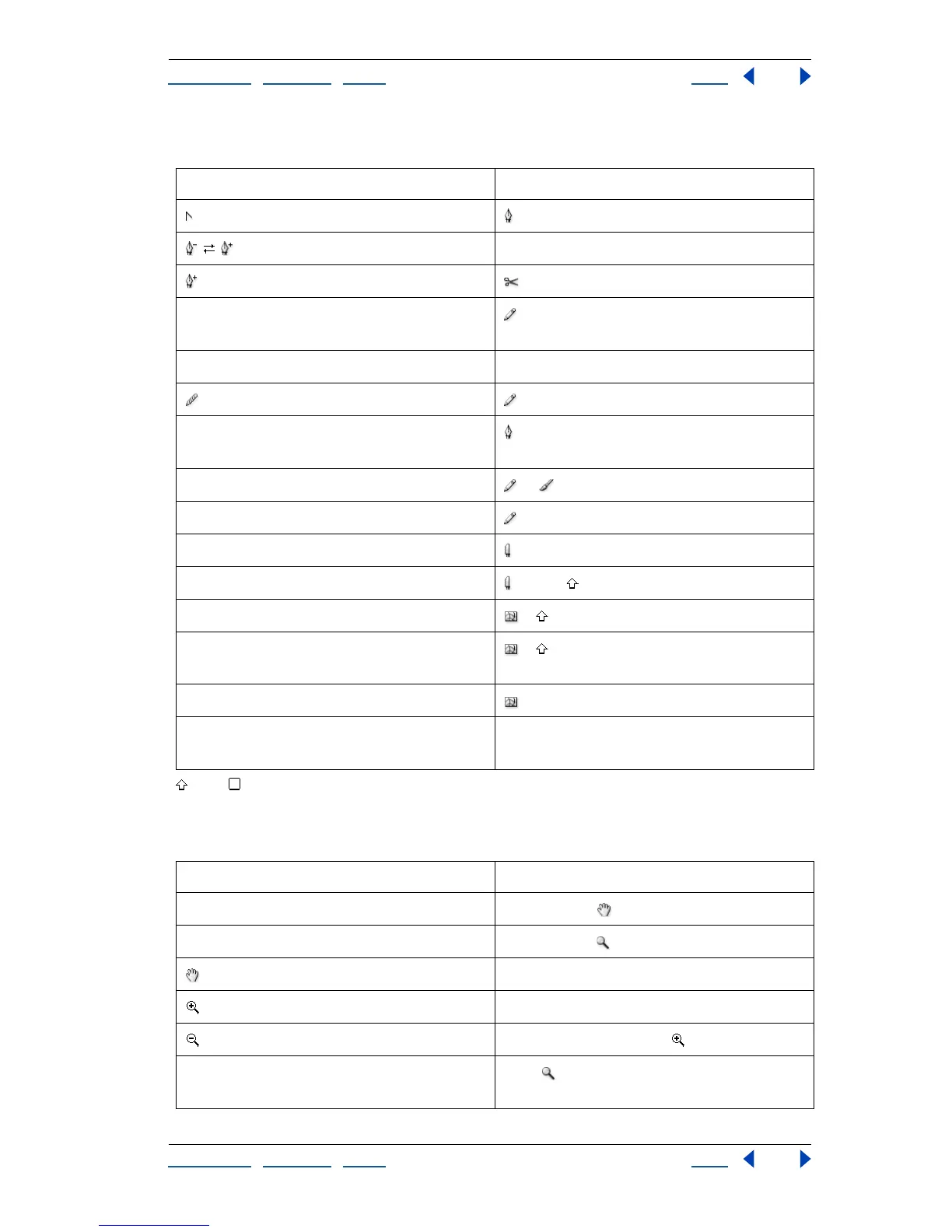
Path Editing
Shift Key
Viewing
Result Action
(convert-anchor-point tool) + Alt
Alt
+ Alt
Edits existing path –drag (while drawing over or near
selected path)
Closes path over start point Click start point with the pen
(smooth tool) + Alt
Moves anchor point and handles while
drawing
+ spacebar
Creates closed path while drawing or + Alt –drag
Connects path to end of another path + Ctrl –drag
Cuts along straight line + Alt
Cuts at 45°/90° increments + Alt +
Moves mesh point along path + –drag mesh point
Adds mesh point using existing object
color
+ –click path
Removes mesh point + Alt –click mesh point
Turns shape mode buttons into Pathfinder
commands
Alt + Shape mode
Result Action
Fits imageable area in window Double-click
100% magnification Double-click
spacebar (when not in text focus)
Ctrl + spacebar
Ctrl + Alt + spacebar or + Alt
Adjusts zoom marquee position Drag ; then press spacebar and continue
dragging



 To Next Page