3.9.8.2 Alarm Counter
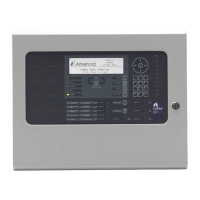
Alarm Counter.
The Panel records the number of times that the fire alarm condition has
occurred at the panel.
[View Alarm Counter]
0000000033
In the above example, the panel has entered the fire alarm condition 33 times since it was installed.
The panel increments the count by one each time it changes from the normal condition to indicate a fire alarm
condition. Whilst in the fire alarm condition, and until it is reset, further fire alarm events do not increment the
counter.
Press the ‘Esc’ button to return to the main view menu.
3.9.9 View - Network
This Option can be used to obtain diagnostic information when a network is used to connect other panels or
remote terminals. The access level of all panels on the network can be checked from this display:
[NETWORK – Press 0 to Clear] More>
Node Status
1 LOCAL
2 Level-2
3 Level-1
4 -
Additional network diagnostics are available by selecting the “More>” option.
For further information, refer to the Ad-Net network manual (Document No. 680-502).
Pressing '0' allows the stored network status information to be cleared.
3.9.10 View - Warnings
This Option can be used to obtain information about warning conditions on the panel.
A warning condition is created whenever a detector device reaches its limit drift of compensation. This does not
affect the performance or operation of the panel in detecting and responding to fire alarm conditions from the
device. It will mean the device is more sensitive and could react to lower levels smoke stimuli resulting in false
alarms. This function is normally used by the service engineer to view which devices need to be cleaned and no
indication is given of this condition on the normal displays. A fault condition will occur when the device becomes
dirty.
3.9.11 View - Supervisory
This Option can be used to obtain information about supervisory conditions on the panel.
The operation of the panel and the information that can be shown is identical to the views available from the
main operating display. Refer to Section 3.6 for further information.
If there are no Zones or Inputs in a Supervisory condition, the display automatically reverts to the Main View
Menu.
www.acornfiresecurity.com
www.acornfiresecurity.com


 To Next Page