Chapter 2
Selecting Your Hardware Components
2-3 Selecting Link Terminal and Cable
Ethernet Network
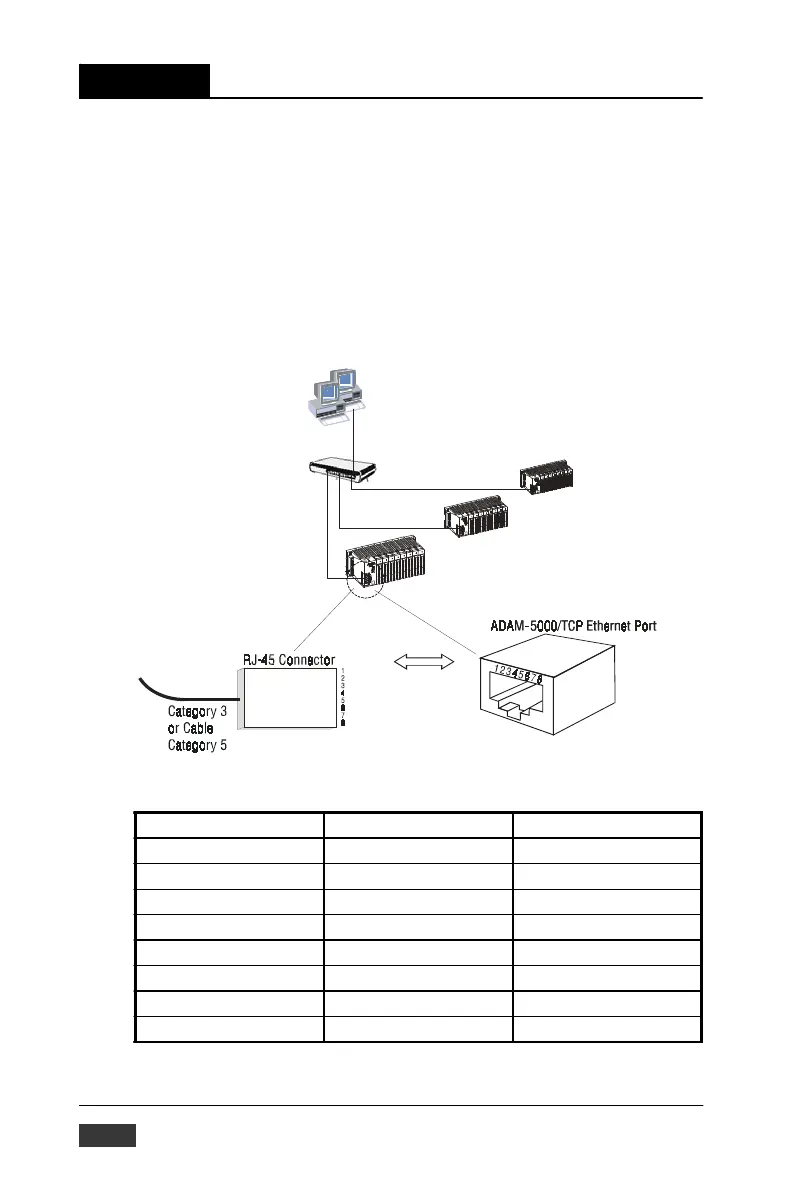
Use the RJ-45 connector to connect the Ethernet port of the ADAM-
5000/TCP Series to the Hub. The cable for connection should be Category 3
(for10Mbps data rate) or Category 5 (for 100Mbps data rate) UTP/STP
cable, which is compliant with EIA/TIA 586 specifications. Maximum
length between the Hub and any ADAM-5000/TCP Series is up to 100
meters (approx. 300ft)
Figure 2-2: Ethernet Terminal and Cable Connection
Pi
n
numbe
r
S
i
gna
l
F
unc
ti
on
1
RD+
R
e
cei
ve
(
+
)
2
RD
-
R
e
cei
ve
(-)
3
T
D+
T
r
ansm
it
(
+
)
4
(
N
o
t
U
sed
)
-
5
(
N
o
t
U
sed
)
-
6
T
D
-
T
r
ansm
it
(-)
7
(
N
o
t
U
sed
)
-
8
(
N
o
t
U
sed
)
-
Table 2-5: Ethernet RJ-45 port Pin Assignment
2-8 ADAM-5000/TCP User’s Manual


 To Next Page
 Loading...