Chapter 5
System Hardware Configuration
5-3-11 Data Gateway Setting
ADAM-5000/TCP Series is designed with an RS-485 Modbus
Interface. As a Data Gateway, It integrates serial Modbus devices into
Ethernet applica- tion easily.
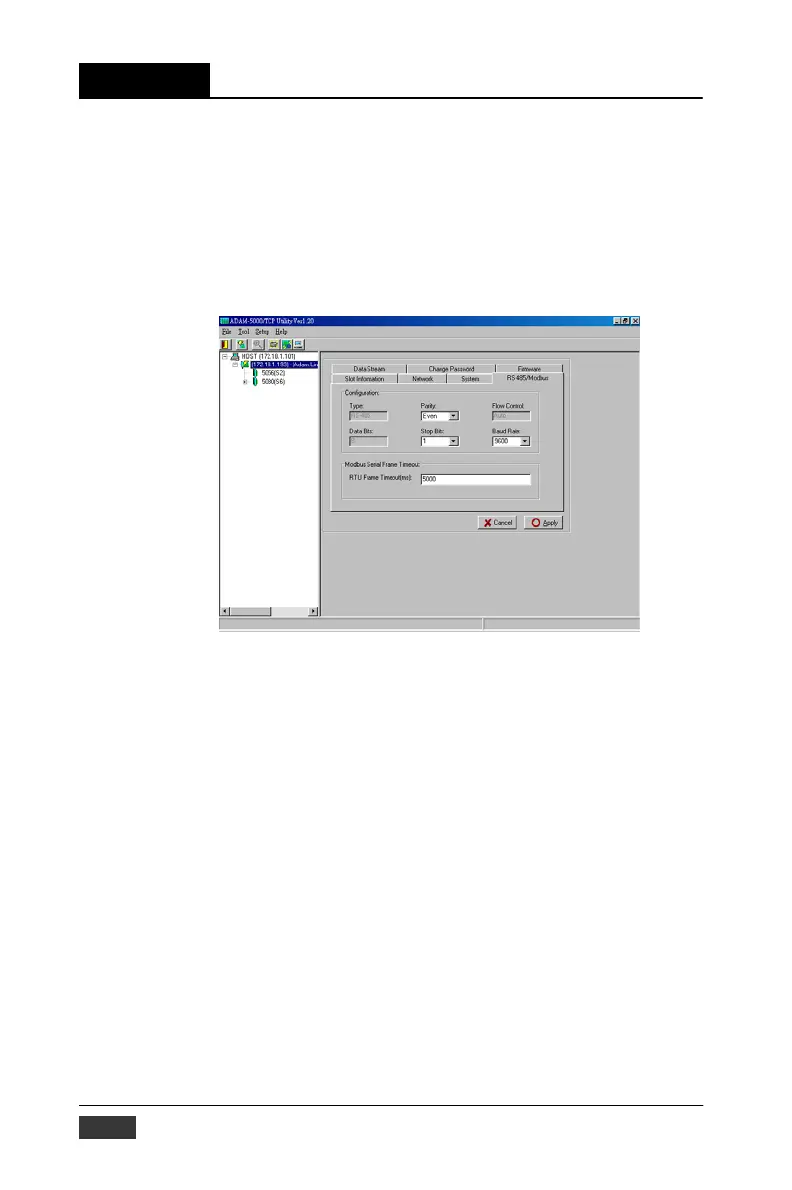
Click the tip of “RS-485/Modbus” to configure the RS-485 network set-
ting with following steps.
Figure 5-26: RS-485 Modbus Network Setting
1. Define the parameter of the network, includes Parity, stop bit, Baud
Rate (300~115200bps),and Timeout.
2. Click the Apply button, the password verification dialog block
will pop up.
3. Key in your specific password and click “OK”, The setting is done.
5-22 ADAM-5000/TCP User’s Manual


 To Next Page
 Loading...