Chapter 5
System Hardware Configuration
This chapter explains how to use Windows Utility to configure the
ADAM-5000/TCP Series system for various applications. Users can
learn the hardware connection, software installation, communication
setting and every procedure for system configuration from these
sections.
5-1 System Hardware Configuration
As we mentioned in chapter 3-1, you will need following items to com-
plete your system hardware configuration.
System Requirement
• Host computer
- IBM PC compatible computer with 486 CPU (Pentium is recommended)
- Microsoft 95/98/2000/NT 4.0 (SP3 or SP4) or higher versions
- At least 32 MB RAM
- 20 MB of hard disk space available
- VGA color monitor
- 2x or higher speed CD-ROM
- Mouse or other pointing devices
- 10 or 100 Mbps Ethernet Card
• 10 or 100 Mbps Ethernet Hub (at least 2 ports)
• Two Ethernet Cable with RJ-45 connector
• Power supply for ADAM-5000/TCP Series (+10 to +30 V
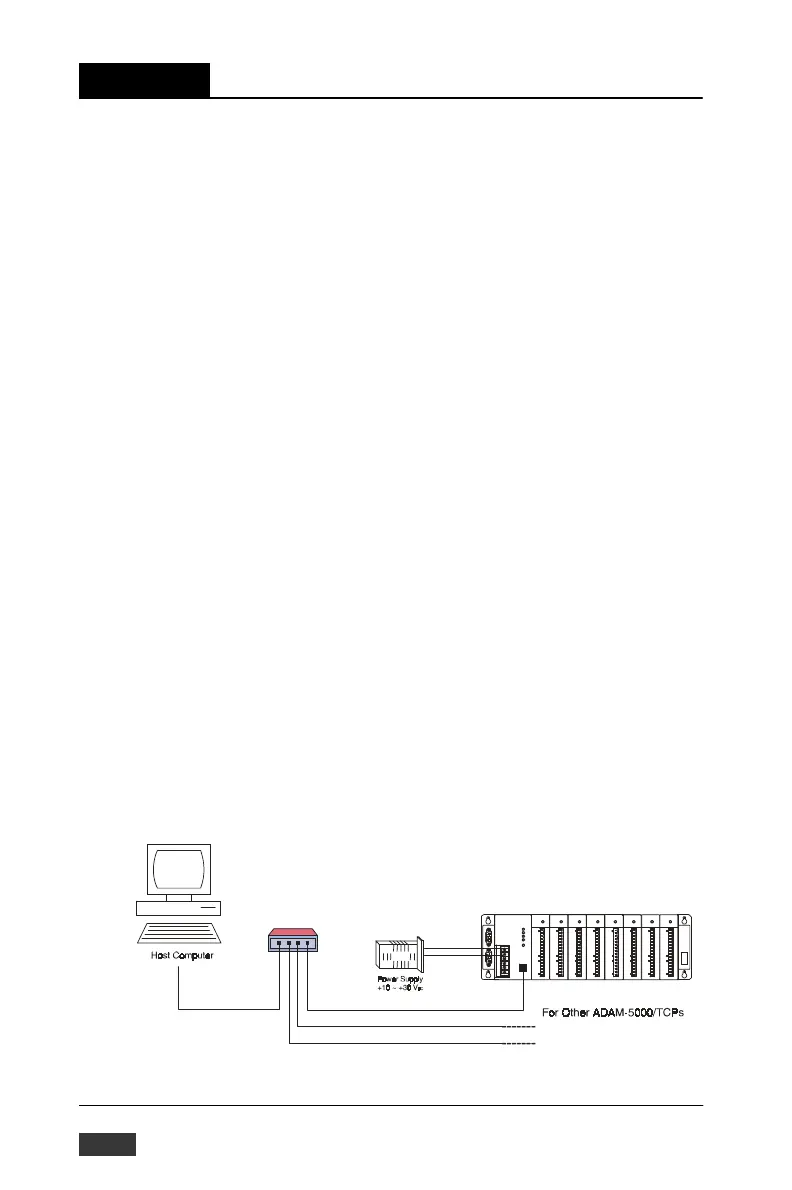
unregulated) Make sure to prepare all of the items above, then connect
the power and network wiring as figure 5-1.
Figure 5-1: Hardware Configuration
5-2 ADAM-5000/TCP User’s Manual


 To Next Page
 Loading...