Chapter 5
System Hardware Configuration
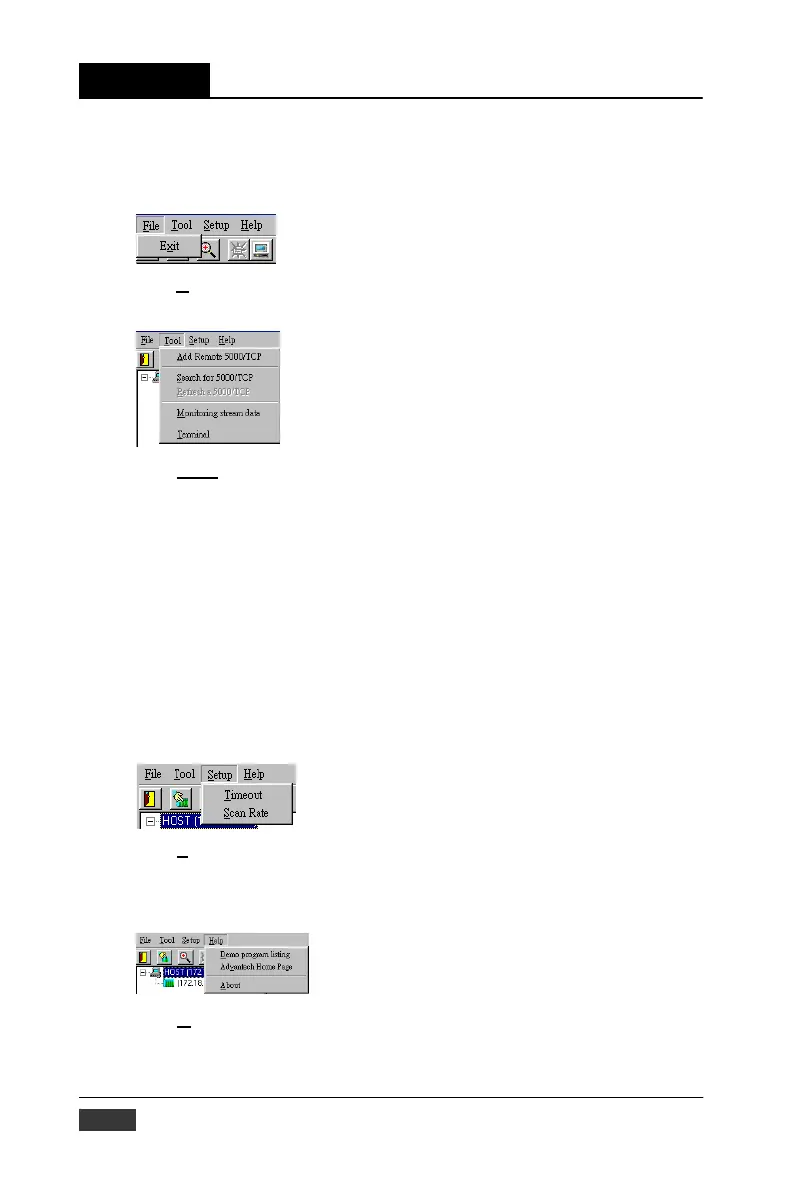
The top of the operation screen consists of a function menu and a tool
bar for user’s commonly operating functions.
Function menu
Item F
ile contents “Exit” Function, using to exit this Utility program.
Item Tool
contents functions as below:
Add Remote 5000/TCP : Create a new ADAM-5000/TCP located in other
Ethernet domination, both available to local
LAN and Internet application.
Search for 5000/TCP: Search all ADAM-5000/TCP units in the
spe- cific Ethernet domination. ( the same with
host PC’s Ethernet domination)
Refresh 5000/TCP: Refresh the specific ADAM-5000/TCP unit to verify
the system status.
Terminal: Call up the operation screen of Terminal emulation to do
the request / response command execution.
Monitor Data Stream: Call up the monitoring screen of stream data from
specific ADAM-5000/TCP.
Item S
etup contents Timeout and Scan Rate setting functions. Please be
aware of the time setting for other Ethernet domination usually longer
than local network.
Item A
bout contents information about software version, released date,
and support modules.
5-4 ADAM-5000/TCP User’s Manual


 To Next Page
 Loading...