- 28 -
TSE-N 01.03 A.B. 599 50 75 69 EN
B
1
B
2
3
4
5
6
7
A
A
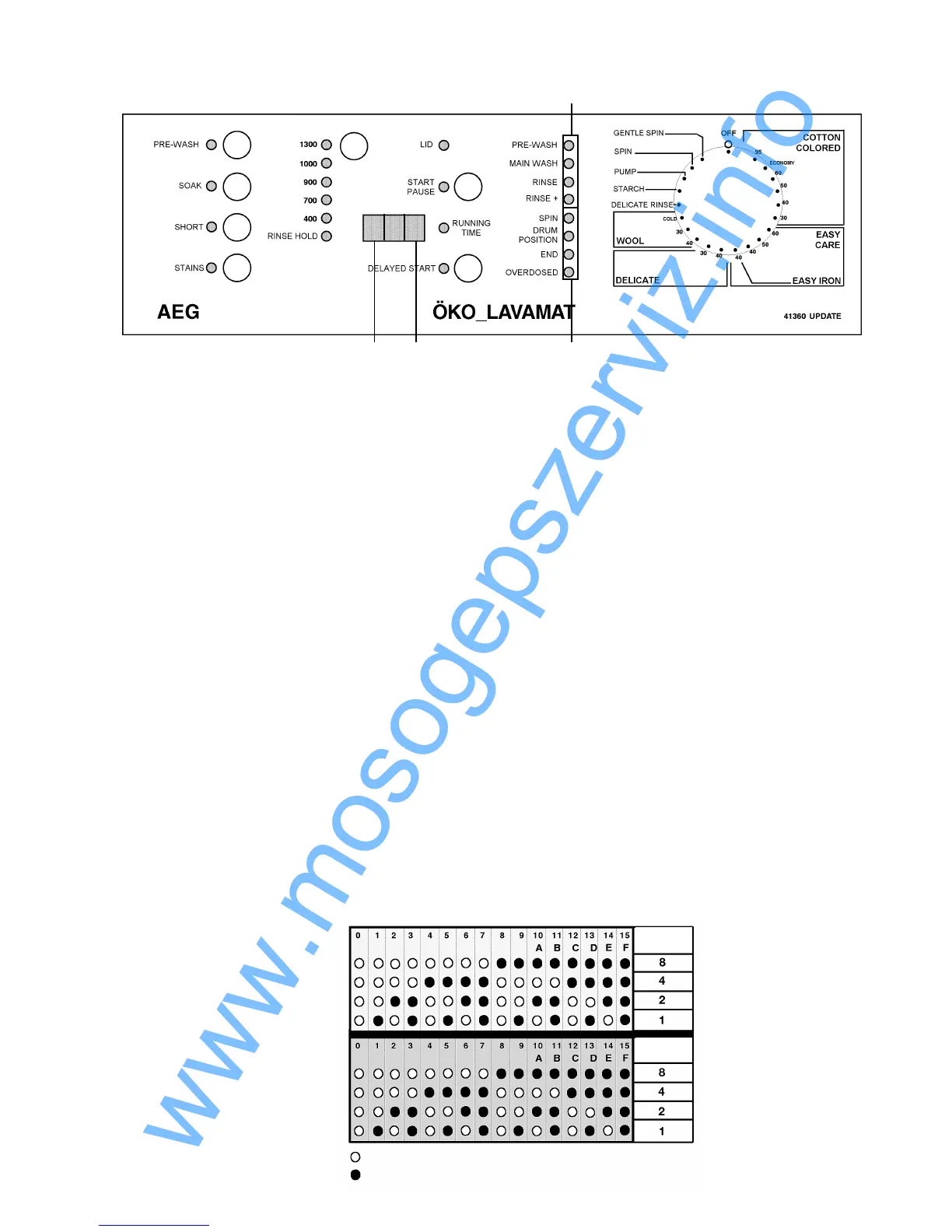
When the main circuit board is replaced, the spare circuit board must be configured anew.
A 16-digit code must be put in, which sets the variant of the appliance.
1. Access to the input mode:
ð Hold buttons 1 and 2 pressed simultaneously and turn the program selector by one position
to the right.
ð Hold the two selected buttons pressed until possibly a buzzer will sound and/or the LEDs and
the display give a running light.
ð Turn the program selector clock-wise to the last program position. The first digit A (see in the
display) will be indicated by the configuration code B (see in the display).
2. Changing the configuration code:
ð The desired configuration code for the first digit can be entered by pressing button 1.
ð By using button 2 the next digit can be requested.
ð If you have programmed all 16 digits, check all digits again for the correct configuration code
by pressing button 2 repeatedly.
3. Saving the configuration code:
ð Pressing buttons 1 and 2 simultaneously will save the entered configuration code. This is
confirmed by a buzzer or the flashing of all LEDs.
Washing appliances without a display indication
In appliances which have no display indication the digits A and the respective configuration code B are
indicated by the cycle run LEDs as a binary code.
For the digit (A) the upper four LEDs are responsible. For the configuration code (B) the lower four LEDs
are responsible.
Service Program
The configuration program
LED OFF
LED ON
Digits (A) ð
Configuration code (B) ð
LEDs
valency
LEDs
valency



 To Next Page