19
—
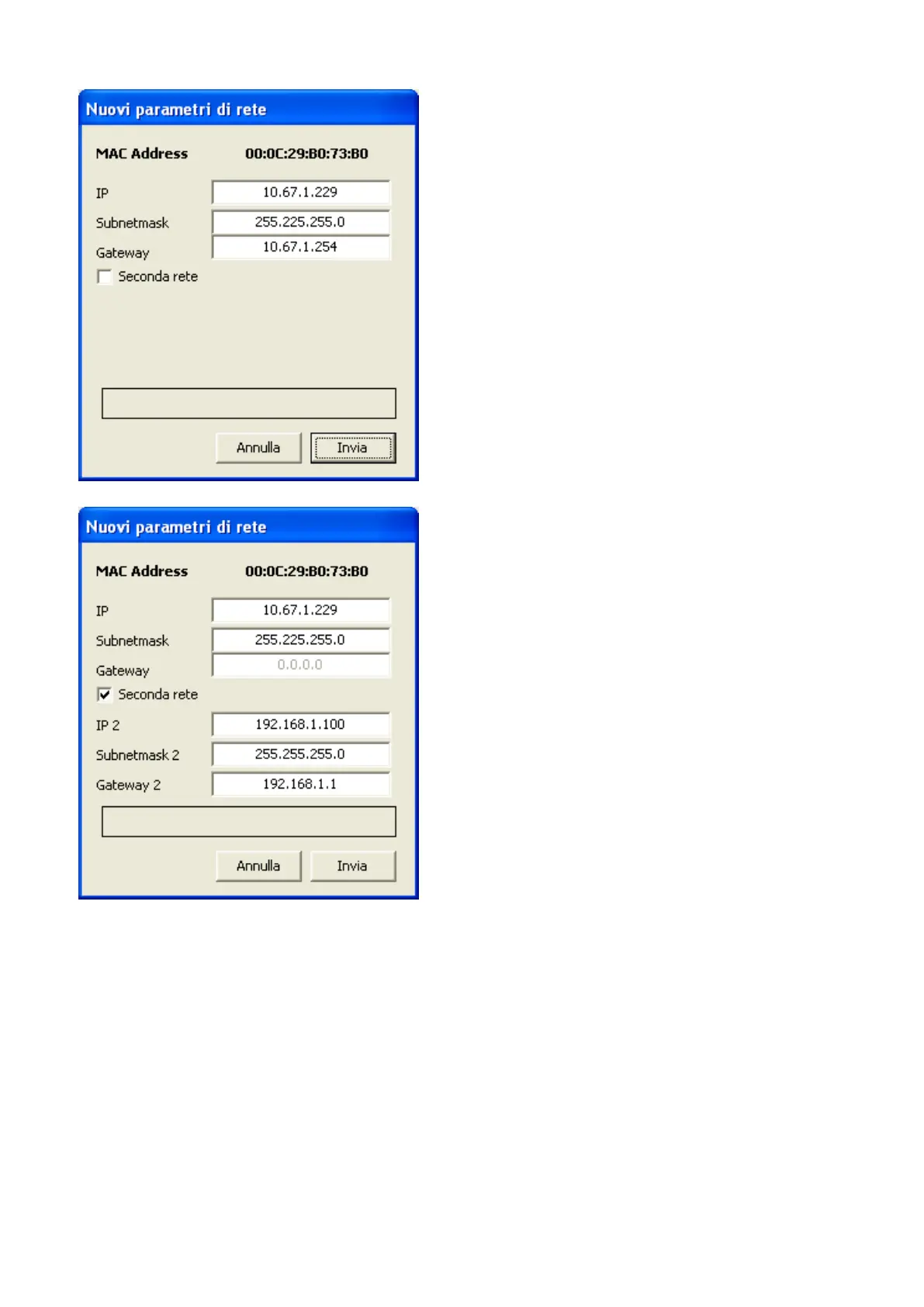
Conguration of the AerConnect device IP address:
One or two networks can be set up in the webserver.
If the second network is enabled, the rst is that intended for AerConnect devices and the second is that with the internet connection.
ATTENTION: Access from the internet requires opening the http port in the router, through port-forwarding rules, a method that may dier from router
to router. In this case it is advisable to assign an http port to the AerConnect other than 80 and 8080. Remote access always takes place as “<PUBLIC_IP-
>:<REMOTE_HTTP_PORT>\login.html.” or via DynDNS services “<HOSTNAME>:<REMOTE_HTTP_PORT>\login.html”
As a rule, the remote http port must match the local one in the TCP port-forwarding rule.
3. After conguring the device, go to the “VMF” section to congure the VMF-E6 systems you that are to be controlled.
3. Specically, the number of VMF-E6 panels present can be set together with the type of communication, the associated modbus address and the IP address of any Eth-
ernet-RS485 device which they are connected to
— RTU: baud rate congured in VMF-E6, and the modbus address for every VMF (max 6)


 To Next Page