32
AUTO-RESTART FUNCTION WITH NON-VOLATILE MEMORY
By default, the unit is supplied with DIP4 OFF, which corre-
sponds to the auto-restart active function.
The user settings will be stored in a non-volatile memory
(when 5 seconds have passed with no changes made to the
settings).
This means that if the electricity supply to the controller is cut
off and then reactivated, the controller will resume operation
with the last settings memorised.
The memorised settings are POWER on/off, MODE, FAN speed,
TEMPERATURE, SWEEP.
The non-memorised settings are TIMER, SLEEP.
If the setting cannot be restored, the controller will work with
its default value (power OFF, COOL mode, AUTO ventilation,
set temperature 25°C, sweep OFF, econo OFF, dim OFF).
If DIP4 is ON, the unit will remain deactivated when the power
supply is restored after a power failure.
PUMP CONTACT OPERATION
When season changeover based on the water temperature
is selected (i.e. with DIP6 ON (AUTO_TWIN) and the water
temperature sensor activated), the pump contact is always
powered when the unit is active.
With AUTO_air mode, the pump contact is only powered
when the valve is open.
EMERGENCY BUTTON
The auxiliary button (AUX) underneath the front panel can be
used to change the fan coil operating mode, choosing from
“COOL”, “HEAT” or “POWER OFF”. The emergency button is not
active if the wired panel of the unit is connected.
This function is handy if the wireless remote control gets lost.
The temperature is set at 25°C in COOL mode, and 22°C in
HEAT mode. The fan speed is set on AUTO.
When the auxiliary button (AUX) is used, the TIMER and SLEEP
functions are annulled.
MICROSWITCH
The MS contact on the board can be used to connect a micro-
switch (MS) on the control board with the following functions
"Window contact" (with DIP8 OFF, default value), "Presence
contact" (with DIP8 ON) or managed by Modbus" (by setting
register 257 equal to 1).
WINDOW CONTACT
With DIP8 OFF (default setting), the unit works normally when
the MS contact is open. When the MS contact is closed, the
unit is deactivated and it cannot be switched back on from the
remote control, wired panel or Modbus communication. When
the contact is re-opened, the unit starts working again with
the last settings (as with Auto-Restart).
PRESENCE CONTACT
With DIP8 ON, the unit does not switch off when the MS con-
tact is closed, but the set temperature of the system (sTSET) is
modified (sTSET = TSET + 3 in COOL mode, sTSET = TSET – 3 in
HEAT mode). In this way it is possible to use a microswitch to
limit energy consumption when appropriate. Modbus address
No.39 signals the status of the MS contact.
CONTACT MANAGED VIA MODBUS
With Modbus address No.257 value equal to 1, the unit does
not switch off and the system set temperature (sTSET) does
not change when the MS contact is closed. Modbus address
No.39 signals the status of the MS contact and allows the unit
settings to be changed accordingly.
TIMER ON/OFF
The air-conditioner can be programmed to switch on/off in
advance. When the set time is reached, the system will be
switched on/off automatically.
For more details about how to set the timer, refer to the manu-
al or the specifications of each command.
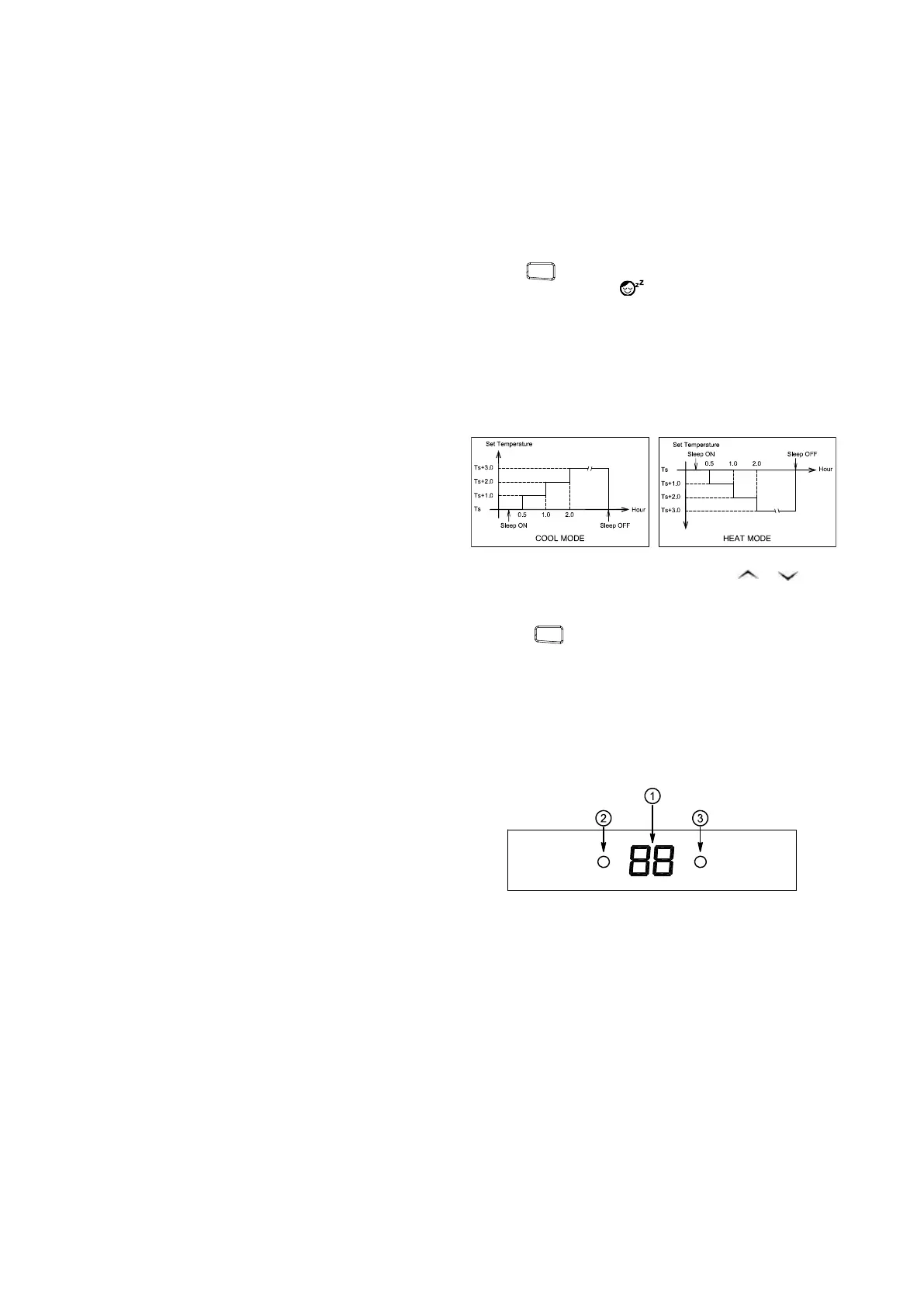
SLEEP
Press the
SLEEP
button to activate the suspension function.
The display will show the
ON
OFF
SET
SENDMODE
SLEEP
LIGHT
Auto
Auto
F
C
symbol. The set temperature will
be automatically increased by 1°C after one hour.
For COOL mode, the set temperature will be automatically
increased by 1°C after one hour.
For HEAT mode, the set temperature will be automatically
reduced by 1°C after one hour.
* When suspension mode is activated and the
POWER ON
POWER OFF
COLD
POWER OFF
HEAT
COOL
POWER ON
or
POWER ON
POWER OFF
COLD
POWER OFF
HEAT
COOL
POWER ON
but-
ton is pressed, the set temperature increases by 1°C in relation
to the last setting.
* Press the
SLEEP
button again to annul the suspension func-
tion.
* If there is a power failure, switch the unit off and change the
operating mode to annul the suspension function.
SELFDIAGNOSTICS UNIT DISPLAY
MODE
INDICATOR
TEMPERATURE/VENTILATION SPEED/ERROR CODE
TIMER
INDICATOR
TEMPERATURE/ERROR CODE:
Normally shows the room temperature when the air condi-
tioner is switched on.
• If the set temperature is altered, the new setting (in °C) will
flash for 3 seconds
• If the ambient sensor error is active, E1 flashes
• If the internal sensor error is active, E2 flashes
• If the inlet water sensor error is active, E4 will appear
briefly 5 minutes after detection
• If the fan fault protection is active, E9 flashes
Fan speed operation as follows:
FA: AUTO FAN - F1: SPEED 1 - F2: SPEED 2 - F3: SPEED 3
MODE INDICATOR
Usually shows the work operation mode.
• COOL MODE: the mode indicator "O" lights up BLUE and the
temperature indicator shows C for 3 seconds, then returns to
the room temperature indicator.





 To Next Page