35
POWER ON/OFF
Press the POWER button to switch the air-conditioner on or off. When turned on, the system will operate according to the set-
ting shown on the remote unit.
MODE
By pressing the MODE key, the air conditioner can be set in
• 5 operating modes (fan, cool, dry, heat, auto)
The LCD screen on the remote control shows FAN, COOL, DRY, HEAT or AUTO depending on the mode selected. The system will work as the
set mode after no mode is changed for 3 seconds.
FAN
Press FAN button to select the fan speed (auto, low, medium or high speed). The display on the Remote unit will show the
status. While auto speed is set, the fan speed (high, medium, low) will be changed automatically according to the system calcula-
tion. The indoor fan will work according to the set speed after no fan speed is changed for 2 seconds.
NB:
1. the FAN button cannot be used in DRY mode.
2. The Auto Fan will be disabled in Fan mode (can be set but main unit will not response).
3. The indoor fan may not work as setting if some functions or protections are occurring.
SETTING THE TEMPERATURE
The temperature can be set within a range of 15-30°C.
Press
POWER ON
POWER OFF
COLD
POWER OFF
HEAT
COOL
POWER ON
or
POWER ON
POWER OFF
COLD
POWER OFF
HEAT
COOL
POWER ON
to increase or decrease the setting in steps of 1°C. The LCD on the remote unit will show the setting tempera-
ture.
The temperature setting function is disabled in FAN mode.
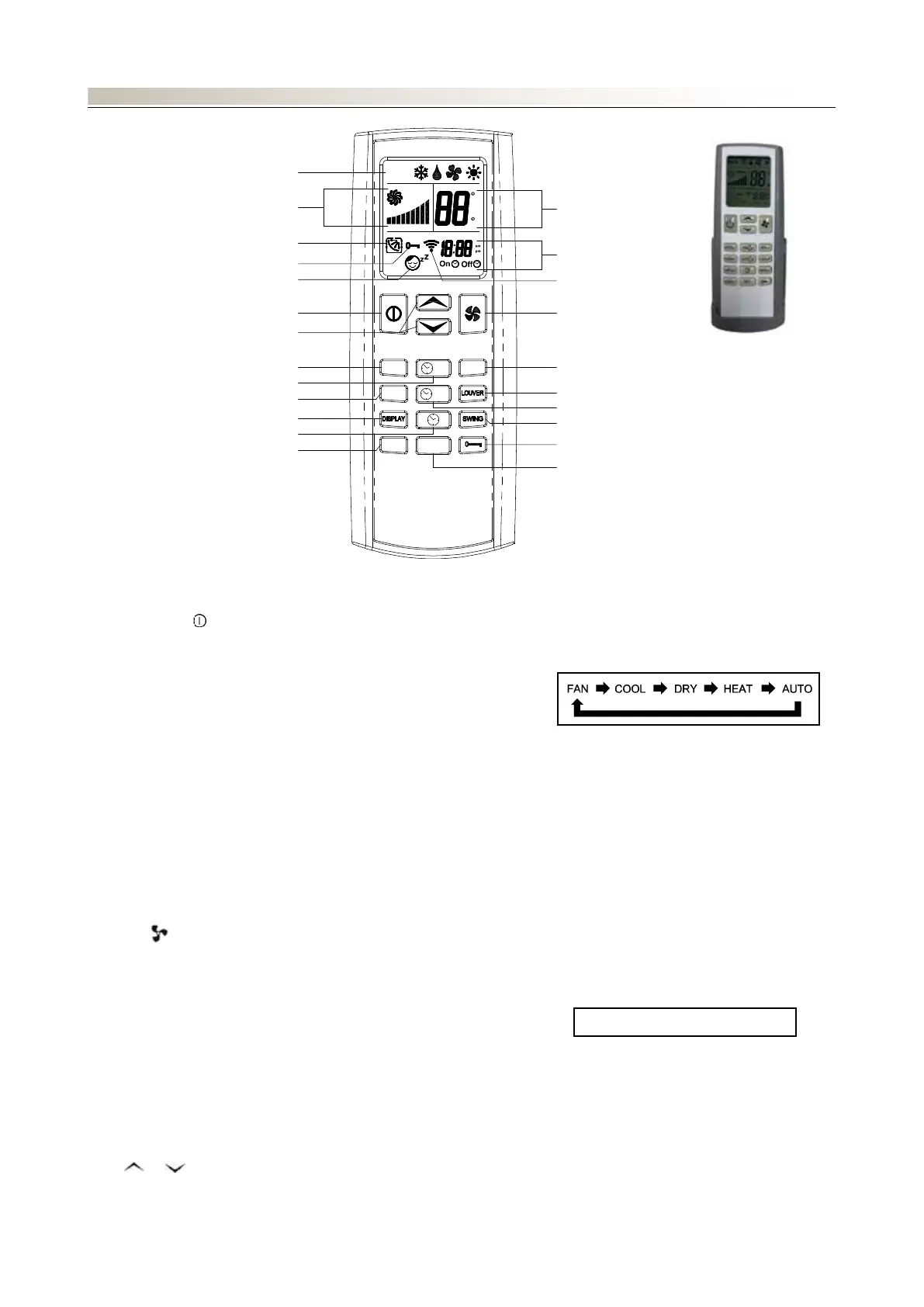
CONTROL: TLW4 WIRELESS REMOTE CONTROL
ON
OFF
SET
SENDMODE
SLEEP
LIGHT
Auto
Auto
F
C
LIGHT
CLOCK
DISPLAY BUTTON
SLEEP BUTTON
TIMER ON BUTTON
MODE BUTTON
TEMPERATURE BOTTON
SLEEP SETTING
POWER BUTTON
LOCK SETTING
SWING/LOUVER SEETING
FAN SPEED SETTING
MODE SETTING
TEMP SETTING
TIMER SETTING
SEND INDICATOR
FAN BUTTON
SEND BUTTON
LOUVER BUTTON
TIMER OFF BUTTON
SWING BUTTON
LOCK BUTTON
SET BUTTON
LOW → MED → HIGH → AUTO





 To Next Page