36
SWEEP
Press SW button to turn on/off the louvre stepper motor.
NB: if the indoor fan is stopped by other functions or protective systems, the louvre will be forced to stop and the SW key will not be enabled.
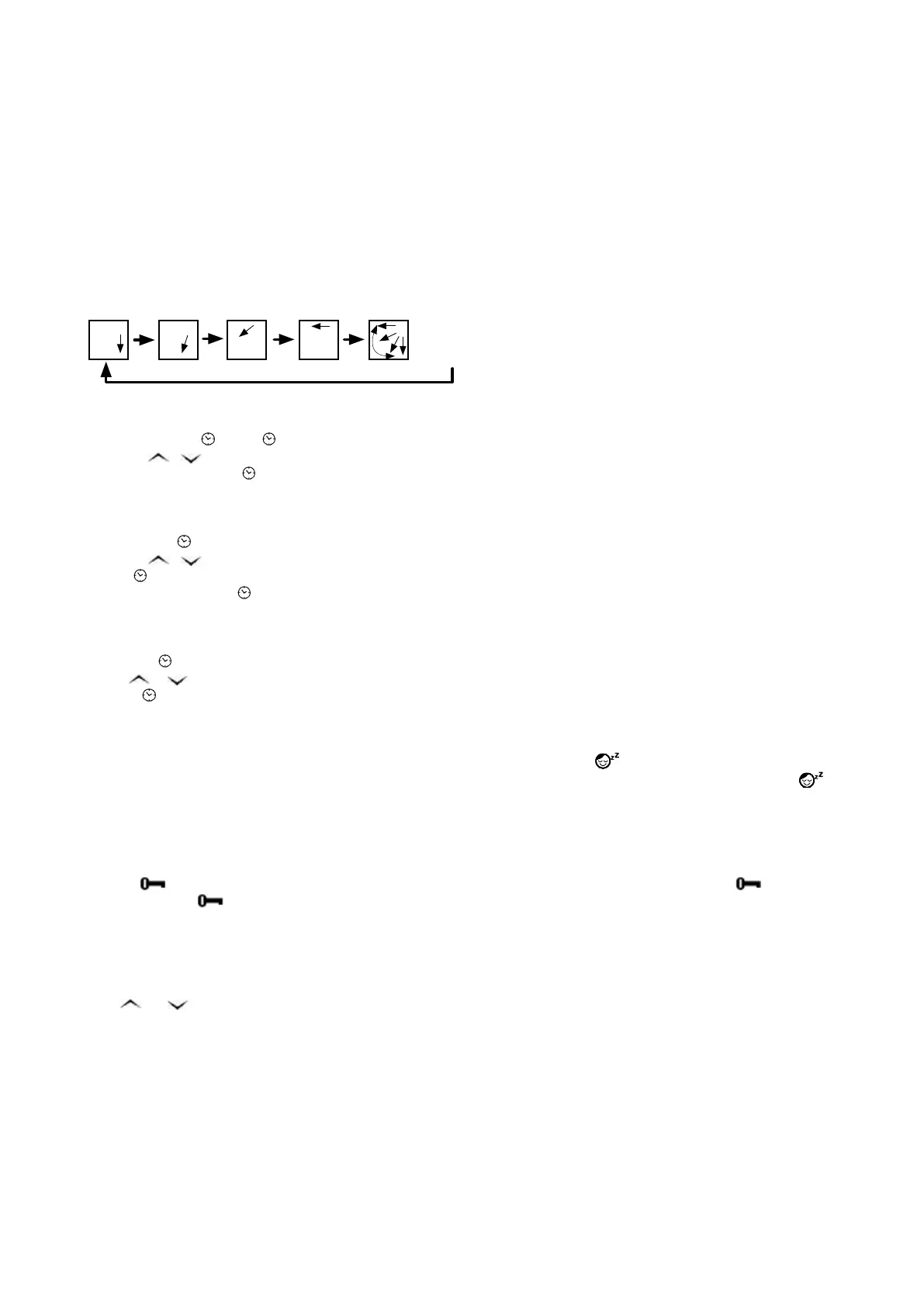
LOUVRE
Press LV button to change the angle of the louvre stepper motor.
• Press and release the button to change the angle of the ventilation louvre one step at a time.
• Press and hold the button to change the angle of the ventilation louvre continuously (until the button is released).
NB: when the LV or LOUVRE button is pressed, the Sweep function is annulled.
Louver OFF
Louver 1
Louver 4
Louver 2
Louver 3
Louver ON
CLOCK
The clock on the LCD of Remote unit can be set by
• If you press the
POWER ON
POWER OFF
COLD
POWER OFF
HEAT
COOL
POWER ON
key, the
POWER ON
POWER OFF
COLD
POWER OFF
HEAT
COOL
POWER ON
symbol and the time will flash.
• Press
POWER ON
POWER OFF
COLD
POWER OFF
HEAT
COOL
POWER ON
or
POWER ON
POWER OFF
COLD
POWER OFF
HEAT
COOL
POWER ON
to set the clock. Hold the button for fast changing.
• Press again, the symbol
POWER ON
POWER OFF
COLD
POWER OFF
HEAT
COOL
POWER ON
and time display will stop blinking.
AUTO START TIMER
The air-conditioner can be programmed to turn on in advance.
• If you press
POWER ON
POWER OFF
COLD
POWER OFF
HEAT
COOL
POWER ON
ON, the ON symbol and the start time will flash.
• Press
POWER ON
POWER OFF
COLD
POWER OFF
HEAT
COOL
POWER ON
or
POWER ON
POWER OFF
COLD
POWER OFF
HEAT
COOL
POWER ON
to set the start timer. Hold the button for fast changing.
Pressing
POWER ON
POWER OFF
COLD
POWER OFF
HEAT
COOL
POWER ON
ON again, the ON symbol and the start time will stop flashing.
To annul this function, press
POWER ON
POWER OFF
COLD
POWER OFF
HEAT
COOL
POWER ON
ON again.
AUTO STOP TIMER
The air-conditioner can be programmed to turn off in advance.
• If you press
POWER ON
POWER OFF
COLD
POWER OFF
HEAT
COOL
POWER ON
OFF, the OFF symbol and the stop time will flash.
• Press
POWER ON
POWER OFF
COLD
POWER OFF
HEAT
COOL
POWER ON
or
POWER ON
POWER OFF
COLD
POWER OFF
HEAT
COOL
POWER ON
to set the stop timer. Hold the button for fast changing.
• Pressing
POWER ON
POWER OFF
COLD
POWER OFF
HEAT
COOL
POWER ON
OFF again, the OFF symbol and the stop time will stop flashing.
To cancel this function, press the button again.
SLEEP
Press the SLEEP button to activate the Sleep function. The LCD on the remote unit will show the
ON
OFF
SET
SENDMODE
SLEEP
LIGHT
Auto
Auto
F
C
symbol.
After 1 hour, the controlled temperature will be automatically adjusted for greater comfort and energy savings during Sleep mode. The
ON
OFF
SET
SENDMODE
SLEEP
LIGHT
Auto
Auto
F
C
symbol on LCD will disappear at this moment.
To cancel this function, press SLEEP key again.
NB : the SLEEP function can only be used in
COOL, HEAT or AUTO mode.
KEYLOCK
Hold the
POWER ON
POWER OFF
COLD
POWER OFF
HEAT
COOL
POWER ON
button for 3 seconds will lock all the buttons on the remote unit. The LCD on the remote unit will show the
POWER ON
POWER OFF
COLD
POWER OFF
HEAT
COOL
POWER ON
symbol.
Press and hold the
POWER ON
POWER OFF
COLD
POWER OFF
HEAT
COOL
POWER ON
key again for 3 seconds, to release them.
SEND
Press SEND to transmit all the parameters shown on the LCD to the main control board.
TEMPERATURE MEASUREMENT UNIT
Press
POWER ON
POWER OFF
COLD
POWER OFF
HEAT
COOL
POWER ON
and
POWER ON
POWER OFF
COLD
POWER OFF
HEAT
COOL
POWER ON
for 5 seconds to switch from °C to °F and vice versa.





 To Next Page