37
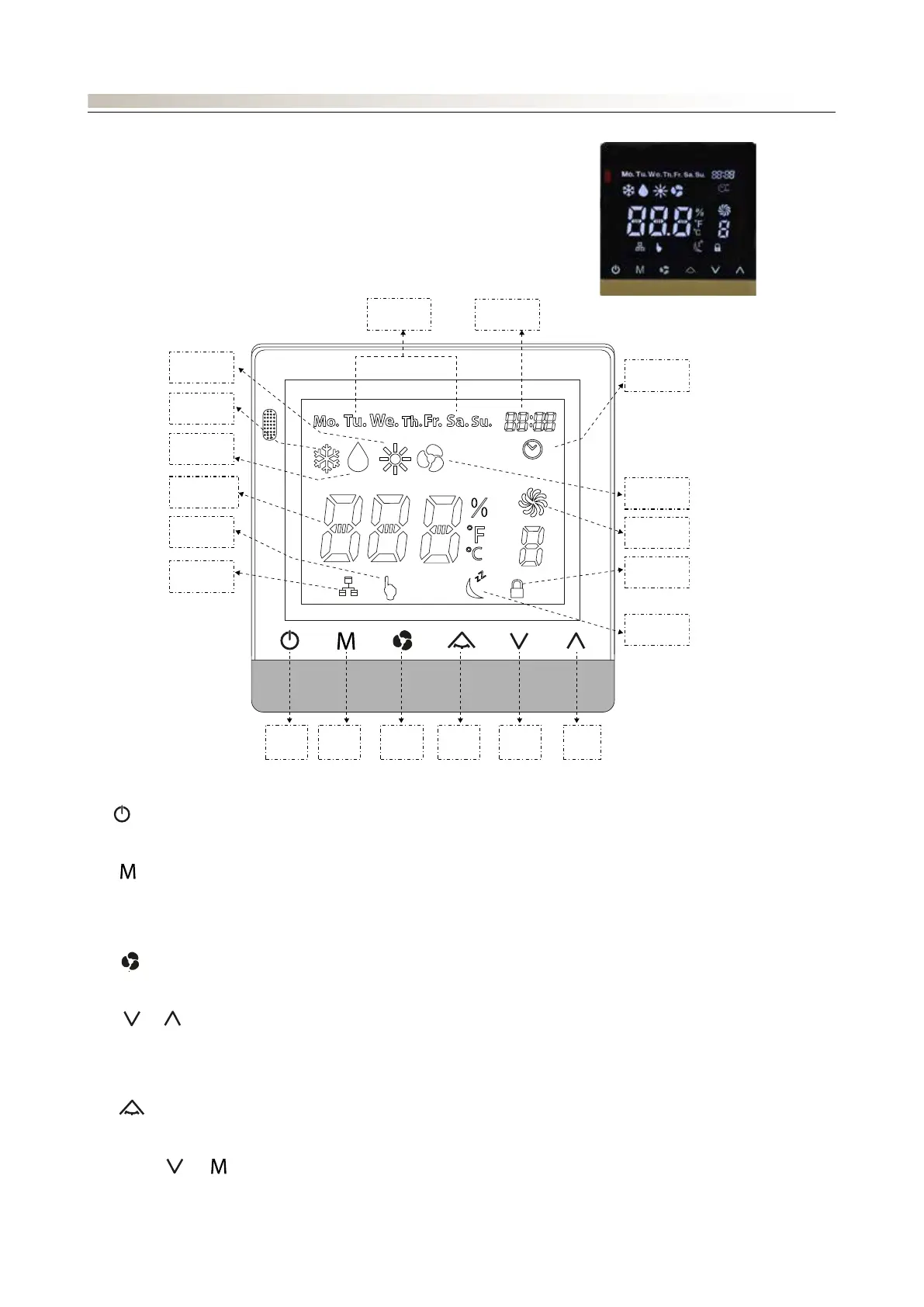
SYSTEM SWITCHON/SWITCHOFF:
Press
ON
OFF
Heat Mode
Cool Mode
Dry Mode
Temperature
Touch
Networking
Timer
Auto Fan
Fan mode
Key Lock
Sleep
On/
O
Mode Up Fan
Speed
Swing Down
Day
Clock
to switch the unit on and off
MODE:
- Press
ON
OFF
Heat Mode
Cool Mode
Dry Mode
Temperature
Touch
Networking
Timer
Auto Fan
Fan mode
Key Lock
Sleep
On/
O
Mode Up Fan
Speed
Swing Down
Day
Clock
to change the operating mode in this order:
- Auto-Cool-Dry-Heat-Fan
FAN SPEED:
- Press
ON
OFF
Heat Mode
Cool Mode
Dry Mode
Temperature
Touch
Networking
Timer
Auto Fan
Fan mode
Key Lock
Sleep
On/
O
Mode Up Fan
Speed
Swing Down
Day
Clock
to select Auto-Low-Medium-High-Auto (indicated as A-1-2-3-A)
SETTING THE TEMPERATURE:
- Press
ON
OFF
Heat Mode
Cool Mode
Dry Mode
Temperature
Touch
Networking
Timer
Auto Fan
Fan mode
Key Lock
Sleep
On/
O
Mode Up Fan
Speed
Swing Down
Day
Clock
or
ON
OFF
Heat Mode
Cool Mode
Dry Mode
Temperature
Touch
Networking
Timer
Auto Fan
Fan mode
Key Lock
Sleep
On/
O
Mode Up Fan
Speed
Swing Down
Day
Clock
to adjust the set temperature (in steps of 1°C)
- The set temperature range is 15°C - 30°C
SWING:
- Press
ON
OFF
Heat Mode
Cool Mode
Dry Mode
Temperature
Touch
Networking
Timer
Auto Fan
Fan mode
Key Lock
Sleep
On/
O
Mode Up Fan
Speed
Swing Down
Day
Clock
to activate/deactivate the swing function
SLEEP:
- Press and hold
ON
OFF
Heat Mode
Cool Mode
Dry Mode
Temperature
Touch
Networking
Timer
Auto Fan
Fan mode
Key Lock
Sleep
On/
O
Mode Up Fan
Speed
Swing Down
Day
Clock
and
ON
OFF
Heat Mode
Cool Mode
Dry Mode
Temperature
Touch
Networking
Timer
Auto Fan
Fan mode
Key Lock
Sleep
On/
O
Mode Up Fan
Speed
Swing Down
Day
Clock
to activate/deactivate night-time mode.
RTC (real time clock):
PFW4 is an air-conditioning control system that can be used with FCWI type fan coils.
PFW4 consists of:
• a panel (display unit)
• a 4-metre cable (which can be extended up to 25m using a 24AWG cable)
• a support for wall mounting
CONTROL: PFW4 WIRED PANEL
ON
OFF
Heat Mode
Cool Mode
Dry Mode
Temperature
Touch
Networking
Timer
Auto Fan
Fan mode
Key Lock
Sleep
On/
O
Mode Up Fan
Speed
Swing Down
Day
Clock






 To Next Page