28
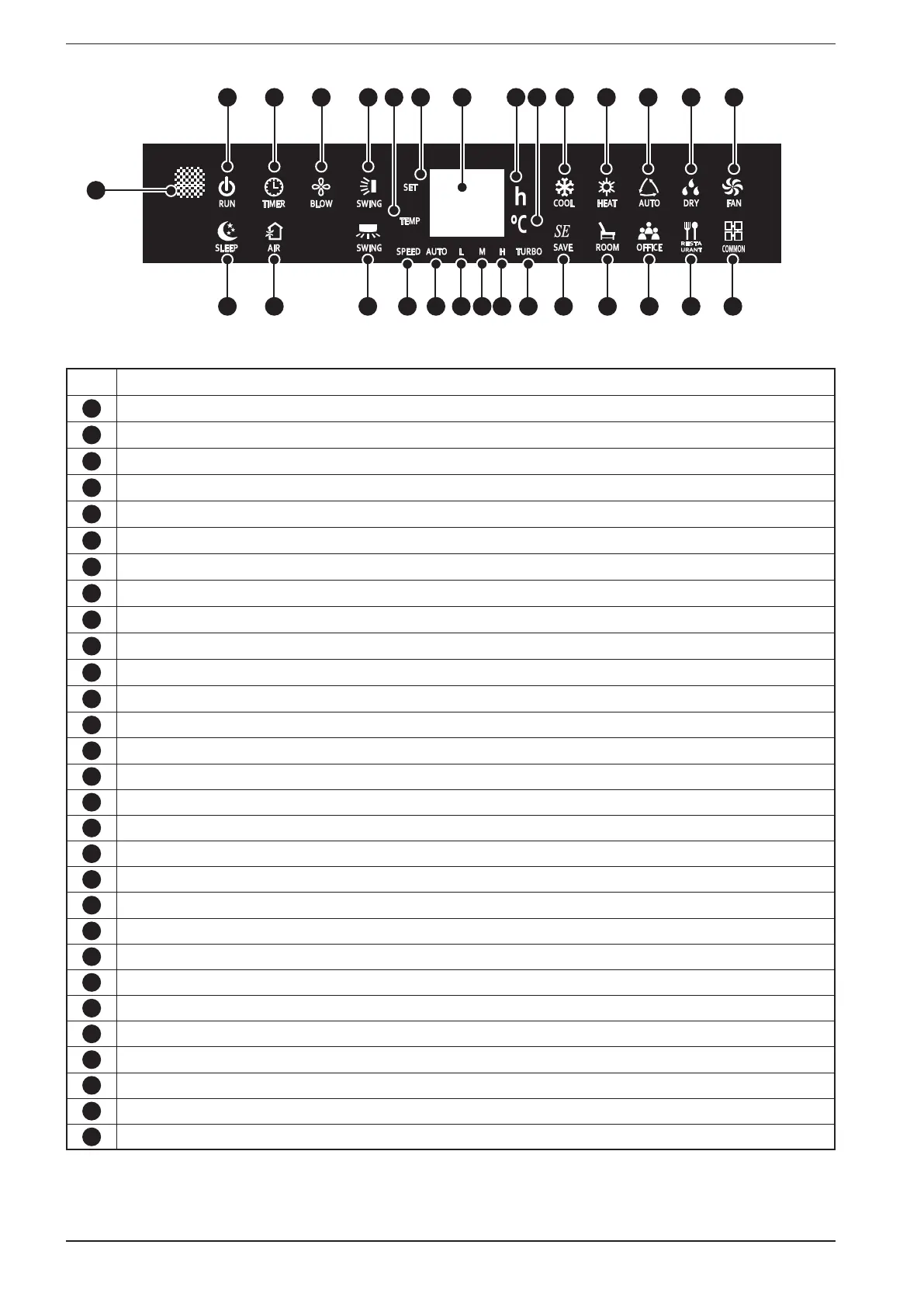
Alarm Function of the button:
1
Infra-red receiver
2
Indicates the status of the unit (the icon is green if the unit is on and red if the unit is in standby)
3
If the icon is active, indicates that a timer is set on the system (On or Off)
4
If the icon is active, indicates that the prolonged ventilation has been activated
5
The icon indicates that the continuous vertical swing is active (top to bottom)
6
This icon indicates that the figures on the display represent the temperature
7
This icon indicates that the figures on the display represent the current temperature set-point
8
The icon indicates that the night-time comfort function is currently active
9
This icon is not used
10
The icon indicates that the continuous horizontal swing is active (left to right)
11
Two-digit display
12
Indicates that the hour set for the on or off timer are shown on the display
13
Indicates that a temperature is currently displayed (expressed in °C)
14
Indicates (along with one of the above icons) the current setting for the fan speed
15
Indicates that the fans are set to "AUTO" speed
16
Indicates that the fans are set to "MINIMUM" speed
17
Indicates that the fans are set to "MEDIUM" speed
18
Indicates that the fans are set to "MAXIMUM" speed
19
Indicates that the fans are set to "TURBO" speed
20
Indicates that the cooling mode is currently active
21
Indicates that the heating mode is currently active
22
Indicates that the automatic mode is currently active
23
Indicates that the dehumidification mode is currently active
24
Indicates that the fan only mode is currently active
25
Indicates that the energy saving program is currently active
26
Indicates that the home saving program is currently active
27
Indicates that the office saving program is currently active
28
Indicates that the office saving program is currently active
29
Indicates that the common saving program is currently active
1
2 3 4 5 7
11
98
6
10
12 13
14
15
16
17 18
19
20 21 22 23 24
25 26 27 28 29


 To Next Page