43
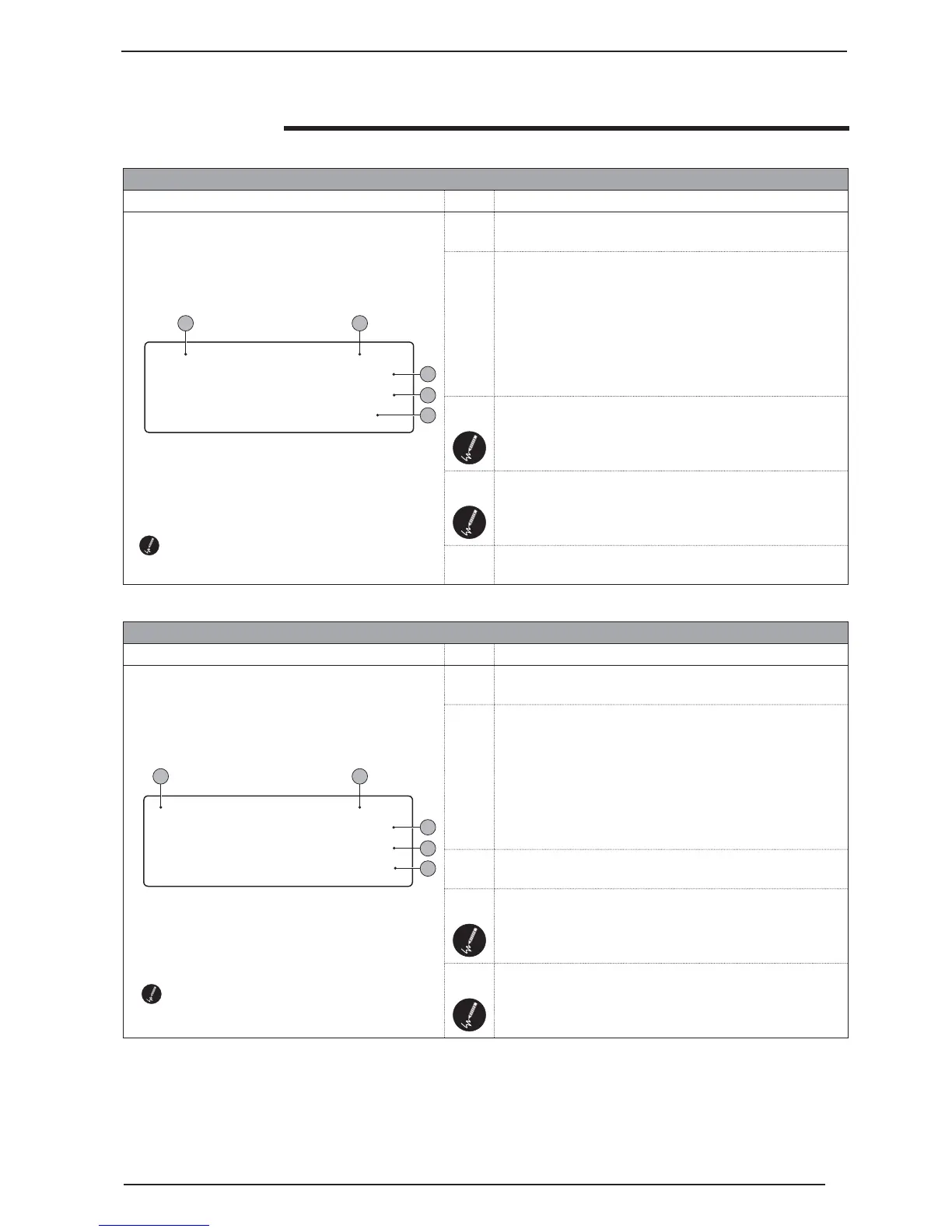
CLOCK menu - PAGE 2
Visualisation on unit display Index Display/Parameter
A Set time periods: In this page it is possible to set the weekly
time periods (from Monday to Friday) for area 1
B Page index: Identifies the menu and the corresponding page:
P = MAIN menu
S = SET-POINT menu
M = MAINTENANCE TECHNICIAN menu (Blocked)
C = MANUFACTURER’S menu (Blocked)
CK = CLOCK menu
The number associated to one of the previous codes, indicates
the page of the menu indicated.
C WEEKLY setting: It indicates the days to which the set time
period refers.
D
COMFORT END/ECONOMY START setting: Indicates the
hour and minutes when the Comfort period will end and the
Economy period will start. These settings refer to the days
from Monday to Friday.
E
ECONOMY END/COMFORT START setting: Indicates the
hour and minutes when the Economy period will end and the
Comfort period will start. These settings refer to the days
from Monday to Friday.
CLOCK MENU parameters
CLOCK menu - PAGE 1
Visualisation on unit display Index Display/Parameter
A Set clock: In this page it is possible to set the clock inside the
regulation board.
B Page index: Identifies the menu and the corresponding page:
P = MAIN menu
S = SET-POINT menu
M = MAINTENANCE TECHNICIAN menu (Blocked)
C = MANUFACTURER’S menu (Blocked)
CK = CLOCK menu
The number associated to one of the previous codes, indicates
the page of the menu indicated.
C
TIME setting: Indicates the time set for the system, can be
modified by the user.
D
DATE setting: Indicates the data set for the system, can be
modified by the user.
E DAY setting: Indicates the day of the week set for the system.
Parameters that can be modified by the user
Parameters that can be modified by the user
Set clock CK1
Hour 00:00
Date 10/06/09
Day friday
Clock zone 1 CK2
Monday to friday
Comfort 00:00
Economy 00:00
A B
C
D
E
A B
C
D
E



 To Next Page