Originale Instructions- Rev.1.3 User Maunal– Loreena 22/ 68
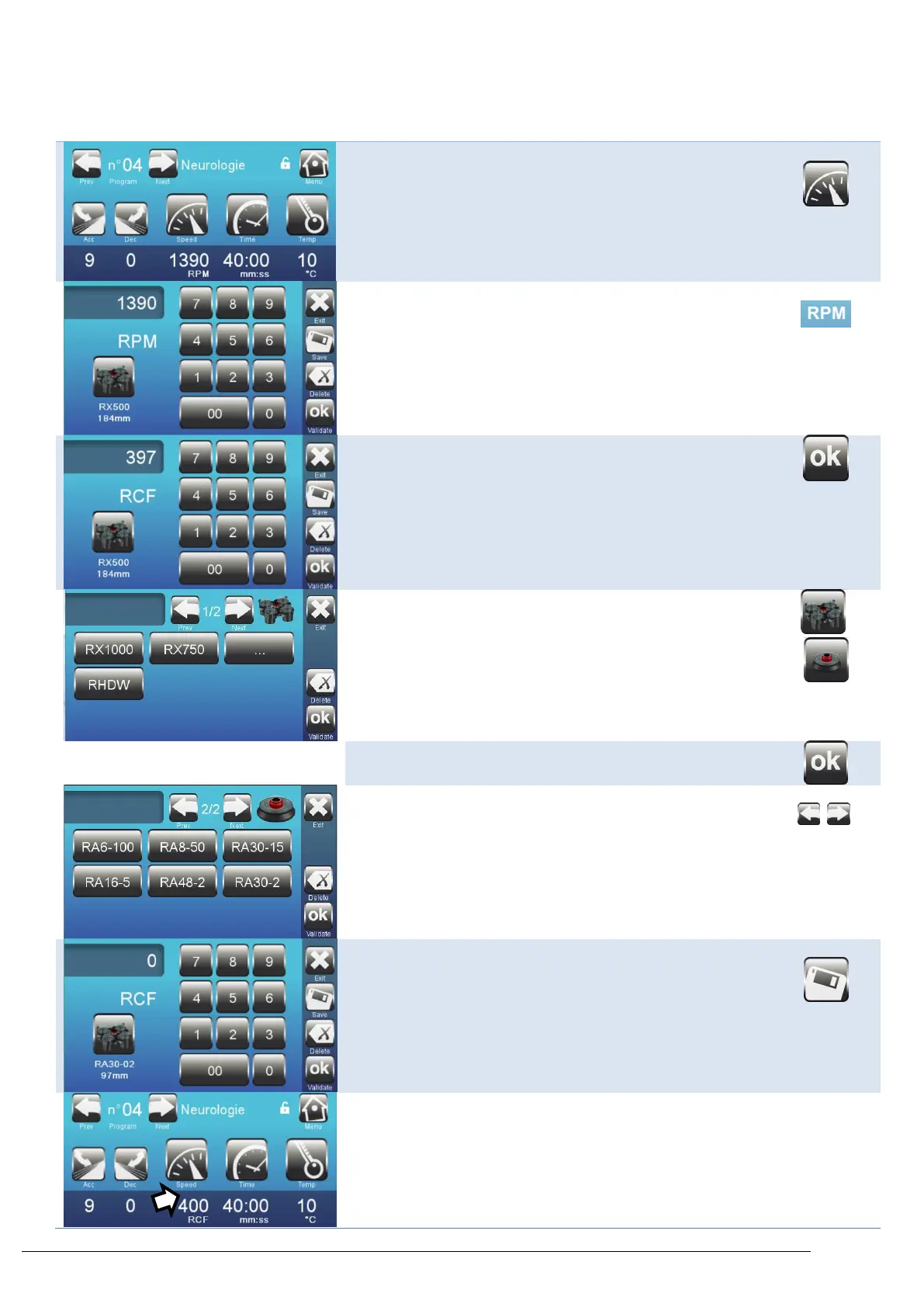
4.4. Set speed in RPM or RCF
Access the speed setting key
Press on the icon RPM to modify the unit from RPM to RCF.
Enter the RCF (g) value desired,
Confirm
Note: The rotor name and radius will be displayed below the
picture of the rotor.
The default rotor setting is :
Swing-out rotor, RX-750
Radius : 184 mm
Modify the rotor or radius pressing on the icon Rotor. Note :
This icon changes whereas the set rotor is angular or swing-out
type.
Select the rotor along the list.
Note : The "…" icon leads to accurate radius setting menu.
Press onto arrows to access to angular rotors.
Enter the RCF (g) value desired,
Confirm
The program will now display the RCF value (g).



 To Next Page