BRIDGE LIVE Video I/O and Streaming Appliance v1.12 96 www.aja.com
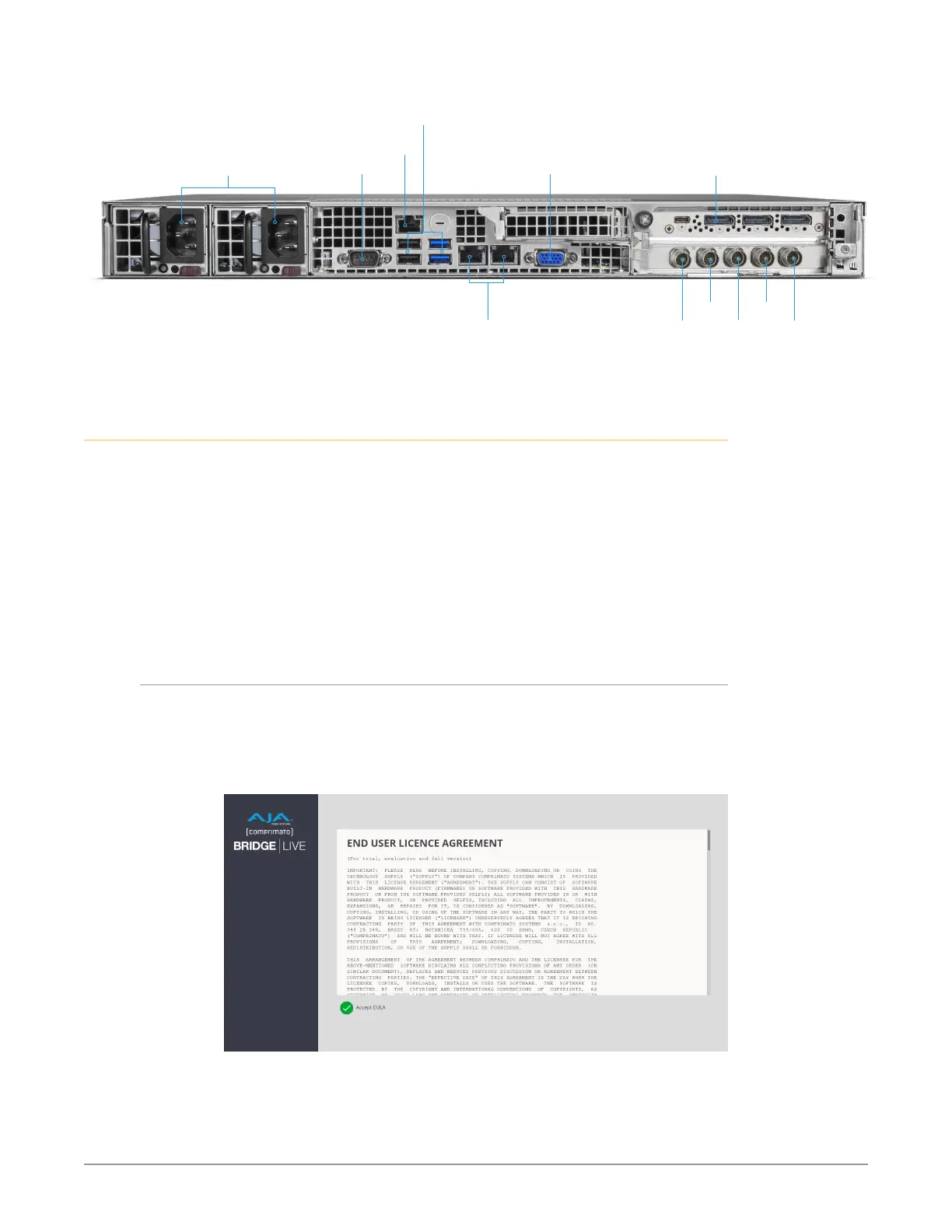
Figure 144. BRIDGE LIVE Rear Connectors
SDI Ch 4
SDI Ch 3 SDI Ch 1 Reference
Dual 10Gig Ethernet
Streaming Video I/O
Baseband Video I/O
Redundant Power Supplies UnusedUnused
IPMI
USB Ports (4)
Display Port
SDI Ch 2
Power Up and Log In
Power on BRIDGE LIVE (front right button). At the login screen, enter the system's
specific Admin credentials as shown below:
• Model: BRIDGE LIVE
• Serial Number: C5140A127A60026 - Example Chassis SN (15 Characters). See
QuickStart Guide for actual SN for unit.
• Username: admin
• Password: See QuickStart Guide for unique Password per unit
After logging in you will need to accept license agreements presented, and after
doing so you will arrive at the AJA BRIDGE LIVE interface.
EULA
When you login to the BRIDGE LIVE UI for the first time, you will be prompted
to read and accept the EULA. If you change the BRIDGE LIVE version using the
Version manager, found in "Updates" on page 100, you will be required to accept
it again.
Figure 145. EULA



 To Next Page