FS3 Frame Synchronizer/Converter v1.1r1 25 www.aja.com
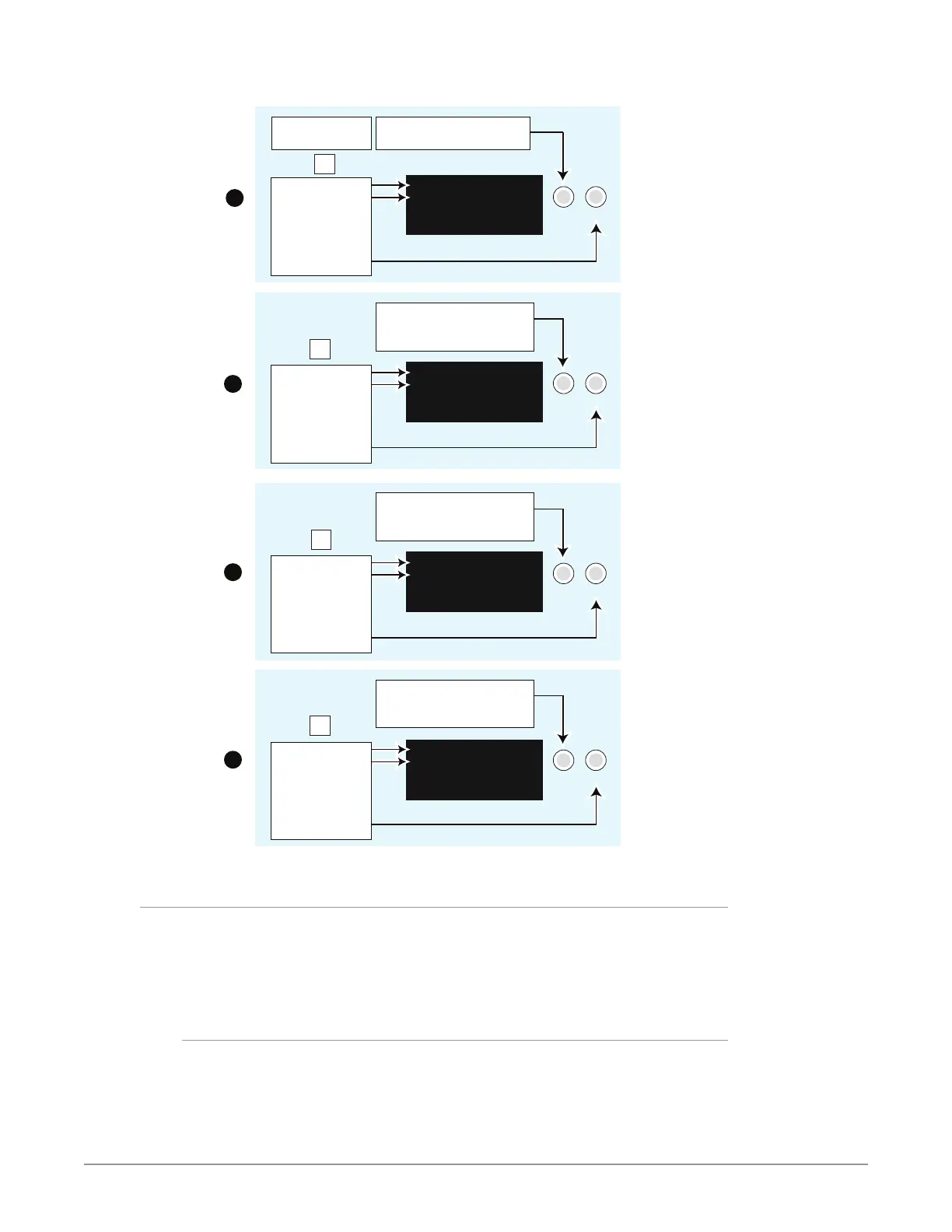
Figure 8. Setting FS3 Static IP Address
Turn the SELECT knob to scroll
to parameter menu 2.1 IP Cong.
2.1 IP Config
STATIC Address
Select the CONFIG
Menu Group button
Parameter Menu
Current Setting
Change setting to
STATIC Address
by turning the
ADJUST knob.
Turn the SELECT knob to scroll
to parameter menu 2.2 IP Address.
Turn SELECT again as needed to
advance through the blinking octets.
2.2 IP Address
192.168.0.2
Parameter Menu
Current Setting
Push ADJUST to
edit octets.
Turn ADJUST
to change values.
Push ADJUST to save.
Turn SELECT to scroll to parameter
menu 2.3 Subnet Mask.
Turn SELECT again as needed to
advance through the blinking octets.
2.3 Subnet Mask
255.255.255.0
Parameter Menu
Current Setting
Push ADJUST to
edit octets.
Turn ADJUST
to change values.
Push ADJUST to save.
Turn SELECT to scroll to parameter
menu 2.4 Default Gateway.
Turn SELECT again as needed to
advance through the blinking octets.
2.4 Default Gateway
192.168.0.1
Parameter Menu
Current Setting
Push ADJUST to
edit octets.
Turn ADJUST
to change values.
Push ADJUST to save.
1
2
3
4
Cong
Cong
Cong
SELECT ADJUST
SELECT ADJUST
SELECT ADJUST
SELECT ADJUST
Cong
Using Ping to Test the Network Connection
If you have connected the FS3 to a computer and set up the IP address and still do
not see the FS3 screens in your browser, you can ping the network to verify the
connection. Simply run the Ping utility from a Mac OS X or Windows PC computer
attached directly or on the same LAN as the FS3 as described below:
Mac Ping Procedure
1. Find the Utilities Folder inside of the Applications Folder.
2. Locate the “Terminal” utility application and double-click it.
3. On the FS3, select the STATUS button and go to System Status menu (with
the FS3 name) to read the unit’s currently congured IP address.



 To Next Page