FS3 Frame Synchronizer/Converter v1.1r1 63 www.aja.com
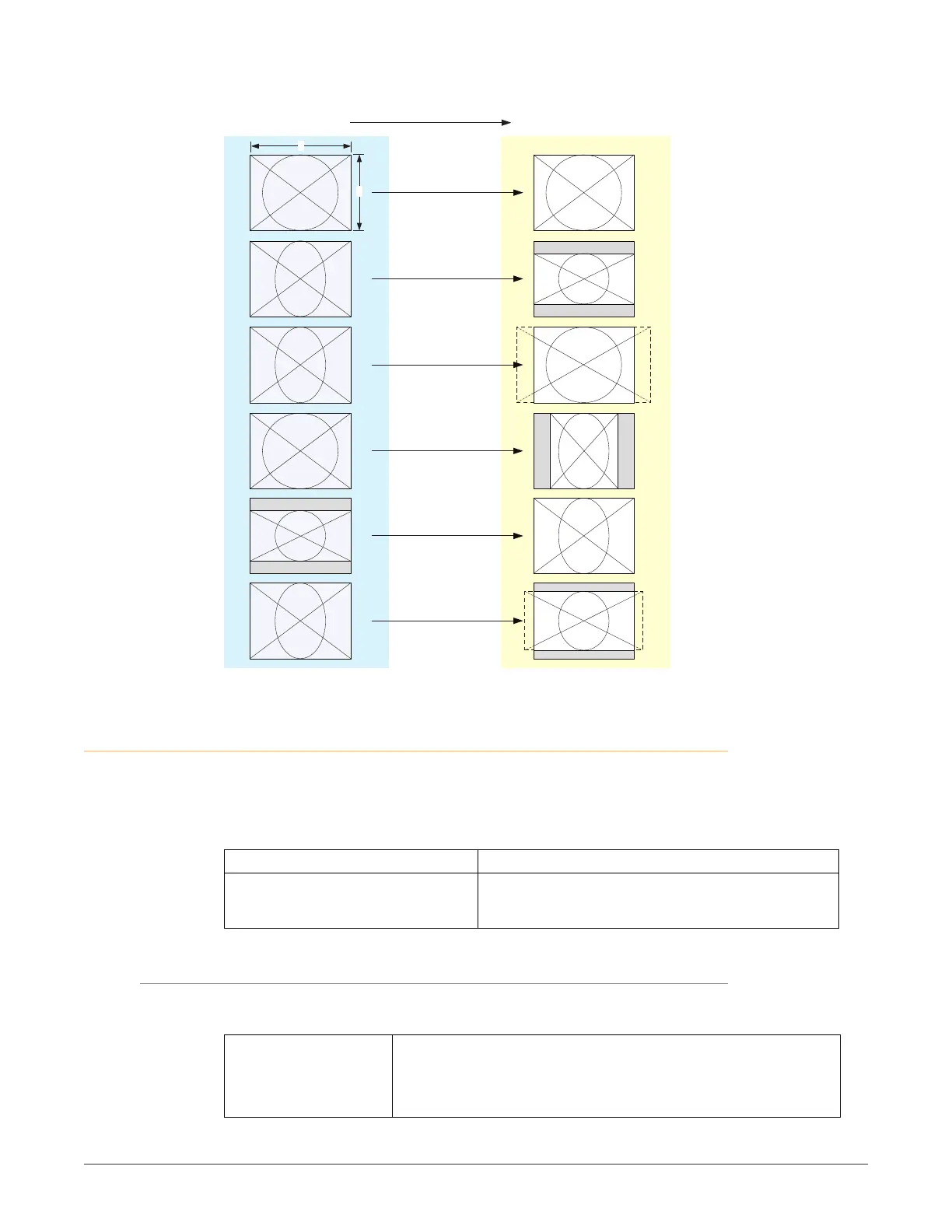
SD Aspect Ratio Conversion Illustrations
H Crop
Pillarbox
V Crop
14:9
Off
(no conversion)
Letterbox
4
3
4:3 Converts To These displays on 4:3
AUDIO PROC Menu Group
The following descriptions explain the Audio Proc Menu Groups, which allows
you to make adjustments to the audio inputs to the FS3 audio processor, and to
control audio routing.
The Audio Proc Menus are formatted as follows
Display Description
MENU # TITLE
PARAMETER VALUE
PARAMETER VALUE
Menu number and title.
Currently selected parameter value for this menu.
Higher range parameter value, when required.
1.0 SDI1 Level
This parameter selects the Audio Level Mode for all 16 SDI1 audio input channels.
The default Unity setting applies 0.0. db gain to all the input channels
Unity (default)
Adjust
All 16 SDI1 audio input channels are set to 0.0 dB. Individual channel
adjustment menus are hidden.
Each of the 16 SDI1 audio input channel adjusted values are applied to
the audio processor, and the individual channel adjustment menus
become available.



 To Next Page