FS3 Frame Synchronizer/Converter v1.1r1 36 www.aja.com
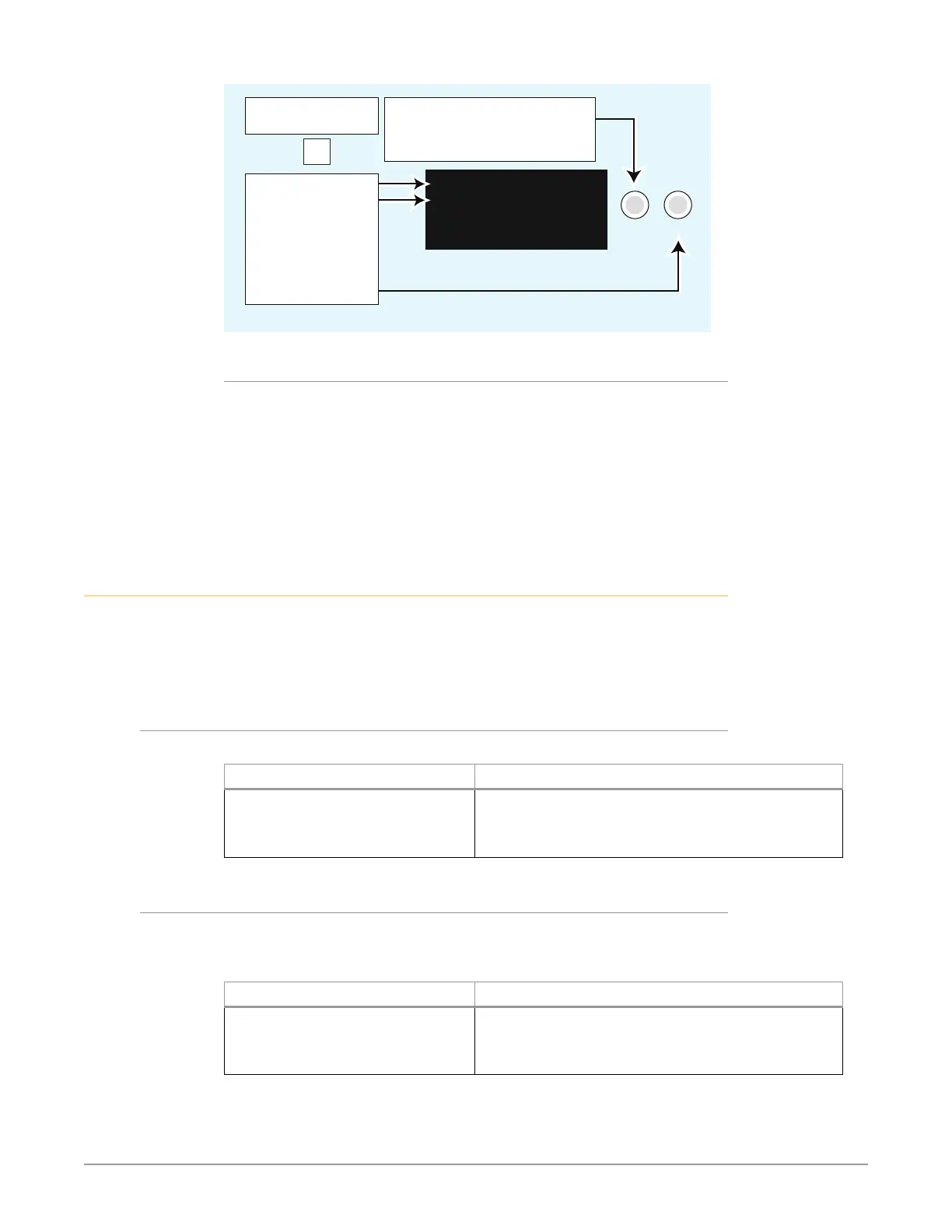
Turn SELECT to scroll to parameter
menu 2.2 IP Address.
When editing params, turn SELECT
to advance elds.
SELECT ADJUST
2.2 IP Address
192. 168. 0. 2
Parameter Menu
Current Setting
Push ADJUST to
edit the rst eld.
Turn ADJUST
to change values.
Push again to save.
Select the CONFIG
Menu Group button
CONFIG
Other Actions
• To begin editing the rst eld in the parameter, push ADJUST momentarily.
• To conrm (save) edits, push the ADJUST knob momentarily again. This saves
the edits and exits the edit mode.
• To undo edits to all of the elds before the changes are conrmed, push the
SELECT knob. This returns all elds to their previous settings.
• To reset the entire parameter to the factory default value, push in and hold
down the ADJUST knob for at least 4 seconds.
STATUS Menu Group
The Status Menu Group contains a series of Status display pages that you can
scroll using the SELECT knob. The various Status pages are actually just displays,
not menus, since they don’t include menu numbers or editable values. The
ADJUST knob doesn’t affect the Status display pages.
Vid Format Status
This menu shows the current primary video settings for the Video Processor.
Display Description
IN Input Source Format
BKGD Backgd Source
GEN Genlock Source Format
OUT Format
Selected video input source and format.
Selected Background video source.
Selected Genlock source and format.
Selected video output format.
Vid Format Alarm Status
This menu shows the Video Processor alarm status. Absence of alarm shows
as OK. If selections are incompatible, the status of the affected signal shows
incompat.
Display Description
IN Input Source Status
BKGD Backgd Source Status
GEN Genlock Source Status
OUT Status
Video input source alarm status.
Selected Background video source alarm status.
Selected Genlock source alarm status.
Selected output format/alarm status.



 To Next Page