FS3 Frame Synchronizer/Converter v1.1r1 78 www.aja.com
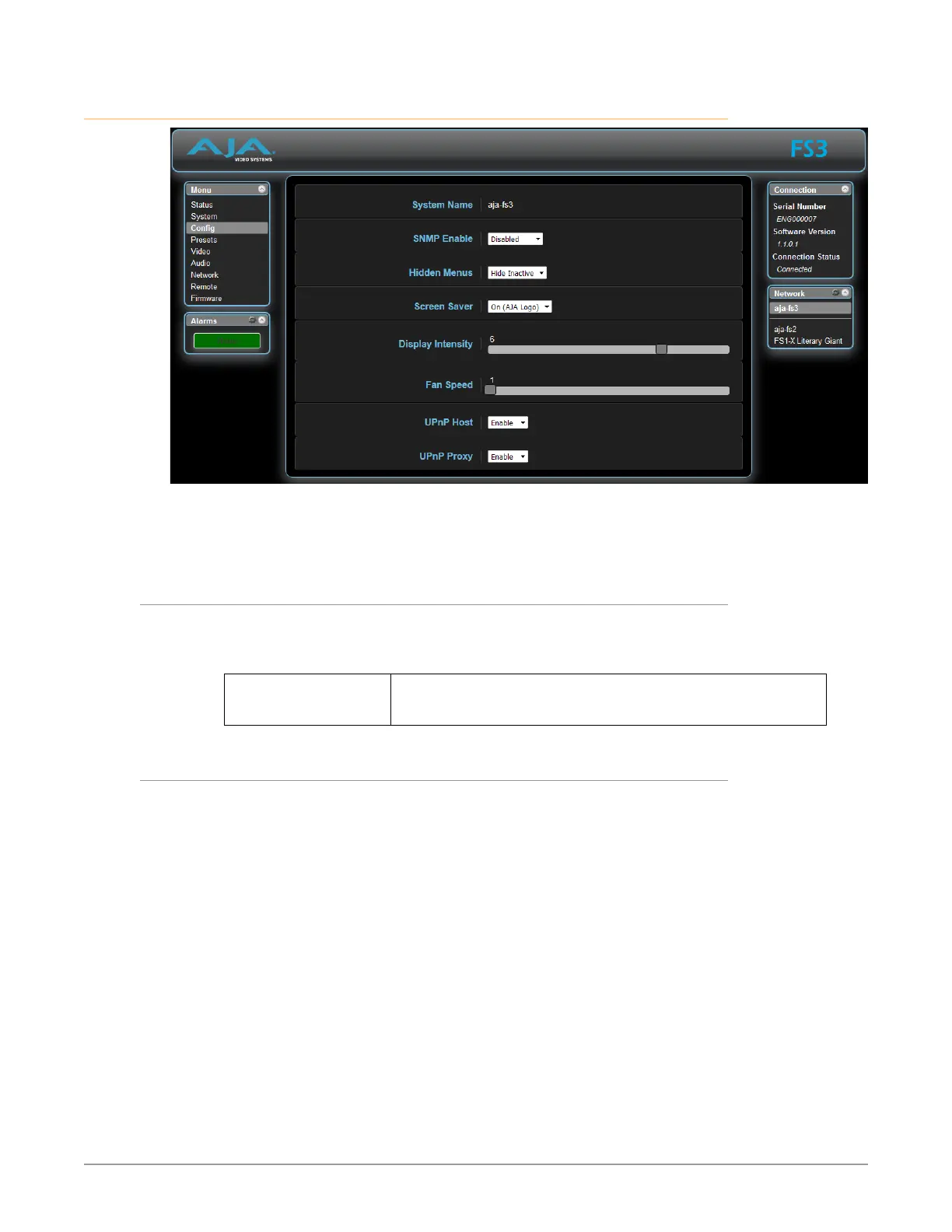
Config Screen
The Config screen includes functions to name the FS3, configure SNMP, hide or
show unused menus, change the front panel display brightness and fan speed,
and configure UPnP.
System Name
The System Name parameter sets the name of the FS3 system. To change the
System Name, click on and drag the cursor across the displayed name, and type in
a new name.
Variable Highlight the existing name and type in a new name, up to 20
characters. Allowed characters are A-Z, a-z, numerals, hyphen,
spaces, and period.
SNMP Parameters
The following parameters are used to setup the FS3 SNMP (Simple Network
Management Protocol) feature.
• SNMP Enable
• SNMP Trap Dest 1
• SNMP Trap Port 1
• SNMP Trap Dest 2
• SNMP Trap Port 2
In addition, the following alarms may affect SNMP messages:
• Power Supply Alarm
• Over Temp Alarm
• Video Format Alarm
• Reference Alarm
Refer to "Chapter 6 SNMP" on page 86 for a description of SNMP and how the
FS3 supports it.



 To Next Page