EasyManua.ls Logo

Akai CD-55 - About the FL Display

Akai CD-55
24 pages
Print Icon
To Next Page IconTo Next Page
To Previous Page IconTo Previous Page
Loading...
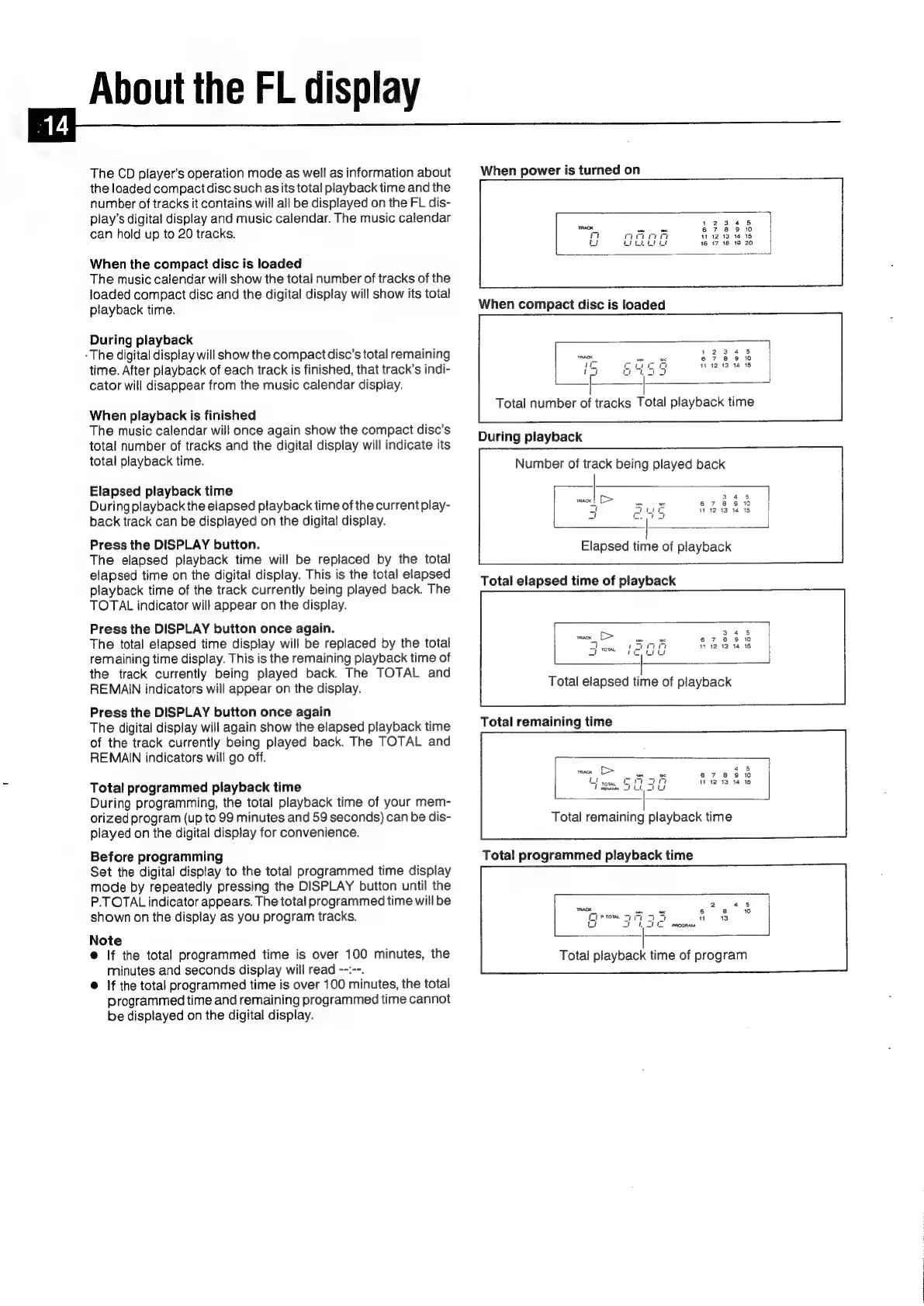
About
the
FL
display
The
CD
player's
operation
mode
as
well
as
information
about
the
loaded
compact
disc
such
as
its
total
playback
time
and
the
number
of
tracks
it
contains
will
all
be
displayed
on
the
FL
dis-
play’s
digital
display
and
music
calendar.
The
music
calendar
can
hold
up
to
20
tracks.
When
the
compact
disc
is
loaded
The
music
calendar
will
show
the
total
number
of
tracks
of
the
loaded
compact
disc
and
the
digital
display
will
show
its
total
playback
time.
During
playback
-The
digital
display
will
show
the
compact
disc’s
total
remaining
time.
After
playback
of
each
track
is
finished,
that
track’s
indi-
cator
will
disappear
from
the
music
calendar
display.
When
playback
is
finished
The
music
calendar
will
once
again
show
the
compact
disc’s
total
number
of
tracks
and
the
digital
display
will
indicate
its
total
playback
time.
Elapsed
playback
time
During
playback
the
elapsed
playback
time
of
the
current
play-
back
track
can
be
displayed
on
the
digital
display.
Press
the
DISPLAY
button.
The
elapsed
playback
time
will
be
replaced
by
the
total
elapsed
time
on
the
digital
display.
This
is
the
total
elapsed
playback
time
of
the
track
currently
being
played
back.
The
TOTAL
indicator
will
appear
on
the
display.
Press
the
DISPLAY
button
once
again.
The
total
elapsed
time
display
will
be
replaced
by
the
total
remaining
time
display.
This
is
the
remaining
playback
time
of
the
track
currently
being
played
back.
The
TOTAL
and
REMAIN
indicators
will
appear
on
the
display.
Press
the
DISPLAY
button
once
again
The
digital
display
will
again
show
the
elapsed
playback
time
of
the
track
currently
being
played
back.
The
TOTAL
and
REMAIN
indicators
will
go
off.
Total
programmed
playback
time
During
programming,
the
total
playback
time
of
your
mem-
orized
program
(up
to
99
minutes
and
59
seconds)
can
be
dis-
played
on
the
digital
display
for
convenience.
Before
programming
Set
the
digital
display
to
the
total
programmed
time
display
mode
by
repeatedly
pressing
the
DISPLAY
button
until
the
P.TOTAL
indicator
appears.
The
total
programmed
time
will
be
shown
on
the
display
as
you
program
tracks.
Note
@
If
the
total
programmed
time
is
over
100
minutes,
the
minutes
and
seconds
display
will
read
--:--.
@
If
the
total
programmed
time
is
over
100
minutes,
the
total
programmed
time
and
remaining
programmed
time
cannot
be
displayed
on
the
digital
display.
ee
__—
When
power
is
turned
on
12
:13:14:«15
16
17
18 19
20
17:12:13
14
15
Total
number
of
tracks
Total
playback
time
During
playback
Number
of
track
being
played
back
3.45
67
8
9
10
41
42:13
14
15
3°45
6 7
8
9
10
1112
13 14 18
Total
playback
time
of
program

Related product manuals