EasyManua.ls Logo

Akai CD-55 - Before Using Your CD Player; Aword about Compact Discs

Akai CD-55
24 pages
Print Icon
To Next Page IconTo Next Page
To Previous Page IconTo Previous Page
Loading...
Before
using
your
CD
player
Use
compact
discs
that
are
marked
as
follows:
COMPACT
aISe
DIGITAL
AUDIO
How
to
load
a
compact
disc
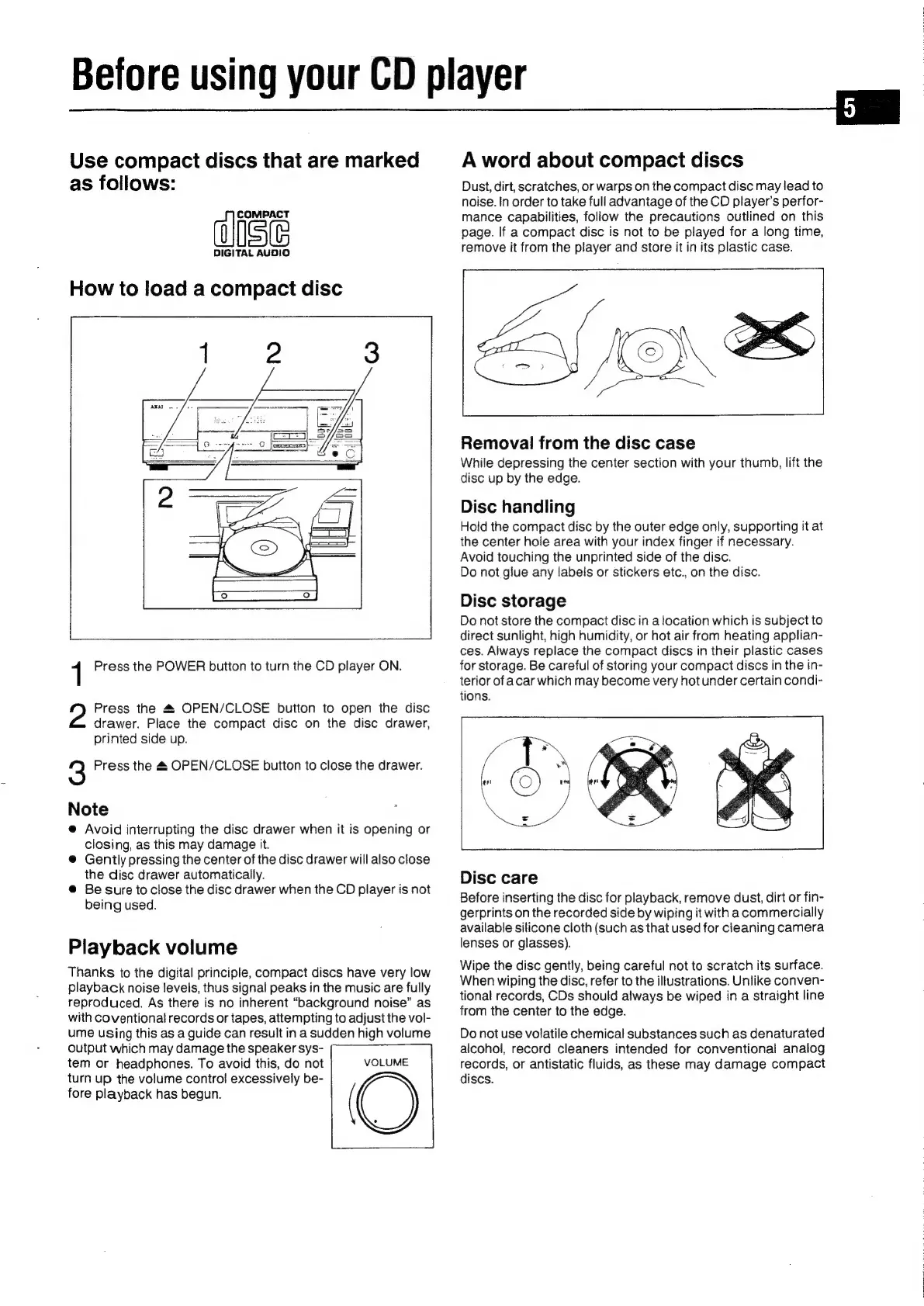
1
Press
the
POWER
button
to
turn
the
CD
player
ON.
Press
the
4
OPEN/CLOSE
button
to
open
the
disc
drawer.
Place
the
compact
disc
on
the
disc
drawer,
printed
side
up.
3
Press
the
&
OPEN/CLOSE
button
to
close
the
drawer.
Note
@
Avoid
interrupting
the
disc
drawer
when
it
is
opening
or
closing,
as
this
may
damage
it.
®@
Gently
pressing
the
center
of
the
disc
drawer
will
also
close
the
disc
drawer
automatically.
@
Be
sure
to
close
the
disc
drawer
when
the
CD
player
is
not
being
used.
Playback
volume
Thanks
to
the
digital
principle,
compact
discs
have
very
low
playback
noise
leveis,
thus
signal
peaks
in
the
music
are
fully
reproduced.
As
there
is
no
inherent
“background
noise”
as
with
coventional
records
or
tapes,
attempting
to
adjust
the
vol-
ume
using
this
as
a
guide
can
result
in
a
sudden
high
volume
output
which
may
damage
the
speaker
sys-
tem
or
headphones.
To
avoid
this,
do
not
turn
up
the
volume
control
excessively
be-
fore
playback
has
begun.
(
VOLUME
A
word
about
compact
discs
Dust,
dirt,
scratches,
or
warps
on
the
compact
disc
may
lead
to
noise.
In
order
to
take
full
advantage
of
the
CD
player’s
perfor-
mance
capabilities,
follow
the
precautions
outlined
on
this
page.
If
a
compact
disc
is
not
to
be
played
for
a
long
time,
remove
it
from
the
player
and
store
it
in
its
plastic
case.
a)
OS
Removal
from
the
disc
case
While
depressing
the
center
section
with
your
thumb,
lift
the
disc
up
by
the
edge.
Disc
handling
Hold
the
compact
disc
by
the
outer
edge
only,
supporting
it
at
the
center
hole
area
with
your
index
finger
if
necessary.
Avoid
touching
the
unprinted
side
of
the
disc.
Do
not
glue
any
labels
or
stickers
etc.,
on
the
disc.
Disc
storage
Do
not
store
the
compact
disc
in
a
location
which
is
subject
to
direct
sunlight,
high
humidity,
or
hot
air
from
heating
applian-
ces.
Always
replace
the
compact
discs
in
their
plastic
cases
for
storage.
Be
careful
of
storing
your
compact
discs
in
the
in-
terior
of
acar
which
may
become
very
hot
under
certain
condi-
tions.
Disc
care
Before
inserting
the
disc
for
playback,
remove
dust,
dirt
or
fin-
gerprints
on
the
recorded
side
by
wiping
it
with
acommercially
available
silicone
cloth
(such
as
that
used
for
cleaning
camera
lenses
or
glasses).
Wipe
the
disc
gently,
being
careful
not
to
scratch
its
surface.
When
wiping
the
disc,
refer
to
the
illustrations.
Unlike
conven-
tional
records,
CDs
should
always
be
wiped
in
a
straight
line
from
the
center
to
the
edge.
Do
not
use
volatile
chemical
substances
such
as
denaturated
alcohol,
record
cleaners
intended
for
conventional
analog
records,
or
antistatic
fluids,
as
these
may
damage
compact
discs.

Related product manuals