EasyManua.ls Logo

Akai CD-55 - Playback Standby and Start

Akai CD-55
24 pages
Print Icon
To Next Page IconTo Next Page
To Previous Page IconTo Previous Page
Loading...
Index
search
Some
compact
discs
include
index
=
numbers
which
you
can
make
use
of
to
go
to
certain
pre-determined
points
within
a
selection.
Classical
selections,
for
example,
may
contain
sev-
eral
index
numbers
to
note
the
1sttheme,
2nd
theme,
codaetc..
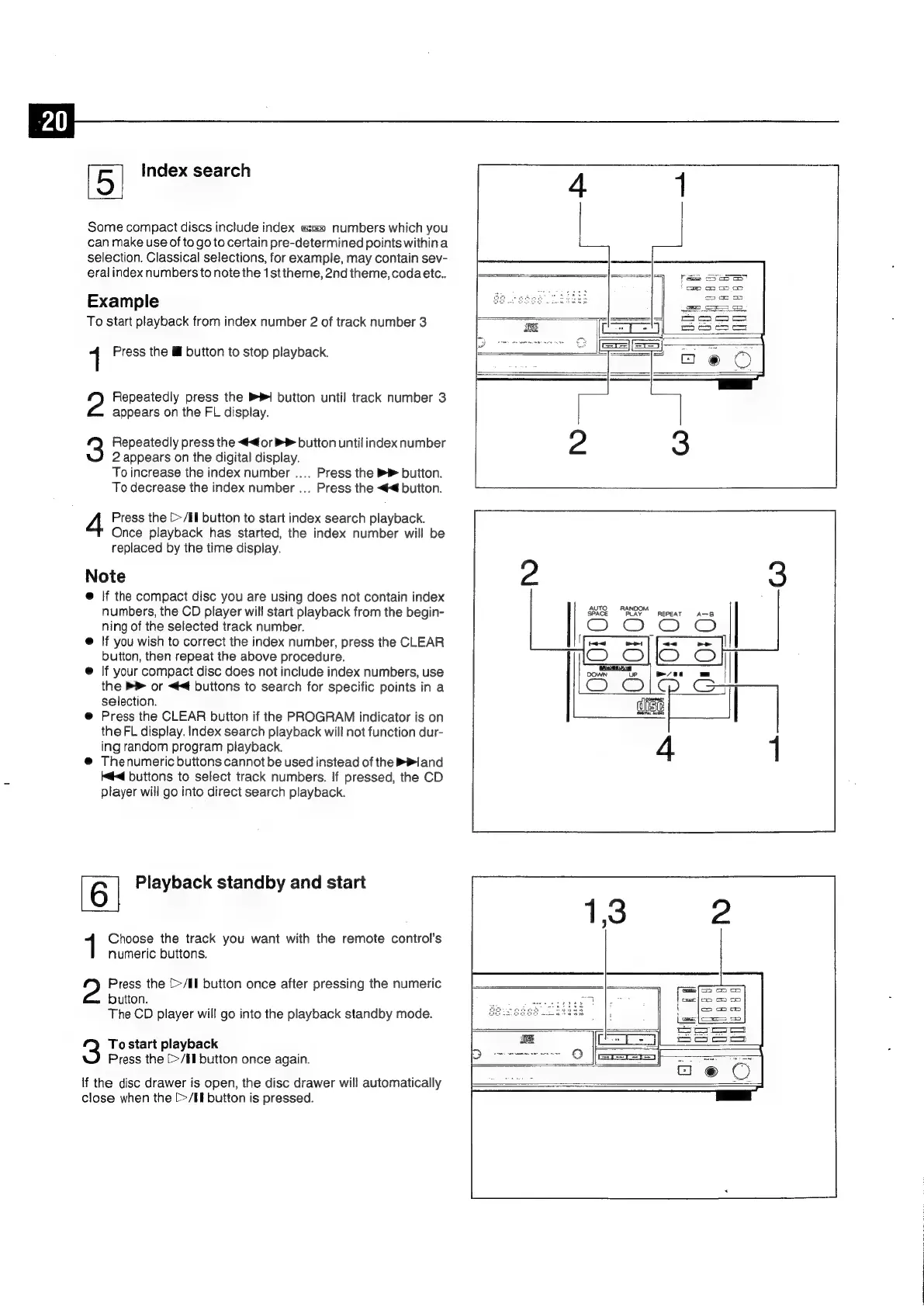
Example
To
start
playback
from
index
number
2
of
track
number
3
1
Press
the
lf
button
to
stop
playback.
2?
Repeatedly
press
the
PR
button
until
track
number
3
appears
on
the
FL
display.
3
Repeatedly
press
the
<4
or
B
button
until
index
number
2
appears
on
the
digital
display.
To
increase
the
index
number
....
Press
the
button.
To
decrease
the
index
number
...
Press
the
<<
button.
4
Press
the
[>/Il
button
to
start
index
search
playback.
Once
playback
has
started,
the
index
number
will
be
replaced
by
the
time
display.
Note
@
If
the
compact
disc
you
are
using
does
not
contain
index
numbers,
the
CD
player
will
start
playback
from
the
begin-
ning
of
the
selected
track
number.
@
If
you
wish
to
correct
the
index
number,
press
the
CLEAR
button,
then
repeat
the
above
procedure.
©
|f
your
compact
disc
does
not
include
index
numbers,
use
the
P
or
<4
buttons
to
search
for
specific
points
in
a
selection.
@
Press
the
CLEAR
button
if
the
PROGRAM
indicator
is
on
the
FL
display.
Index
search
playback
will
not
function
dur-
ing
random
program
playback.
@
Thenumeric
buttons
cannot
be
used
instead
of
the
Bland
<4
buttons
to
select
track
numbers.
If
pressed,
the
CD
player
will
go
into
direct
search
playback.
AUTO
RANDOM
SPACE
PLAY
REPEAT
A-B
6|
Playback
standby
and
start
Choose
the
track
you
want
with
the
remote
control's
numeric
buttons.
Press
the
[>/Il
button
once
after
pressing
the
numeric
button.
The
CD
player
will
go
into
the
playback
standby
mode.
To
start
playback
Press
the
[>/El
button
once
again.
lf
the
disc
drawer
is
open,
the
disc
drawer
will
automatically
close
when
the
[>/II
button
is
pressed.

Related product manuals