10. Anti-tippers
Because your wheelchair may already be equipped with anti-tippers, Alber anti-tippers
are only offered as accessory. Do not remove the anti-tippers with which your wheelchair
is equipped. When using the original wheelchair anti-tippers, the instructions and safety
information of the manufacturer apply to their usage.
If your wheelchair has no anti-tippers, you must install Alber anti-tippers. Failure to
•
do so might cause serious damage or personal injury.
When using Alber anti-tippers, two additional brackets are attached to your wheelchair in
which the anti-tippers are introduced. The following instructions and safety information
applies.
To prevent damage or personal injury, never use or operate the e-
motion unless anti-tippers are properly installed.
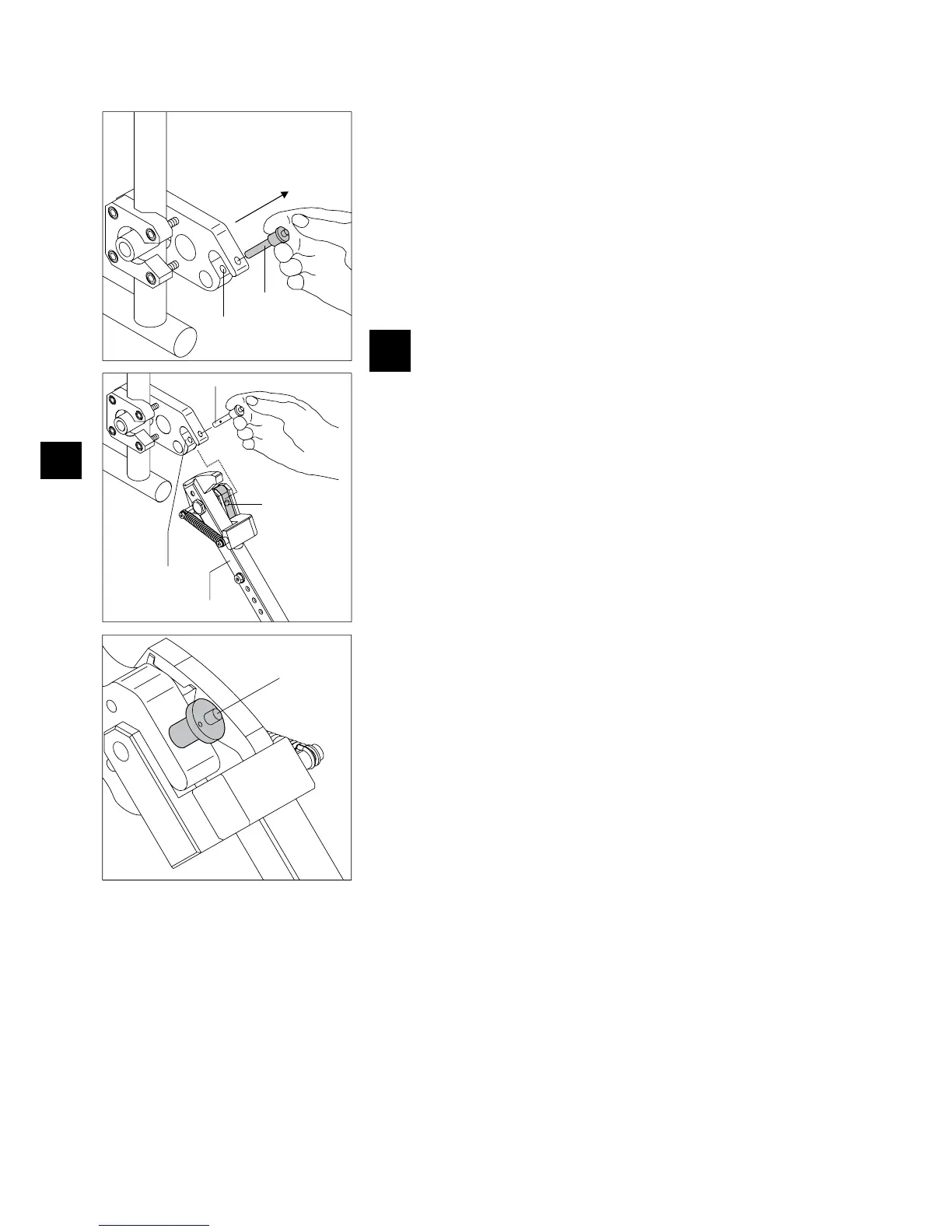
10.1 Attaching and removing the Alber anti-tippers
Pull the quickpin [28] out of the receiver fork of the bracket [29] by using your thumb
•
to press on the pin and at the same time using your forefinger and middle finger to
pull it out.
Insert the clamping piece of the anti-tipper [31] into the receiver fork of the bracket
•
[29].
Lock the receiver for of the bracket [29] with the quickpin [28]. Press on the pin
•
with your thumb and then push it all the way against the stop in the bracket.
Check the secure seat of the quickpin [28] in the receiver fork of the bracket [29].
•
It may not be pulled out again without pushing the unlocking mechanism.
Attach the second anti-tipper.
•
Remove anti-tippers in the reverse order.



 To Next Page