Management from the attendant set
3BA 19875 ENAA - Ed. 02 - April 2000 - Alcatel 4035 - Attendant set 3-21
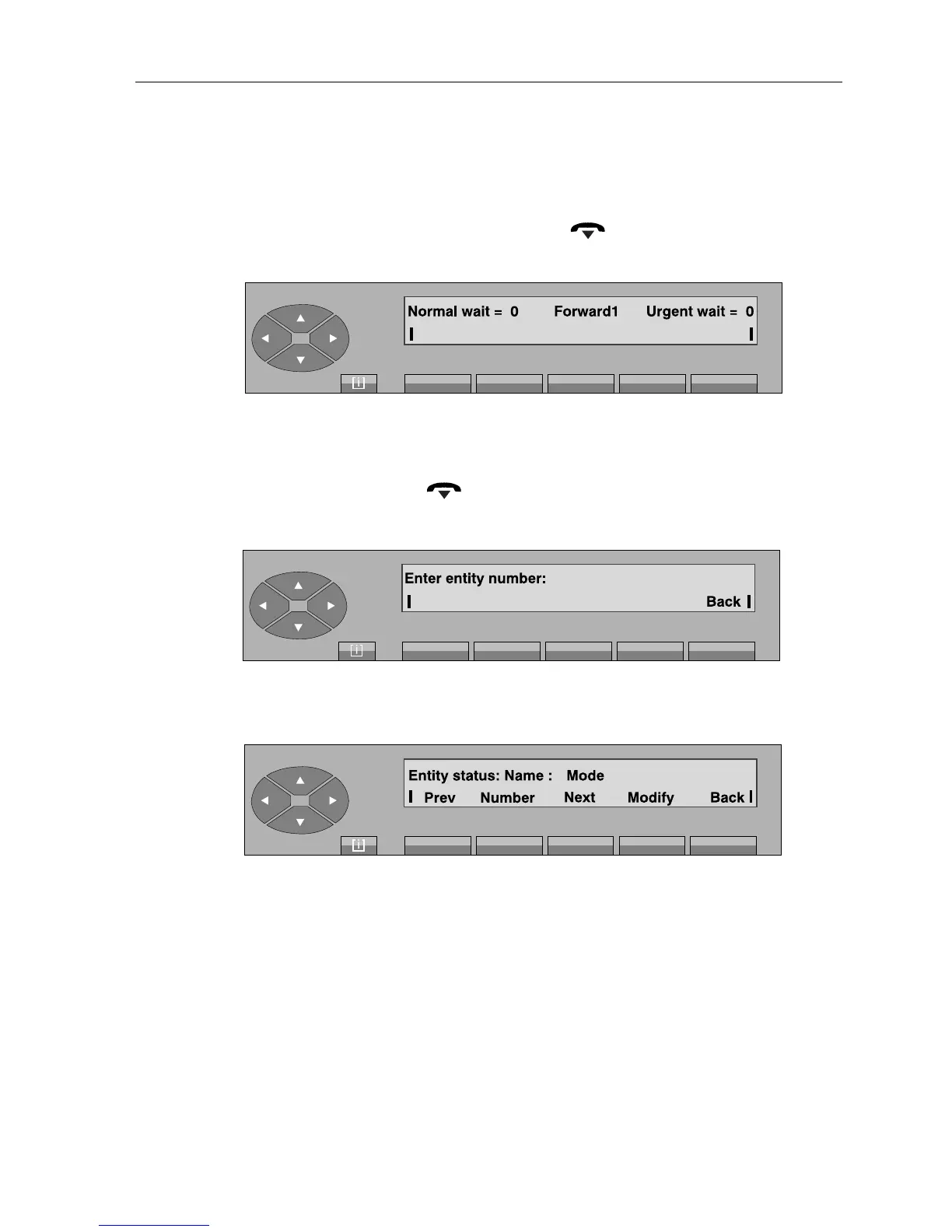
- On pressing the «Fwd 1» key, the attendant switches the group to «Forward1 mode»
(the first line of the display shows: «Forward1»).
After a timer or forced return by pressing the « » fixed key, the attendant set returns
to its idle screen with indication of the forwarding:
- On pressing the «Fwd2» key, the attendant switches the group to «Forward2 mode»
(the first line of the display shows: «Forward2»).
The attendant set returns to its idle screen either automatically after a timer, or by a forced
return by pressing the « » fixed key with indication of the forwarding:
- On pressing the «Entity» key, the screen displays:
The attendant completes the number of the entity (x) and confirms by pressing the «Apply»
key. The following is displayed:
The first line displays:
Name this is the name programmed by the administrator for the entity.
Mode indicates the operating mode for this entity.
The second line gives the following keys:
Prev used to modify the previous entity.
Number used to set the entity number.
Next used to modify the next entity.
Modify used to display and then select the «entity» calls operating mode («Night»,
«Day», «Fwd1», «Fwd2», «Normal»).



 To Next Page