B 10
2 / 6
Alcatel Vacuum Technology France --- IPUP A100 Instruction manual
Unpacking / Handling / Storage
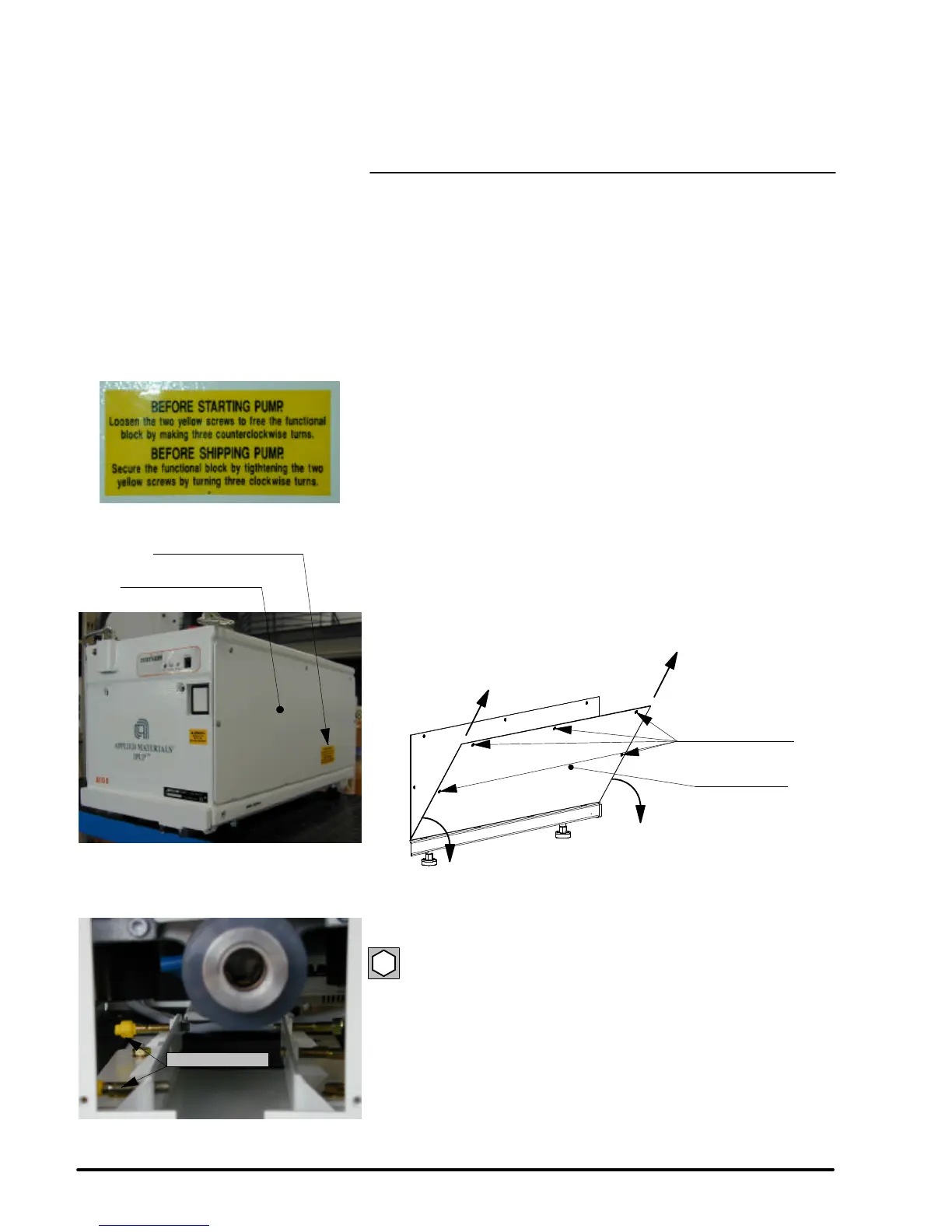
SHIPPING SCREWS
PROCEDURE
The IPUP A100 pumps are sent from the factory with two screws to
hold the functional block in place during shipping.
These screws must be loosened before pump is operated.
Also, located on the top of the pump there is a warning sign posted.
Dismantling of the lateral panel
l Loosen the five captive screws from the lateral panel located at the
right of the front panel.
l Rotate the lateral panel (1).
l Remove the lateral panel by lifting it (2).
5 captive screws
Lateral panel
1
2
2
1
Loosen the functional block
Locate two C CH M8x45 screws highlighted in yellow.
6
loosen these two screws two to three turns.
Replace the cover.
When unit is to be shipped again the screws need to be tightened up.
Note: Apply a spot of 222 low---strength threadlocker on each screw.
Yellow warning sticker
Panel to be removed
Yellow screws


 To Next Page