C 20
1 / 3
Alcatel Vacuum Technology France --- IPUP A100 Instruction manual
Start up of the monitoring system
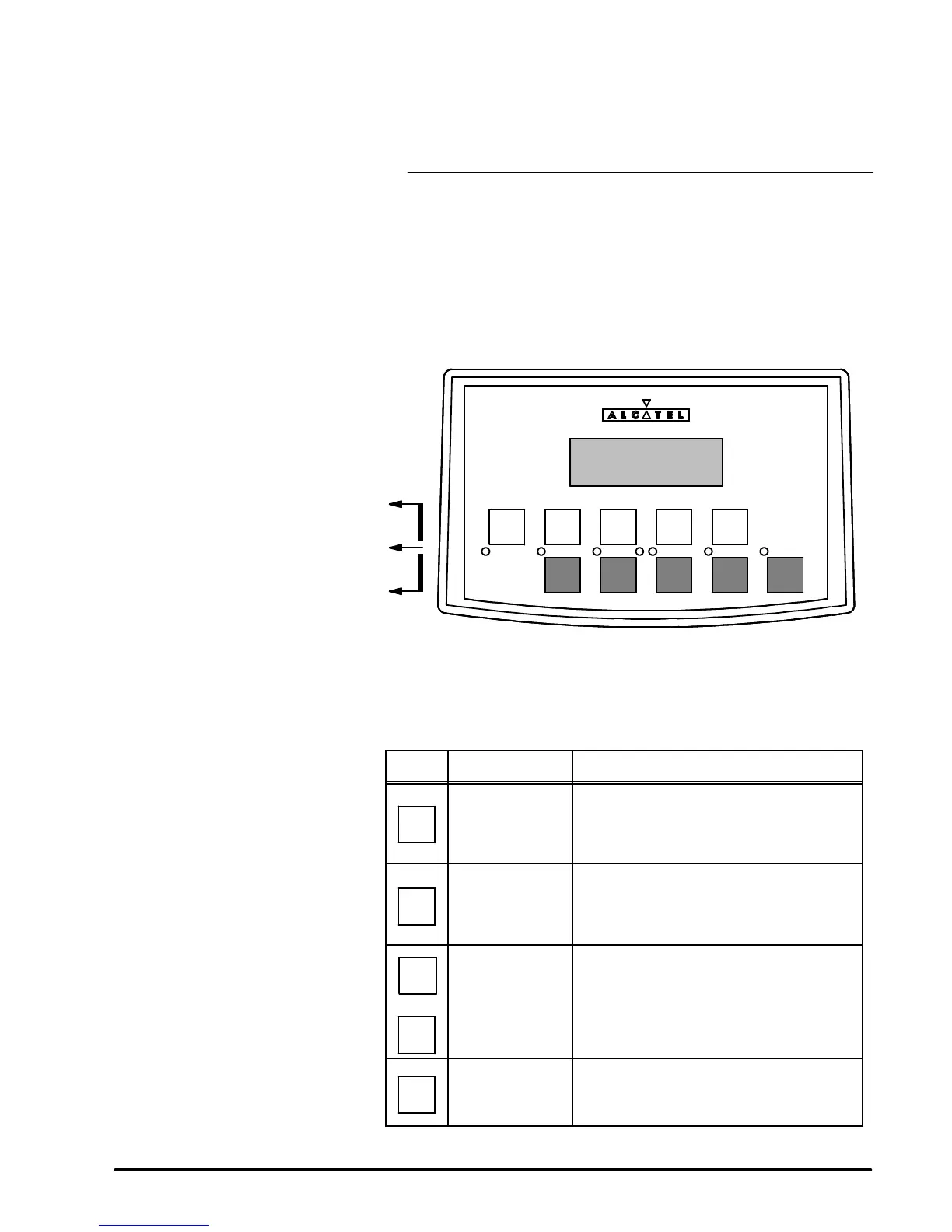
HAND HELD DISPLAY MODULE
The keyboard is used to configure the parameters.
WATER AUX
START STOP
PURGE ROOTS
SET
-- +
ENTER
CONTROL
Parameter selection and configuration keys
Indicator lights
Manual control key
PARAMETER SELECTION AND
CONFIGURATION KEY
FUNCTIONS
Description
Functions
CONTROL
Local mode
selection key
l Press control to access to the pump command
through the hand held display module
SET
Parameter setting
mode access key
l Press to access the parameter setting mode
l Press to exit the various menus without validating
the functions
--
+
Selection keys
l Press to move to:
--- the next or the previous menu
--- the next or the previous parameter in the displayed
menu
l Press to select or adjust the value of the pre-
viously selected parameter
ENTER
Configuration
validation key
l Press to validate the selection of a menu, a
parameter or a value
l Press to validate an answer to a requested
information


 To Next Page