Chapter 7: Editing Effects
94 QS6 Reference Manual
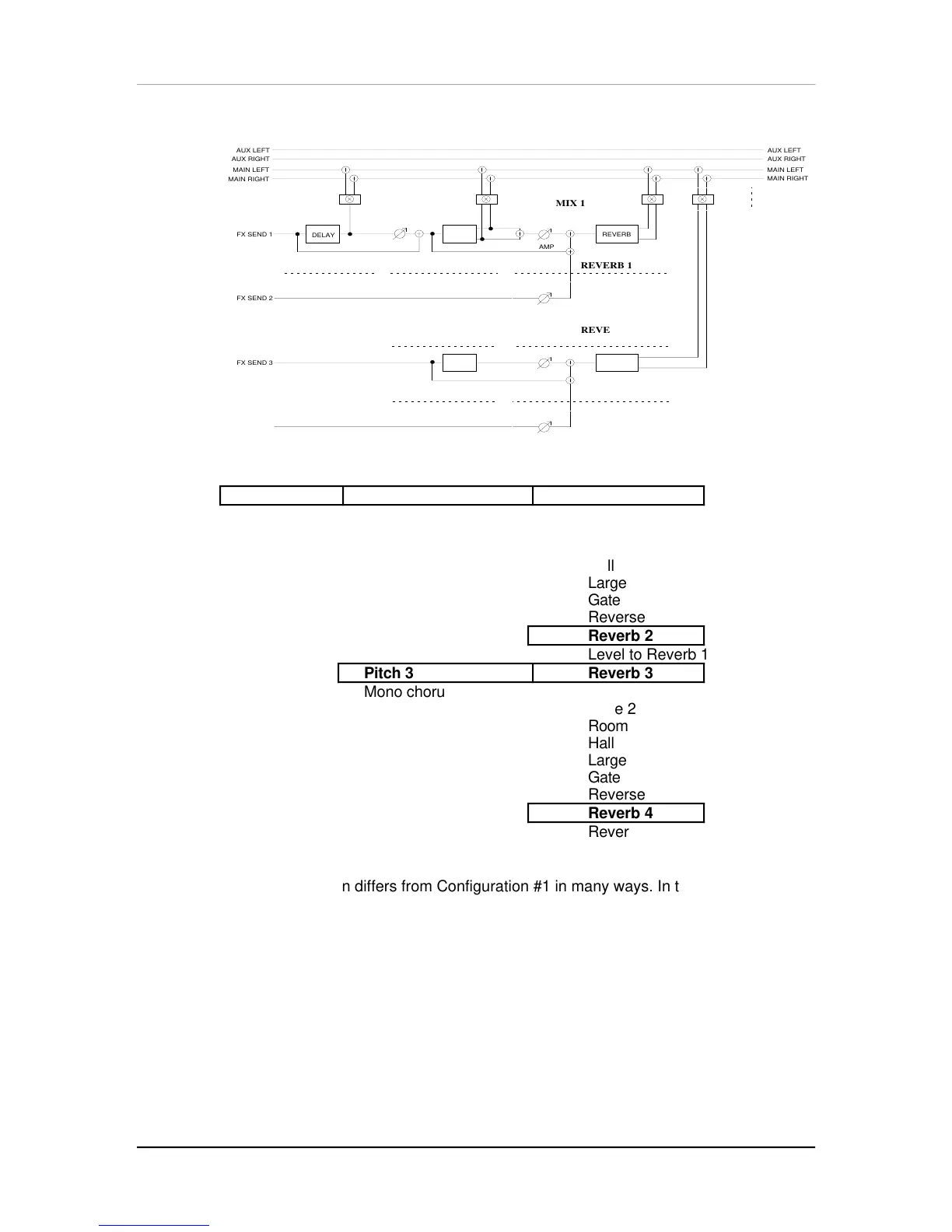
CONFIGURATION #2: 2 REVERBS
AAAAAAA
AAAAAAA
AAAAAAA
AAAAAAA
AAAAAAAAAA
AAAAAAAAAA
AAAAAAAAAA
AAAAAAAAAA
AAAAAAAAAAAAAAAAAAA
AAAAAAAAAAAAAAAAAAA
FX SEND 1
FX SEND 2
AUX LEFT
AUX RIGHT
MAIN LEFT
MAIN RIGHT
AUX LEFT
AUX RIGHT
MAIN LEFT
MAIN RIGHT
DELAY
REVERB
FX SEND 3
AMP
MIX 1
REVERB 1
REVERB 2
DELAY 1 PITCH 1
AMP
PITCH
AMP
AAAAAAAAAA
AAAAAAAAAA
AAAAAAAAAA
AAAAAAAAAA
AAAAAAA
AAAAAAA
AAAAAAA
AAAAAAA
PITCH 3
PITCH
AAAAAAAAAA
AAAAAAAAAA
AAAAAAAAAA
AAAAAAAAAA
REVERB
AMP
REVERB 3
FX SEND 4
REVERB 4
AMP
AAAAAAAAAA
AAAAAAAAAA
AAAAAAAAAA
AAAAAAAAAA
MIX 3
Delay 1 Pitch 1 Reverb 1
Mono delay Mono chorus Plate 1
Stereo chorus Plate 2
Room
Hall
Large
Gate
Reverse
Reverb 2
Level to Reverb 1
Pitch 3 Reverb 3
Mono chorus Plate 1
Plate 2
Room
Hall
Large
Gate
Reverse
Reverb 4
Reverb 4
Level to Reverb 3
This Configuration differs from Configuration #1 in many ways. In this Configuration,
there is only one Delay effect, two Pitch effects and two Reverb effects. Effect send 1
is routed through the mono Delay, then a stereo Pitch effect, and finally a stereo
Reverb effect. Send 2 has no effects of its own, but can be routed to the same
Reverb effect as send 1. Send 3 is routed through a mono Pitch effect, and then a
stereo Reverb effect. Send 4 has no effects of its own, but can be routed to the same
Reverb effect as send 3.
Effect send 1’s Delay, Pitch, and Reverb can feed the Mix output directly. Unlike the
first configuration, however, Pitch 3 can be routed to the Mix only after passing
through Reverb 3.



 To Next Page