8028 SIP Doorphone (G2) FW 3.2
Web Interface Basic Settings
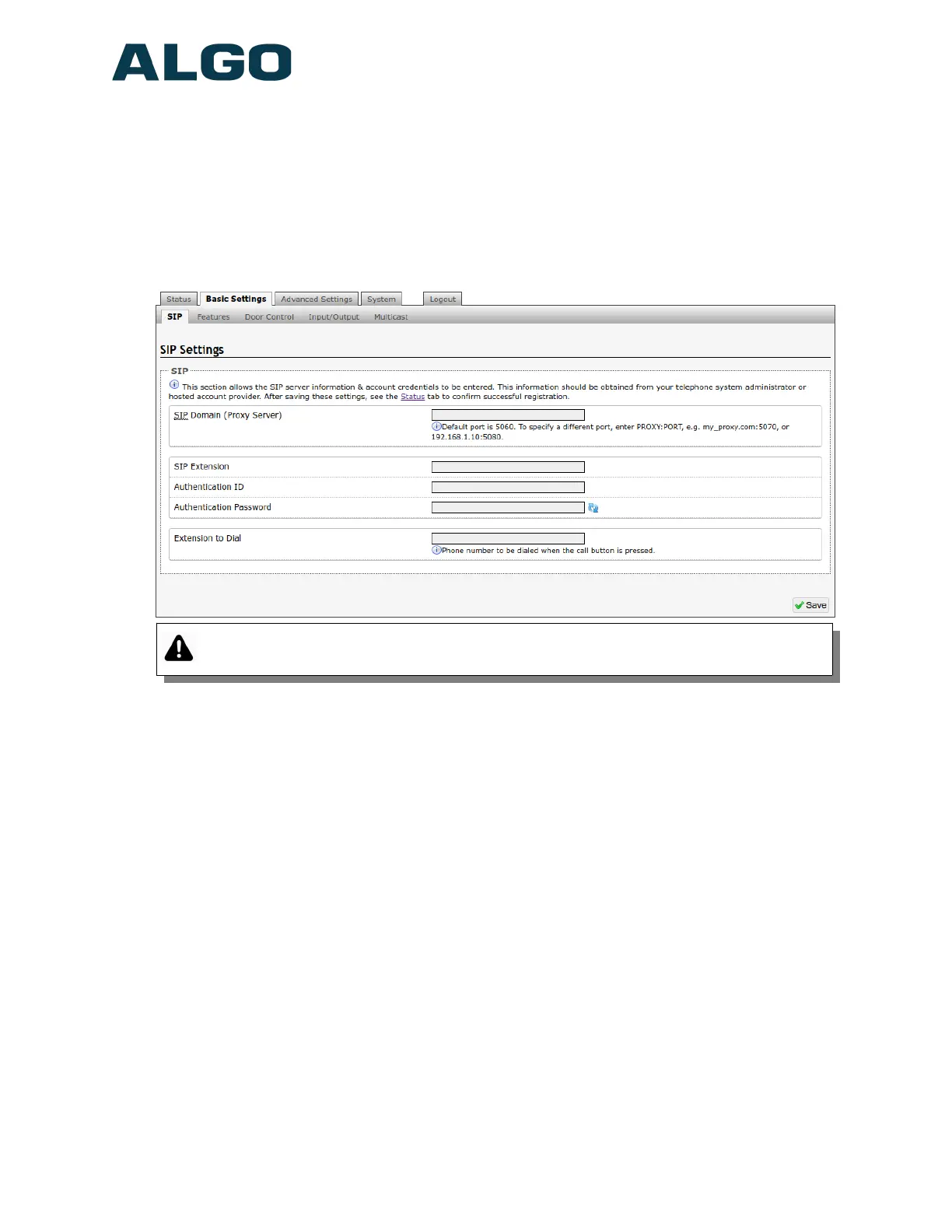
Basic Settings Tab – SIP
SIP Server information and Credentials should be obtained from your telephone system
administrator or hosted account provider. After saving the settings, see the Status tab to
confirm the registration was successful.
Important: Any time changes are made to settings in the web interface the ‘Save’
button must be clicked to save the changes.
SIP Domain (Proxy Server)
The IP address (e.g. 192.168.1.111) or domain name (e.g. myserver.com) of the SIP
Server
SIP Extension
This is the SIP extension used to register the 8028 with the SIP Server.
Authentication ID
May also be called Username for some SIP servers and in some cases may be the same
as the SIP extension.
Authentication Password
SIP password provided by the system administrator for the SIP account.
Display Name
Enter a "Display Name" that will be sent when the SIP call is made. The PBX and
phone(s) will have to be configured to display this message as the Caller ID.
Document 90-00104
05/21/2020
Page 24
Algo Communication Products Ltd
4500 Beedie St Burnaby BC Canada V5J 5L2
www.algosolutions.com
(604) 454-3792
support@algosolutions.com



 To Next Page