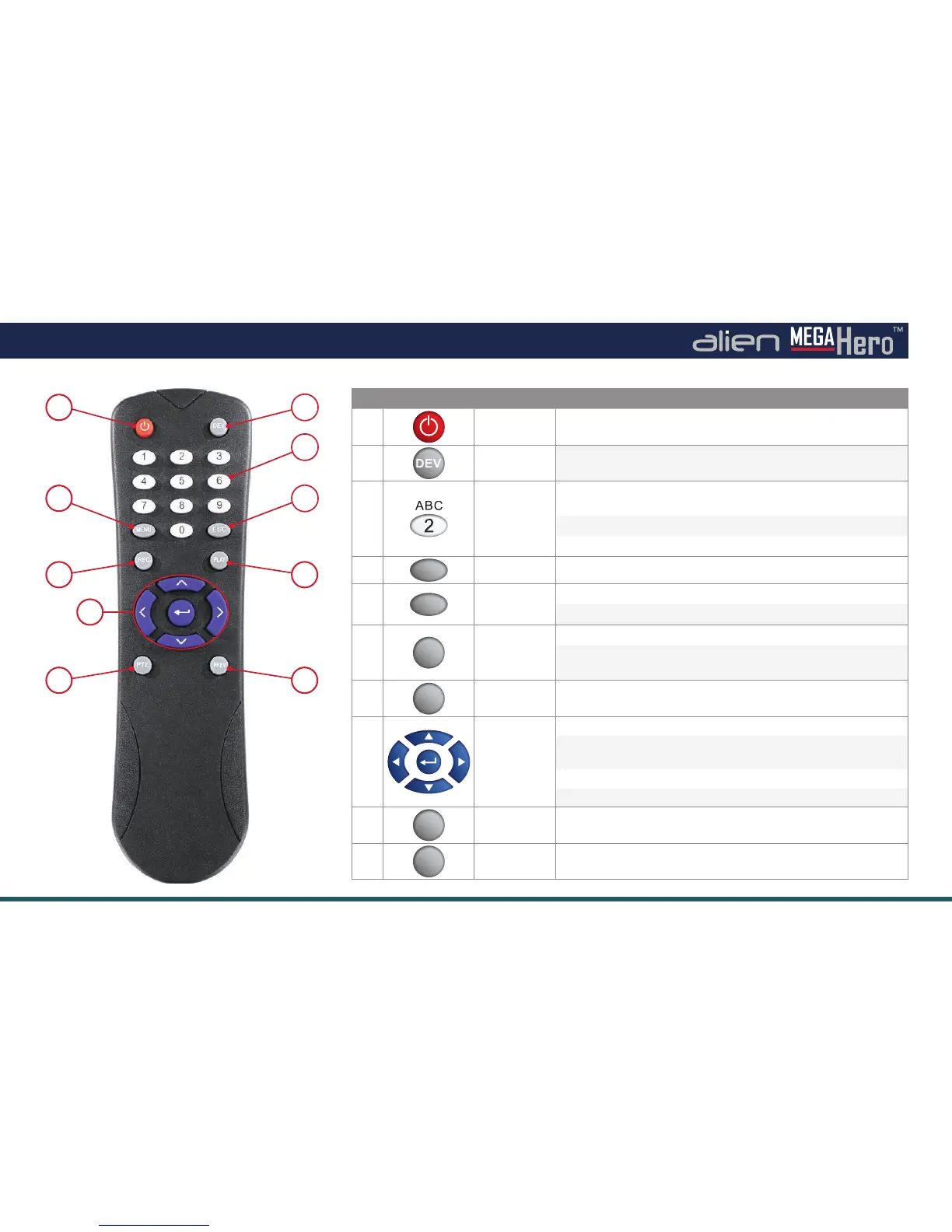
13The full instruction manual can be found on the CD which accompanied the DVR.
Ways To Control Your MegaHero -
By IR Remote Control
2
3
5
1
4
6
9
7
10
8
No. Button Name Function / Description
1
POWER
Power on/o the device.
2 DEV
Enables/Disables Remote Control.
3
Alphanumeric
Buttons:
Switch to the corresponding channel in Live view or PTZ
Control mode.
Input numbers and characters in Edit mode.
Switch between di erent channels in All-day Playback mode.
4
MENU
MENU
Back to the Main menu (after successful login).
5
ESC
Back to the previous menu.
Press for arming/disarming the DVR in Live View mode.
6
REC
REC
Enter the Manual Record settings menu.
In PTZ control settings, press the REC button and then you can
call a PTZ pre-set by pressing a Numeric buttons.
7
PLAY
PLAY
Entering the All-day Playback menu.
8
DIRECTION/
ENTER
Navigate between di erent elds and items in menus.
In Playback mode, the Up and Down button are used to speed up
and slow down the playing of recorded video.
Left/Right buttons used for 30s reverse/30s forward during playback.
Cycle through channels in Live view mode.
9
PTZ
PTZ
Enter the PTZ Control mode.
10
PREV
PREV
Switch between single screen and multi-screen mode.



 To Next Page