6 Get more from your alienDVR with our Free CCTV tips at aliendvr.com
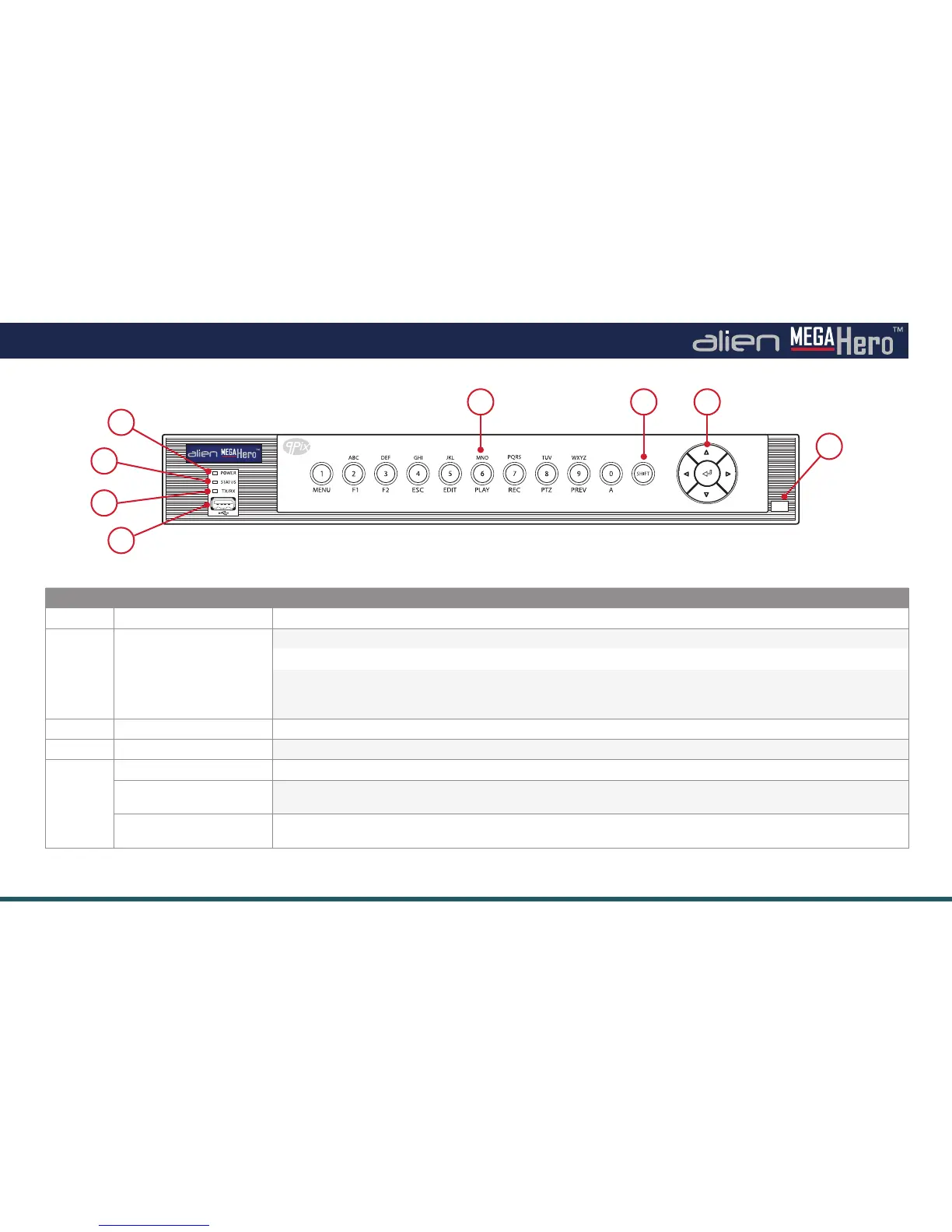
Front Panel
No. Name Function / Description
1 POWER Power indicator turns green when powered on.
2 STATUS Green when controlled by an IR remote or IR remote and keyboard together.
Red when the SHIFT button is used. (6)
Orange:
A. When controlled by IR remote and keyboard at the same time and the SHIFT button is used.
B. When controlled by IR remote and the SHIFT button is used.
3 TX/RX Indicator blinks green when network connection is running.
4 USB INTERFACE USB for mouse or memory stick.
5 1/MENU Enter number “1” / MENU - Access the main menu interface.
2/ABC/F1 Enter number “2” / Enter letters “A,B,C” / F1 - Selects all items on the list /
Zooms out (zoom-) the PTZ camera / Switches between main and spot video output.
3/DEF/F2 Enter number “3” / Enter letters “D,E,F” / F2 - Zooms in (zoom+) the PTZ camera /
Cycles through tab pages.
1
2
3
4
5 6 7
8
MegaHero Front Panel
(
4ch Shown
)



 To Next Page