Smart Setup
Network Setup
Advanced Network Conguration
stop at the wrong time. This could lead to important incidents not
being recorded.
The correct time and date also helps identify when an incident occurred.
Network Setup
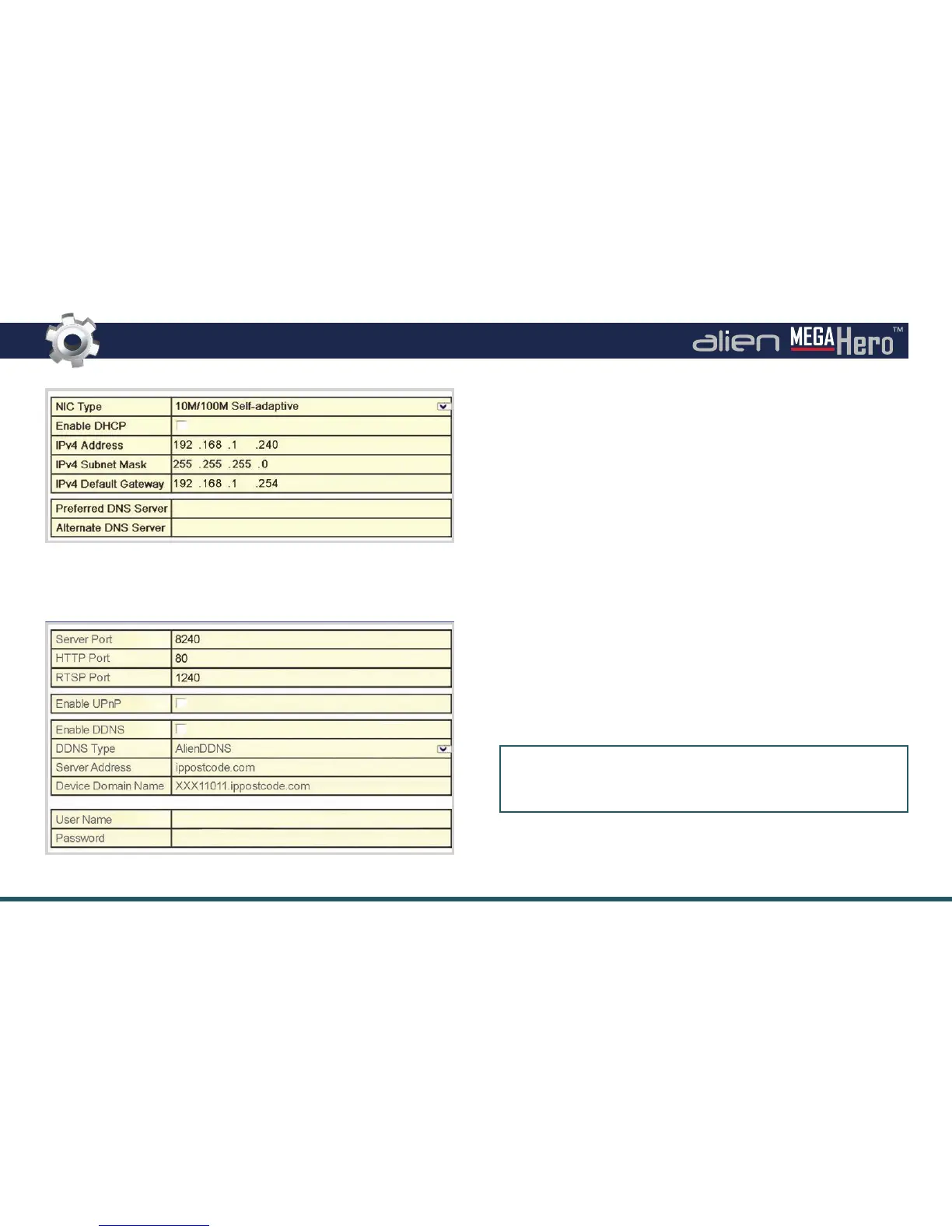
Setting your DVR up on a network will allow you to remotely monitor
the DVR from a PC, tablet or mobile phone once port forwarding has
been congured. We would recommend that you attain advice from
a network professional if you intend to remotely monitor your DVR,
however advice and guidance is available at aliendvr.com.
Advanced Network Conguration
If you intend to remotely monitor you DVR via the web or one of our
apps you must rst setup port forwarding and (if required) DDNS.
If your router supports UPnP you can simply tick ‘Enable UPnP’ and
the DVR will automatically congure port forwarding for you.
Port Settings
Server: 8240 HTTP: 80 RTSP: 1240
Key information for your DDNS account can also be entered at this
point. Full a full step by step guide on how to congure AlienDDNS
see page 34-35.



 To Next Page