18 Get more from your alienDVR with our Free CCTV tips at aliendvr.com
Smart Setup
Smart Setup is a quick and easy way to congure some of the key
settings on the MegaHero. This is a useful tool when using the DVR
for the rst time.
To enable Smart Setup, start the device and from the Main menu
enter the ‘Set Up’ Menu (page 25). Check ‘Smart Setup’ in the
general tab, click ‘Apply’. Now go back to Main menu and enter the
‘Turn O’ menu. From here click ‘Reboot’ to restart the DVR. Upon
restart the DVR will enter Smart Setup.
Settings which can be congured during Smart Setup:
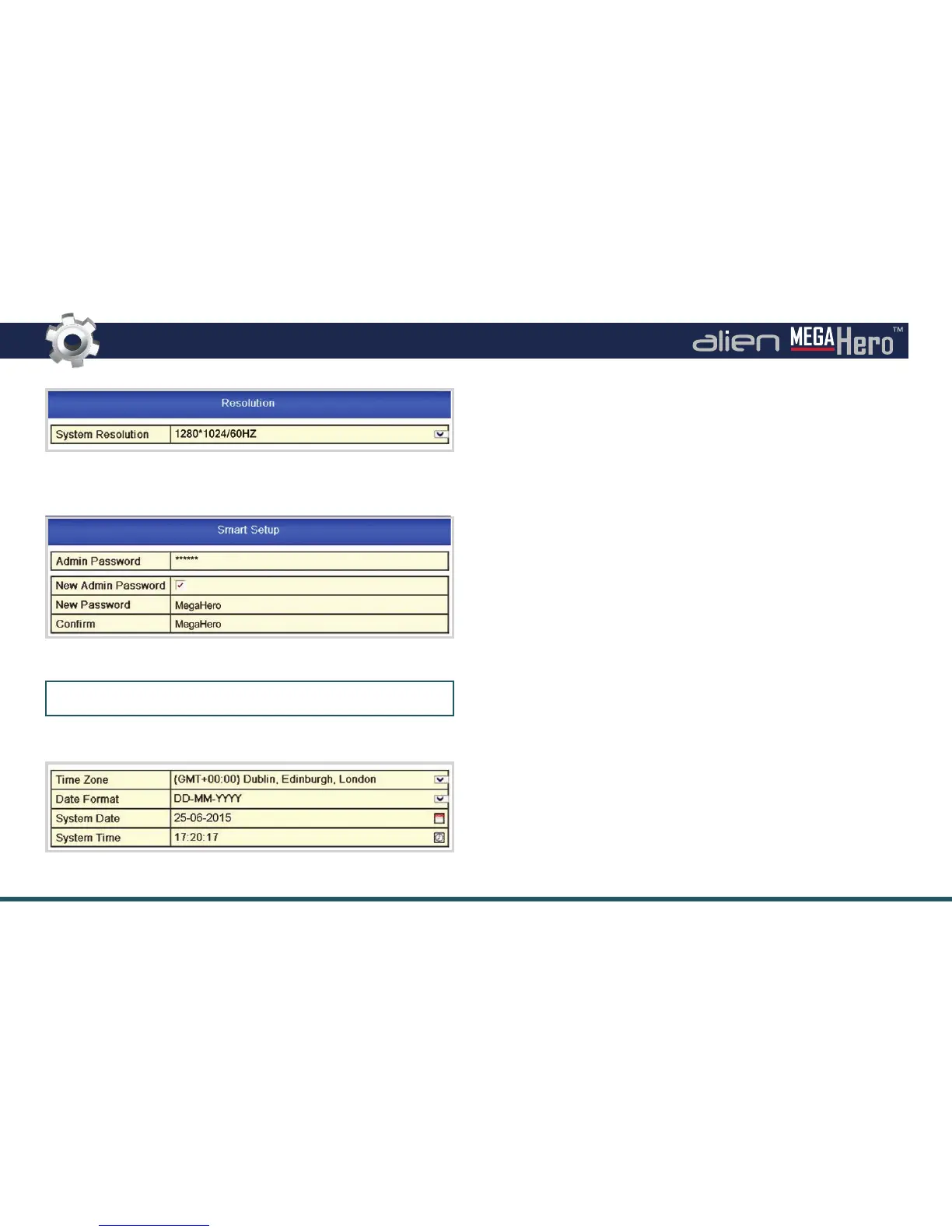
Resolution
Quickly set the output resolution of the DVR. For a monitor we
recommend 1280 x 1024. For a TV we recommend 1920 x 1080 (1080p).
Admin Password
As all our DVRs come with the same admin password, it is highly
recommended that you set your own unique admin password.
Doing this during Smart Setup ensures you DVR is secure right from
the get go. (See Admin Password Setup on the left.)
Time & Date
It is vitally important to set the DVR to the correct time and date.
The wrong time and/or date will cause schedules to start and
Recommended Monitor Resolution
Admin Password Setup
Time & Date Setup
Default Admin Password: 555555



 To Next Page