Schedule
Schedule Submenu Overview
In the Schedule menu you can create or edit recording and holiday schedules.
Each channel can be scheduled to record for set periods of time over the
course of a day. Cameras can be set to only record events such as motion
detection or an alarm trigger during certain hours.
This exibility enables you to create an eective recording schedule for any
situation. Creating a bespoke schedule also allows you to record for greater
periods of time as cameras are not constantly recording.
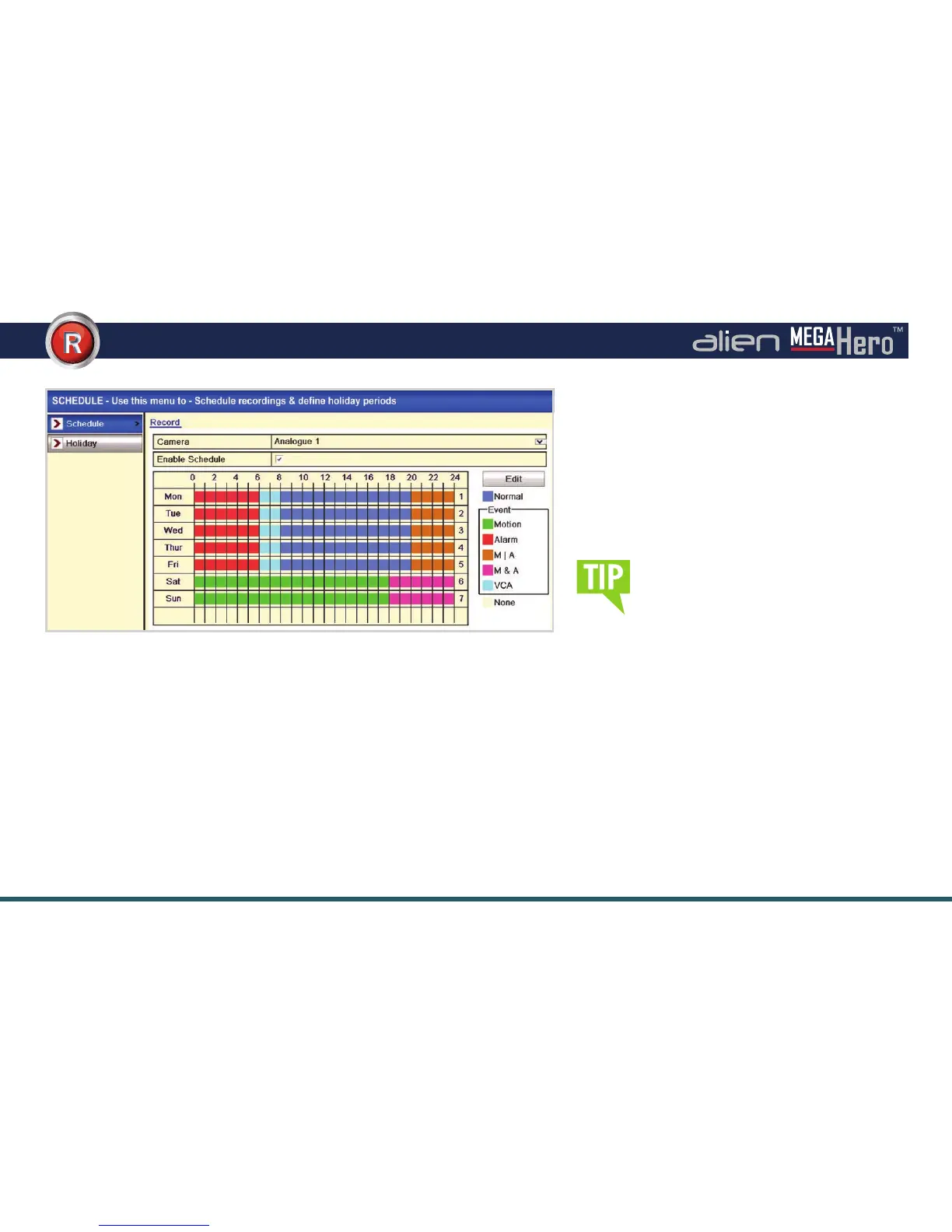
Schedule Interface (Example For A Convenience Store)
6 options are available when creating
a recording schedule. ‘Normal’ will
record exactly as the camera has been
congured. ‘Motion’ records when
motion is detected. ‘Alarm’ records when
an alarm is triggered. ‘Motion/Alarm’
records when motion has been detected
or an alarm has been triggered. ‘Motion
& Alarm’ will only record when motion
is detected and an alarm is triggered
at the same time. Finally ‘VCA’ (Video
Content Analysis) will start recording
when Line Cross Detection or Intrusion
Detection is triggered.
Holiday schedules can be congured if a dierent
recording schedule is required over a long period
of time.
Functions available through the Schedule submenu:
• Recording Schedules
• Holiday Schedules



 To Next Page