Professional
FM Transceiver
54
Resume Factory Default (RESET)
You can make all the settings of transceiver return to the factory default settings
when it has troubles, can't work properly or simply you wish to change settings.
1.Press and hold
【
PF2
】
key while turning on the radio, and keep pressing
【
PF2
】
key for 3 seconds to enter into the Set Mode operations.
2.Press
【
B
】
/
【
C
】
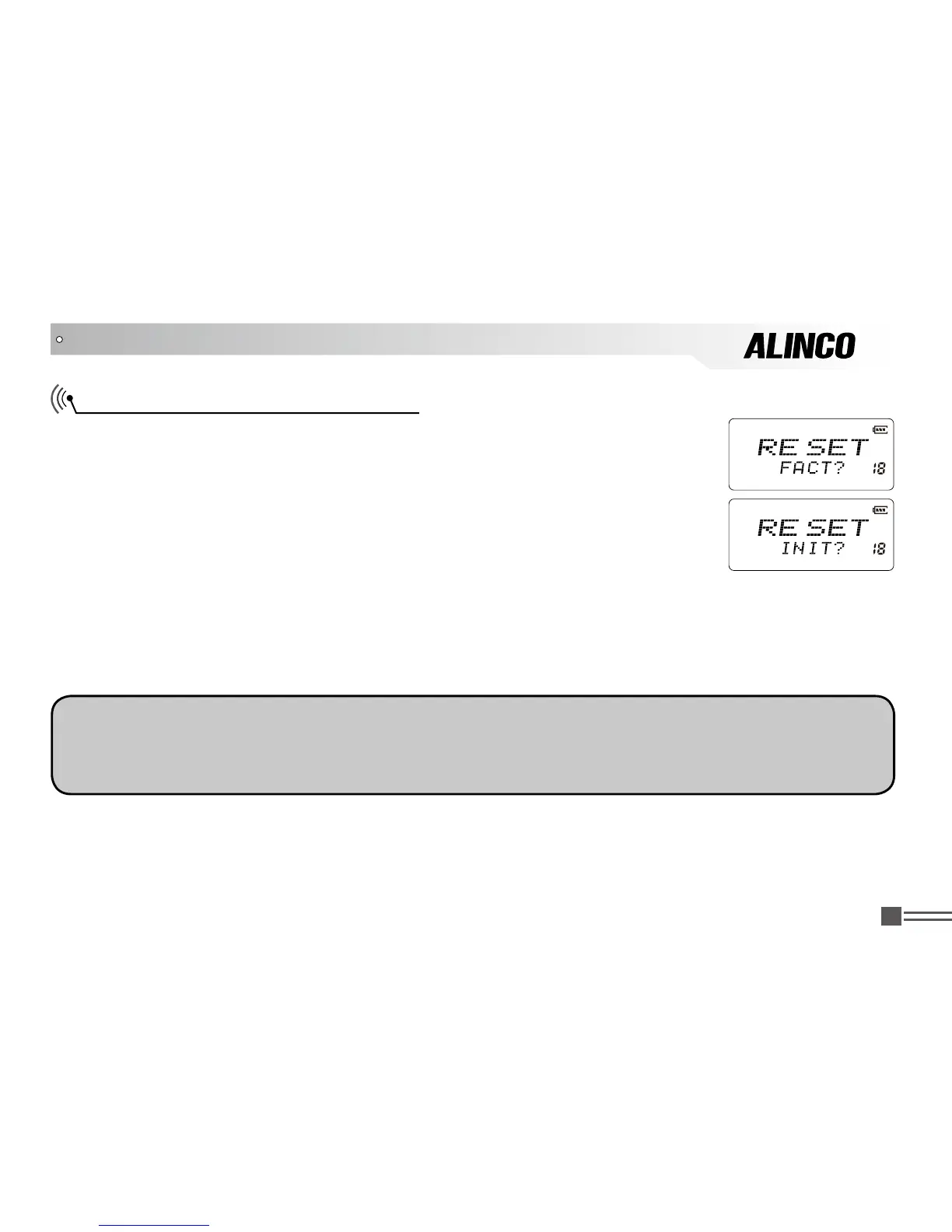
key to choose the Menu 18 and display “
RESET
”.
3.Press
【
A
】
key then press
【
B
】
key or
【
C
】
key to choose the reset mode.
FACT?:
Resume Factory default. Frequency, signaling tones and function
settings will return to the factory default.
INIT?:
Resume Set mode setting parameters to default. Frequency, signaling tones and function
settings remain unchanged.
4. Press
【
#
】
key to confirm and perform the reset.
SET MODE OPERATIONS
NOTE:
Once the reset is performed, previous programming data are gone and can’t recall. Please be sure
to manually record major parameters such as frequency and signaling settings used in your group to
manually restore the data after reset.



 To Next Page