36 39201
© Copyright, Alliance Laundry Systems LLC – DO NOT COPY or TRANSMIT
General Troubleshooting
b. Electronic Coin Drops:
If coin drop is not accepting coins, perform the
following:
(1) Clean coin drop. Refer to Paragraph 62.
(2) Test and replace tension spring using the
following instructions.
Remove Coin Drop From Machine
(1) Disconnect electrical power to machine and
drop.
(2) Remove coin drop from machine.
Test Tension Spring
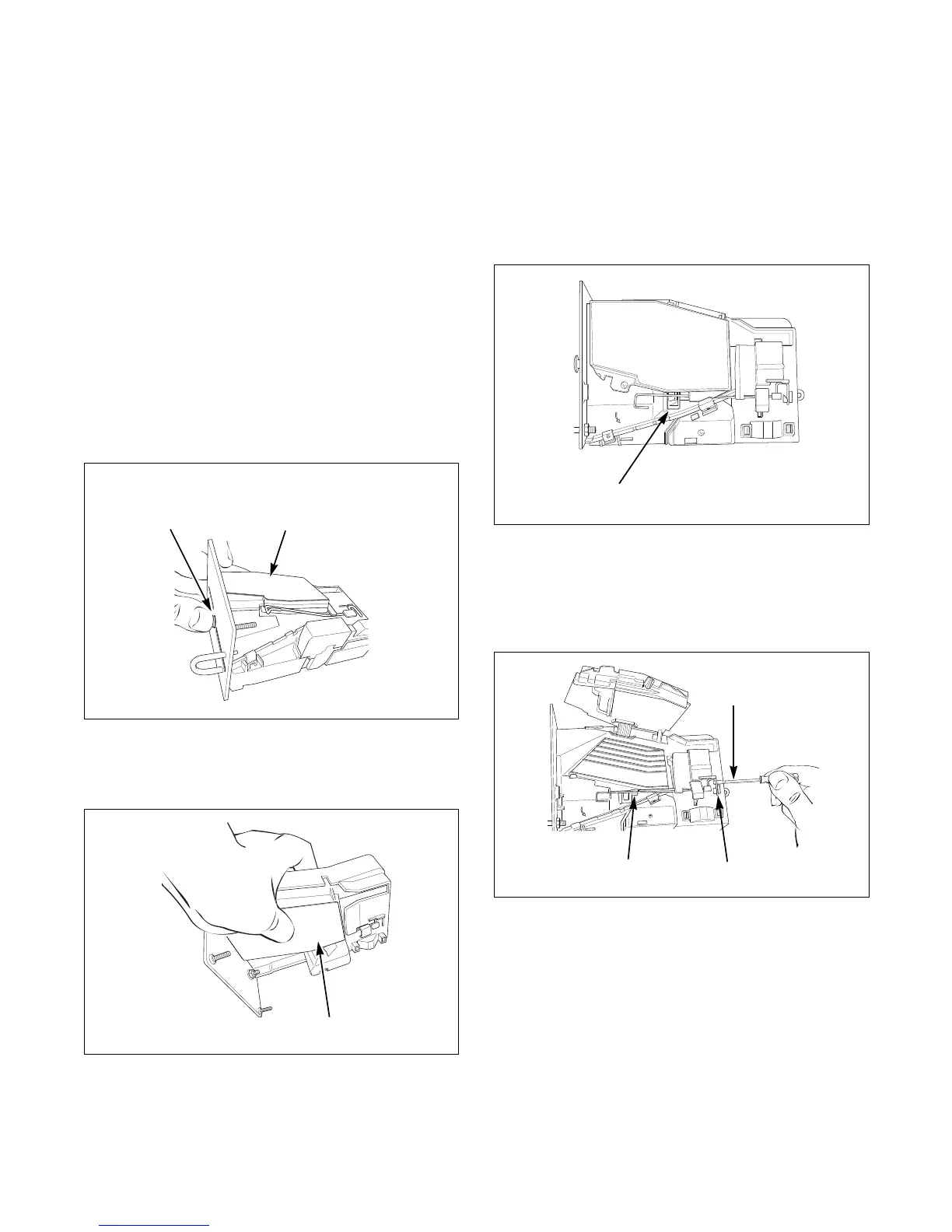
(1) Push coin return button to open and close
coin drop cover to clear possible coin jams.
Refer to Figure 2.
(2) Manually hold down coin drop cover and
insert coin. Refer to Figure 3.
(3) If coin drop now operates properly, replace
tension spring using instructions on
following pages.
Replace Tension Spring
(1) Move tension spring downward until cover
catch is free. Refer to Figure 4.
(2) Open cover for coin drop.
(3) Place a small flathead screwdriver under
right side of tension spring and lift up.
Refer to Figure 5.
(4) Use screwdriver to move spring
approximately 3 mm to left.
(5) Lift spring over left tab. Refer to Figure 5.
Figure 2
Figure 3
Coin Drop
Cover
Coin Return
Button
MIX6B
Figure 4
Figure 5
DRY2088N
MIX2B
Small Flathead
Screwdriver
Right Side of
Tension Spring
Left Tab



 To Next Page