39201 37
© Copyright, Alliance Laundry Systems LLC – DO NOT COPY or TRANSMIT
General Troubleshooting
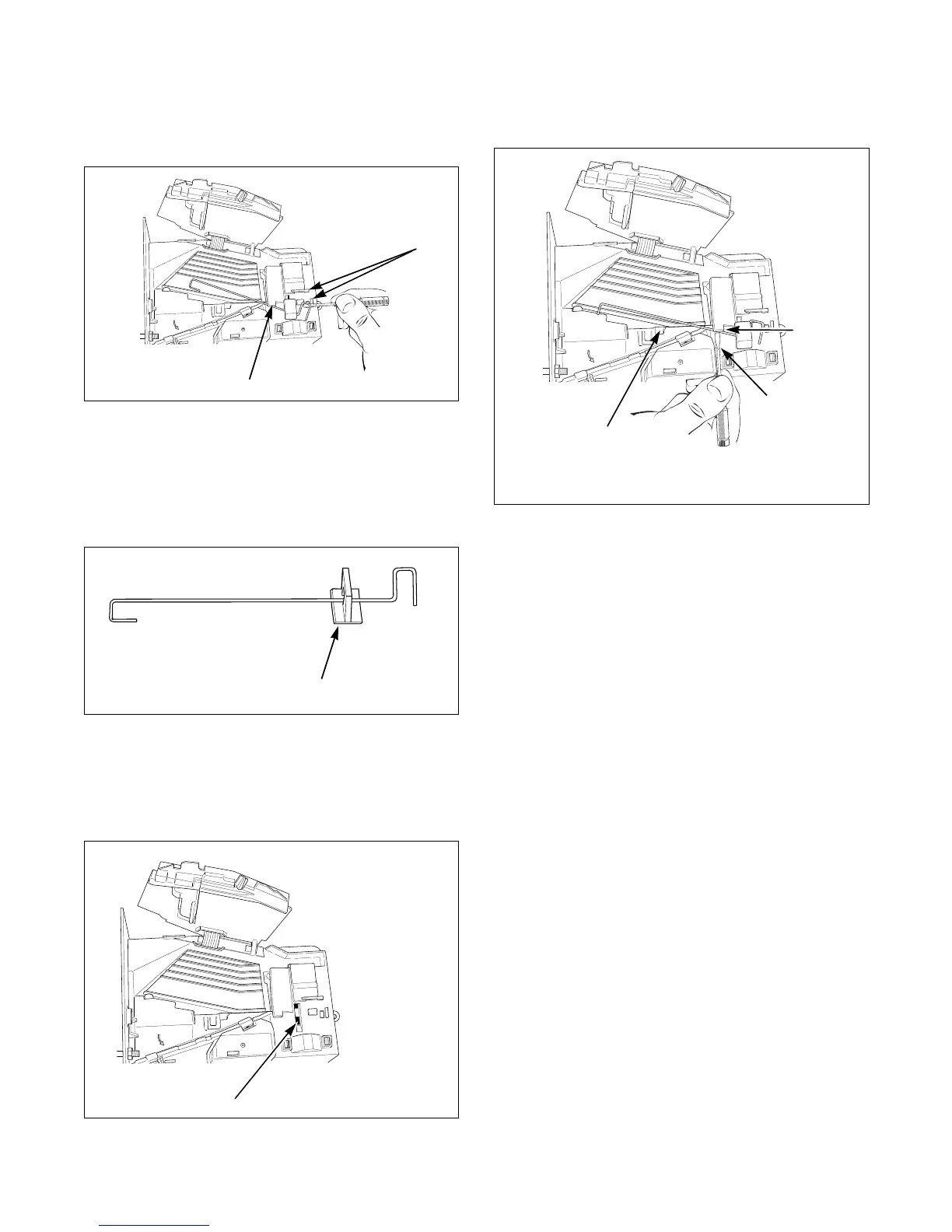
(6) Rotate spring clockwise, 40 to 60 degrees,
until it is free from right tabs. Refer to
Figure 6.
(7) Use screwdriver to remove spring from
center tab. Refer to Figure 6.
(8) Lift spring, with attached clip, off drop.
(9) Remove clip from spring. Refer to
Figure 7.
(10) Attach clip to new tension spring, Part No.
209/00598/02.
(11) Place clip, installed on spring, in slot on
coin drop. Refer to Figure 8.
(12) Use a small flathead screwdriver to push
spring under center tab. Refer to Figure 9.
(13) Lift spring gently to place in position under
left tab.
(14) Push spring to right until it snaps into
position. Refer to Figure 5.
(15) Close coin drop cover.
(16) Move tension spring over cover catch.
Refer to Figure 4.
Reinstall Coin Drop Into Machine
(1) Reinstall coin drop into machine.
(2) Reconnect electrical power to machine and
drop.
(3) Add a coin to drop to verify that coin drop
is operating properly and that electrical
connection is working properly.
Figure 6
Figure 7
Figure 8
Figure 9
Small Flat
Screwdriver
Center
Tab
Left Tab



 To Next Page