16
C048-740-30 R02, Rev. C (01/2020)
4.7.2 4.7.2 GJ Circuit BreakersGJ Circuit Breakers
For a list of compatible GJ breakers, see Appendix E on Page 50.
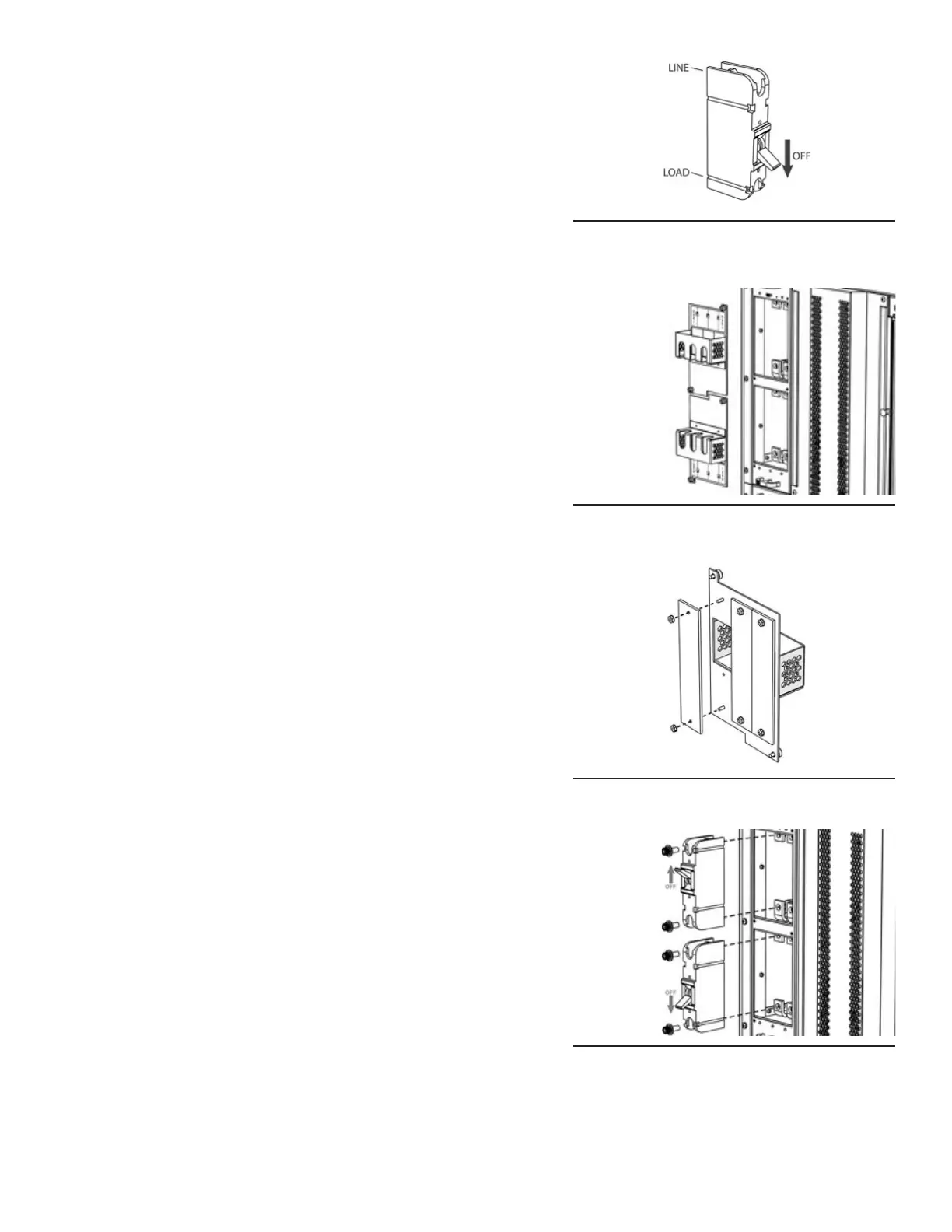
Step 1. Ensure that breaker is in the OFF position before installing
into panel (see Figure 27).
Step 2. Remove breaker shield(s) from GJ breaker panel by loosing
the captive thumbscrews (see Figure 28).
Step 3. Depending on number of breakers selected, remove the
plastic blanking cover(s) by uninstalling the 6-32 hex nuts
(see Figure 29).
Step 4. To ensure correct breaker polarity, view the channel mapping
label located on the breaker shield removed in Step 2 for
correct LOAD/LINE breaker orientation. Secure breaker(s)
into place by tightening the 3/8 in hardware (see Figure 30).
Step 5. Reattach breaker shield(s) from Step 2.
Figure 27. Turn Breaker O
Figure 28. Remove Breaker Shield(s)
Figure 29. Remove Blanking Cover(s)
Figure 30. Install Breaker(s)



 To Next Page