28
C048-740-30 R02, Rev. C (01/2020)
6.5.2 6.5.2 Breaker AmpacityBreaker Ampacity
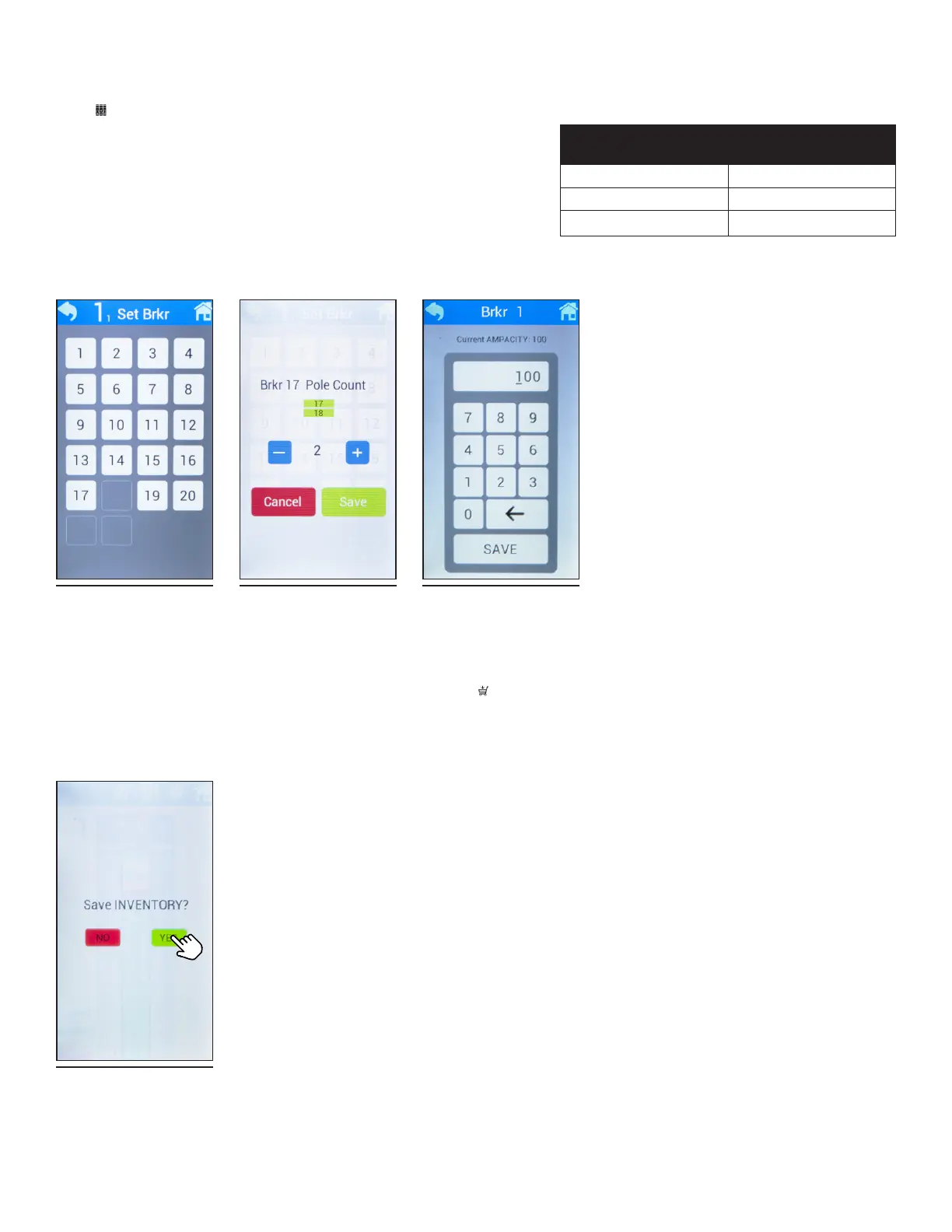
To access breaker ampacity settings, select the breaker ampacity
icon ( ) at the top of the screen. The Set Brkr screen will appear
with up to 22 breakers shown (see Figure 65). Select the breaker
that is to be adjusted, then select pole count (1-3) using the (+) or
(-) buttons. Once pole count is chosen, select Save (see Figure
66). The individual breaker ampacity screen will then appear with
a keypad to modify the current ampacity (see Figure 67). When
entering digits below 100A, ensure that a 0 is placed in front (ex.
20A would be entered in as 020). See Table 20 for max values per
pole count. Tap SAVE once proper adjustments have been made.
6.5.3 6.5.3 Breaker InventoryBreaker Inventory
To save breaker inventory, select the breaker inventory icon ( )
at the top of the screen. Select YES when the screen asks to save
inventory (see Figure 68).
Table 20. AM Breaker Max Ampacity Value
NUMBER OF
POLES
MA X R ATING
1 125A
2 200A
3 300A
Figure 65. Breaker
Ampacity
Figure 66. Breaker
Pole Count
Figure 67. Current
Ampacity
Figure 68. Save
Inventory



 To Next Page