27
C048-740-30 R02, Rev. C (01/2020)
6.5 6.5 Breaker SettingsBreaker Settings
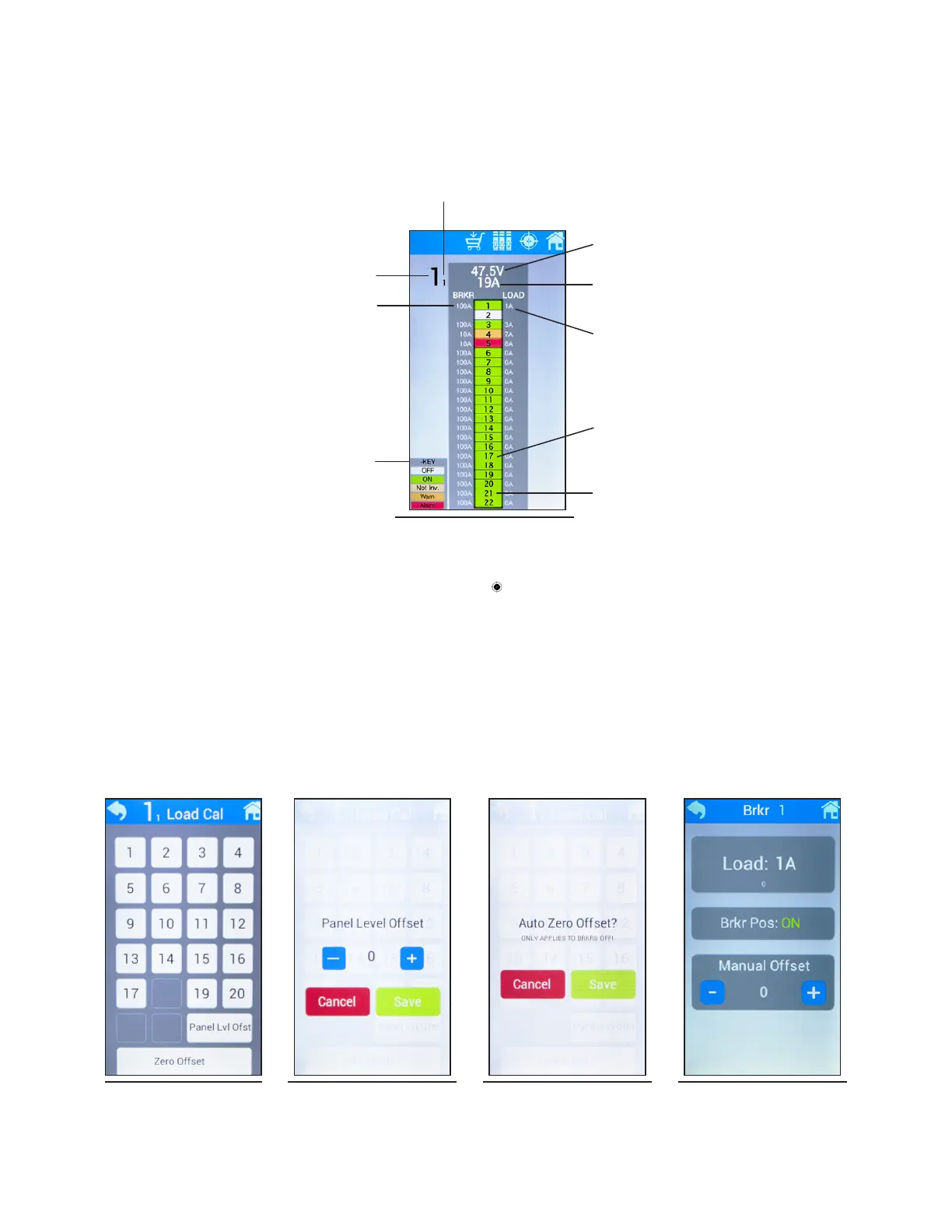
To access breaker settings (calibration/ampacity/inventory), select a panel from the Home screen. Once selected, breaker
load and ampacity data will be displayed along with any breaker alarms (see Figure 60). Refer to alarm key shown on this
screen for alarm severity.
6.5.1 6.5.1 Load CalibrationLoad Calibration
y To access load calibration, select the load calibration icon ( ) at the top of the screen. The Load Cal screen will
appear with all 22 breakers shown. Select the breaker to be calibrated (see Figure 61). The individual breaker
calibration screen will then appear with load data, breaker position, and manual oset adjustment. Tap the (-) or (+)
buttons to manually adjust oset by 10A (see Figure 62).
y To set load oset for all 22 breakers at once, select Panel Lvl Ofst. Tap the (-) or (+) buttons to manually adjust panel
level oset. This feature applies manual oset to all 22 breakers on the corresponding panel and is useful before
connecting any load if all of the breakers are showing 1-2A per channel. (see Figure 63).
y To set the load of all breakers to zero, select Zero Oset. This setting can only be applied if breakers are OFF. Select
Save to proceed (see Figure 64).
Breaker Alarm Key
Figure 60. Breaker Data
Bus Number
Panel Number of Corresponding Bus
Breaker Ampacity
Breaker Load
Total Panel Load
Bus Voltage
2-Pole Breaker Shown
3-Pole Breaker Shown
Figure 61. Load
Calibration
Figure 62. Panel Level
Oset
Figure 63. Auto Zero
Oset
Figure 64. Calibration



 To Next Page