30
C048-740-30 R02, Rev. C (01/2020)
6.8 6.8 Realtime StatusRealtime Status
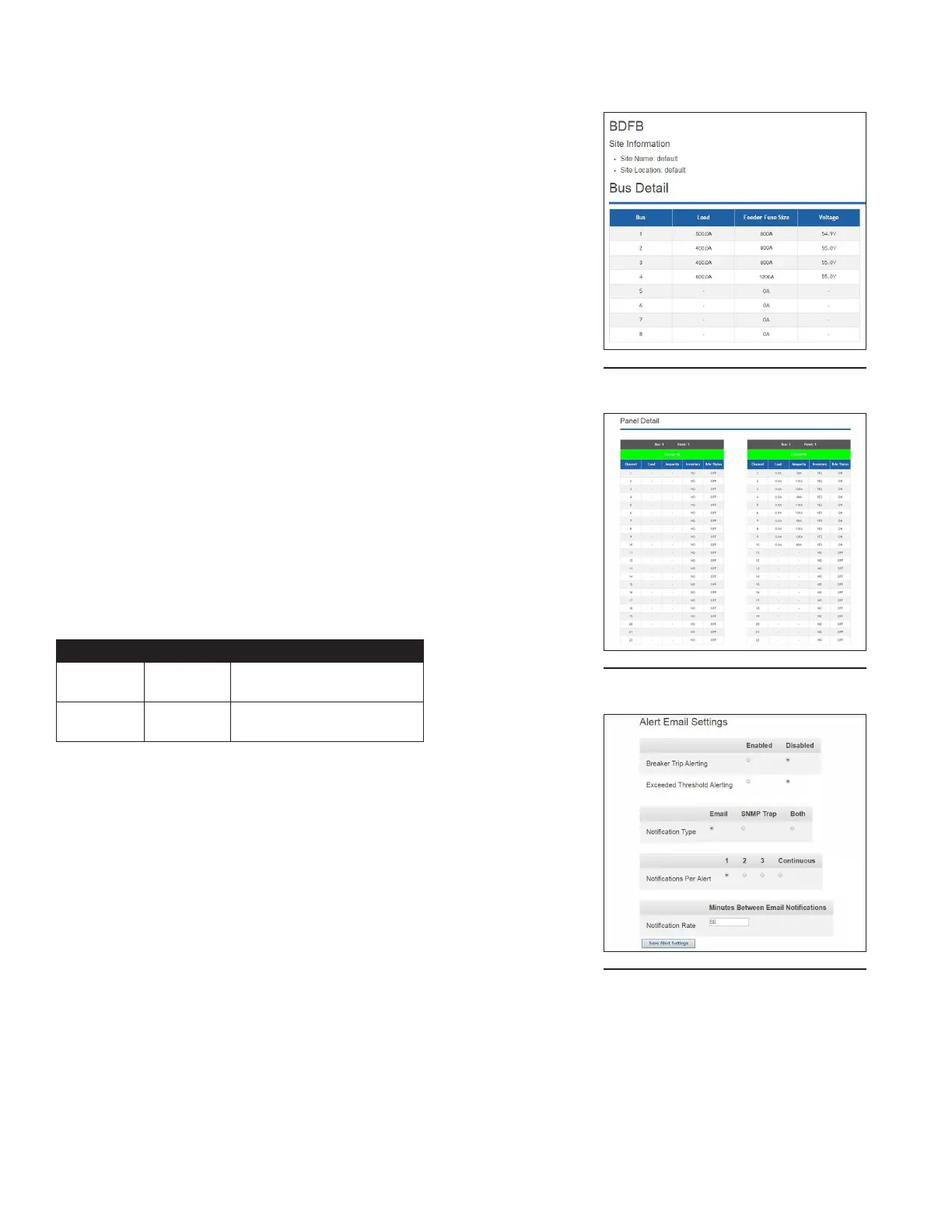
By clicking on the Realtime Status tab located at the top of
the home page, BDFB bus and panel detail will be shown (see
Figure 70 & 71).
For bus detail, a table will display:
y Bus number
y Load
y Feeder fuse size
y Voltage
For panel detail, a table will display:
y Panel communication status
y Channel number
y Load per channel
y Ampacity per channel
y Inventory per channel (yes/no)
y Breaker status per channel (on/o)
Alarms: If communication with a panel is lost, Comms Lost will
appear with a red background at the top of the Panel Detail
table. If communication is not lost, Comms OK will appear with
a green background. See Table 21 below for inventory and
breaker status alarms.
Table 21. Inventory and Breaker Status Alarms
ALARM COLOR CAUSE
Minor Orange Breaker not inventoried;
Breaker ON
Major Red Breaker inventoried;
Breaker OFF
6.9 6.9 Administration HomeAdministration Home
To access the conguration settings of your embedded
ethernet module, select the Administration tab located at the
top of the home page.
6.9.1 6.9.1 Notication SettingsNotication Settings
This page allows the user to specify the SNMP and email
notication settings (See Figure 72).
Figure 70. Bus Detail
Figure 71. Panel Detail
Figure 72. Notication Settings



 To Next Page