EasySet 2 BAG0217.9
Calibrating both shutters on the ZA-X
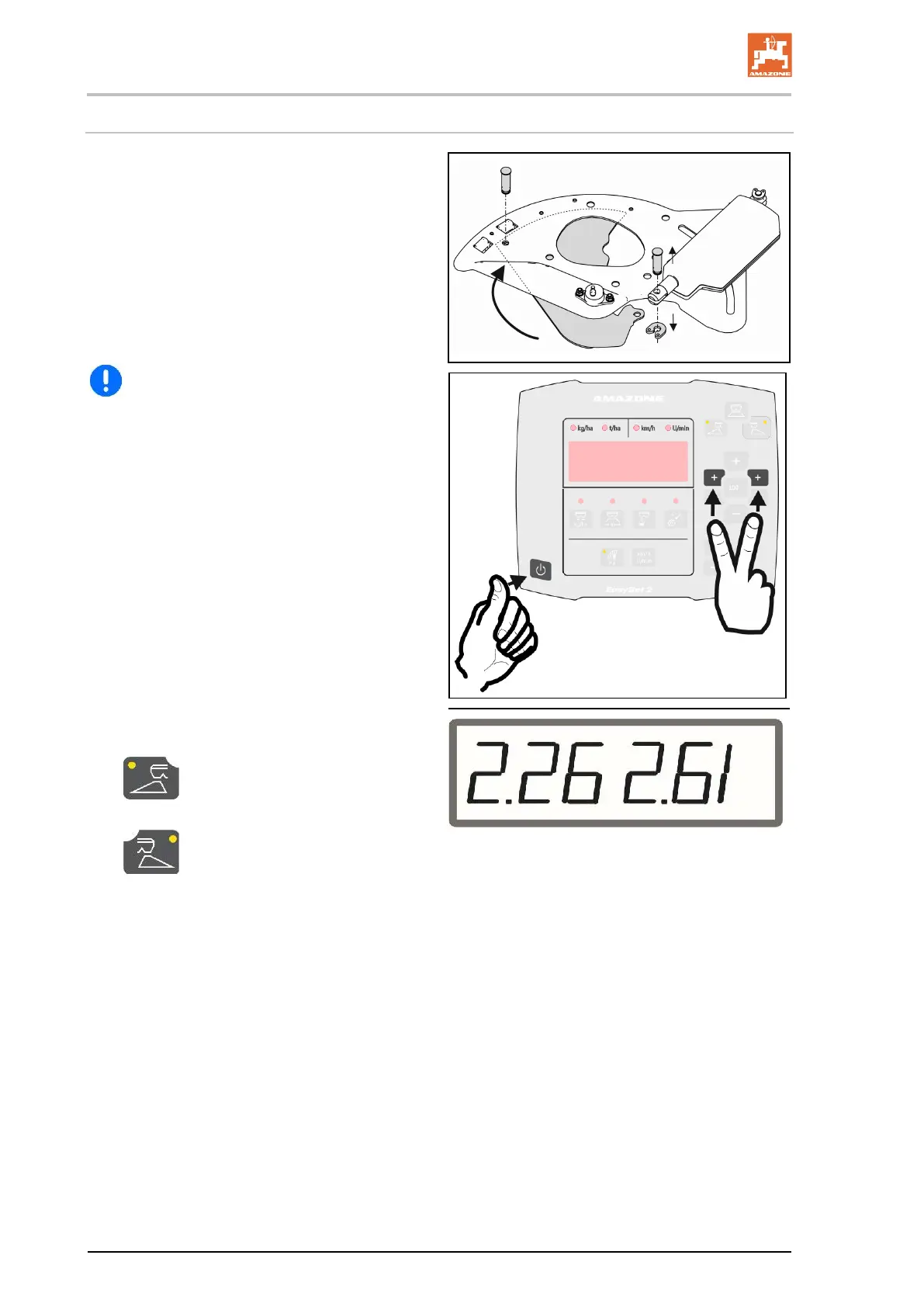
1. Remove the locking clip from the pin on the
motor and remove the pin.
2. Put the shutter into the calibration position.
To do so, turn the shutter manually such
that the holes in the shutter and in the floor
plate are aligned.
3. Secure the calibration position with the pin
for fastening the motor.
4. Perform work steps 1-3 on both sides.
EasySet is switched off!
5. Press the Power on, rate left + and right +
buttons simultaneously and hold for 3 se-
conds.
→ "ConF" and the current calibration value
appear briefly consecutively.
→ The shutter LEDs are flashing.
→The voltage values in volts for the left and right
shutters are shown.
6.
Confirm the calibration of the left
shutter.
7.
Confirm the calibration for the right
shutter.
→ EasySet then switches itself off automa-
tically and the calibration is finished.
8. Connect the motor and shutter again with
the pin and locking clip.





 To Next Page