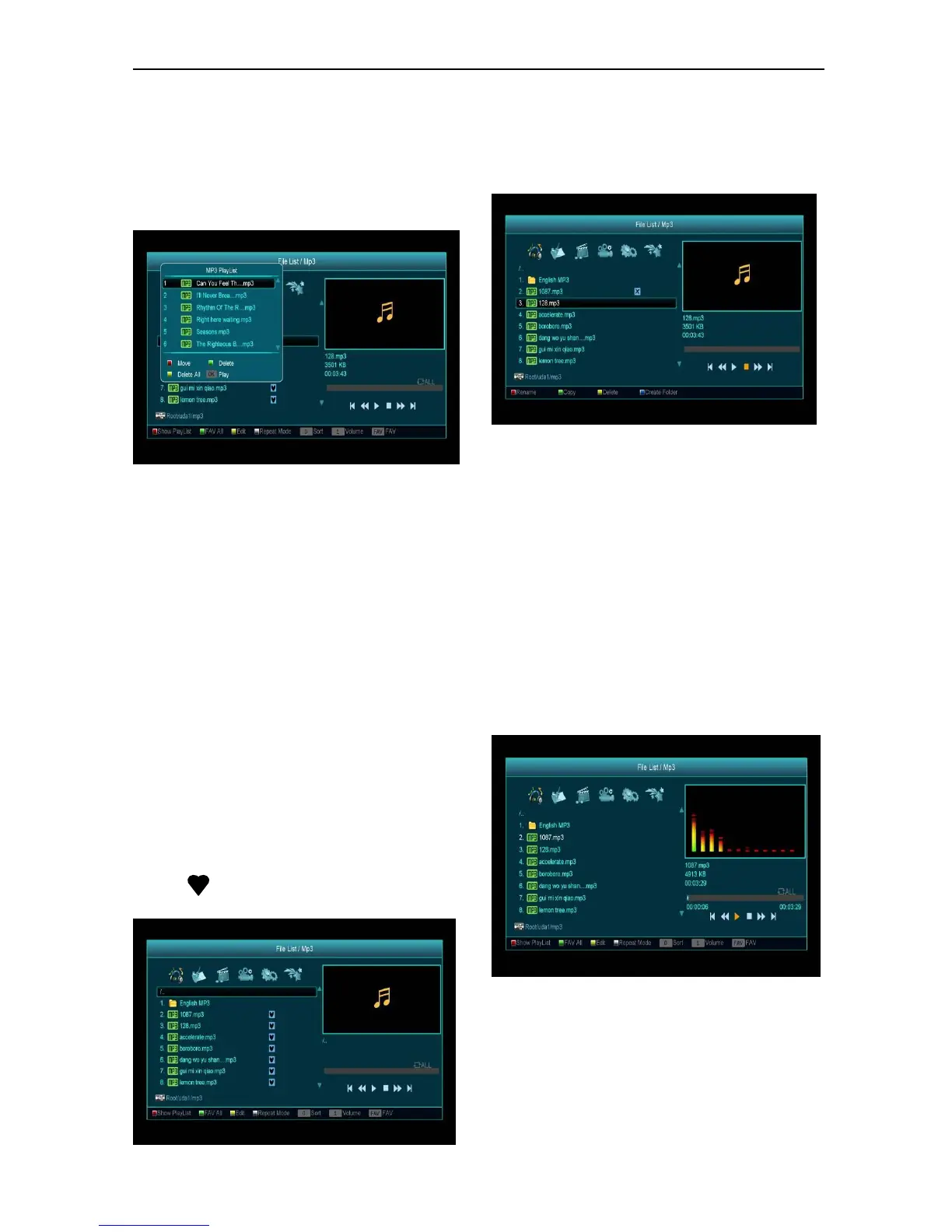
In this menu you can select the MP3 file to play by
pressing [OK] key or [PLAY] key. Also you can set
the play list..
[Red] key: Show play list as the picture bellow:
Red Key:
Move the selected file by pressing Red key and
[UP][DOWN] key.
Green Key:
Delete the selected file by pressing Green key.
Yellow Key:
Delete all files by pressing Yellow Key, but there
will display a dialog box asking “Delete All” before
practical operation, if user selects Yes, all files will
be deleted, and the Play list window will close.
Press OK button to play file.
[Green] key:
All the MP3 files in current directory are added into
MP3 play list by pressing [Green] key, and will
display “ ”beside the MP3 files.
[Yellow] key:
To edit the files or folders in the USB storage press
this button, you can see the picture like the below.
Red Key
To rename the file or folder.
Green Key
To copy the file or folder to another folder.
Yellow Key
To delete the file or folder from the disk.
Blue Key
To create a new folder in the disk.
Press [EXIT] key to draw back to ‘EDIT’ MENU.
[White] key:
To set the Repeat mode of the MP3 player.
After begin playing MP3, it will show the MP3 play
window.
Press “PAUSE” button to pause. Press “PLAY”
button to play. Press “STOP” button to stop and
time return to 00:00.


 To Next Page