Record Type
You can select the record type by pressing
[left/right] key.
HDD Sleep Time
You can select the HDD sleep time by
pressing [left/right] key. When the HDD is not
being used, it will sleep after the time you
select.
Jump Time
You can select the jump time by pressing
[left/right] key.
Default Record time
You can input with numeric keys in this item to set
the default record time.
Press [Menu] key to draw back to “PVR Setting”
menu.
14.4 USB Speed Test
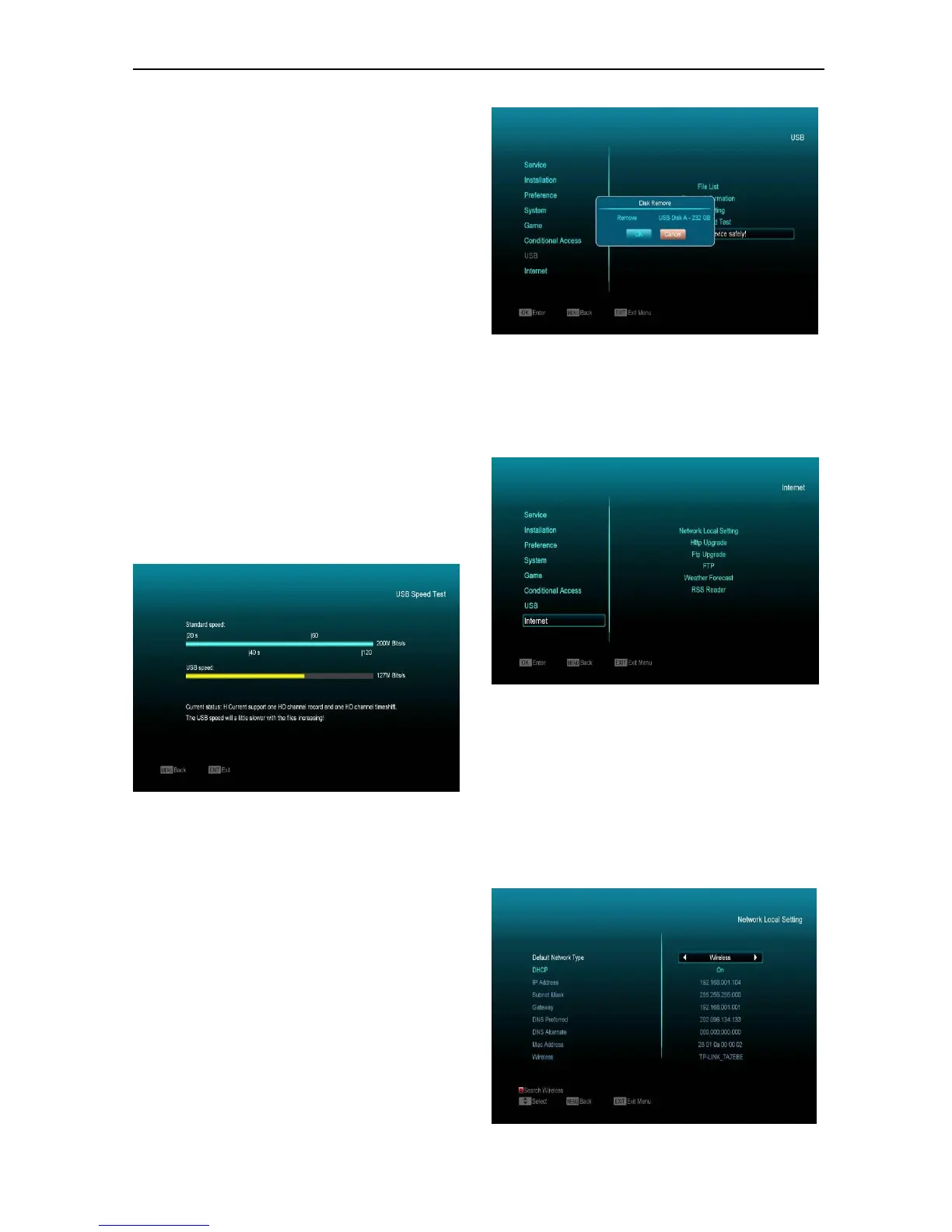
In "USB Speed Test" Menu you can see the
Standard speed and your USB harddisk speed,
according to this information you can know what
operation your disk can support.
14.5 Remove USB Device safely!
Use this menu to remove the USB Device safely.
15. Internet
If you enter the "Internet " Menu, you will see the
picture like the below:
You can download new software from the network
via LAN port.
15.1 Network Local Setting
1. Select your Network Type as Wired or Wireless,
if you select Wireless, you can configure Wi-Fi
(wireless) by the following steps:
a. Select Wireless on Default Network Type item.


 To Next Page