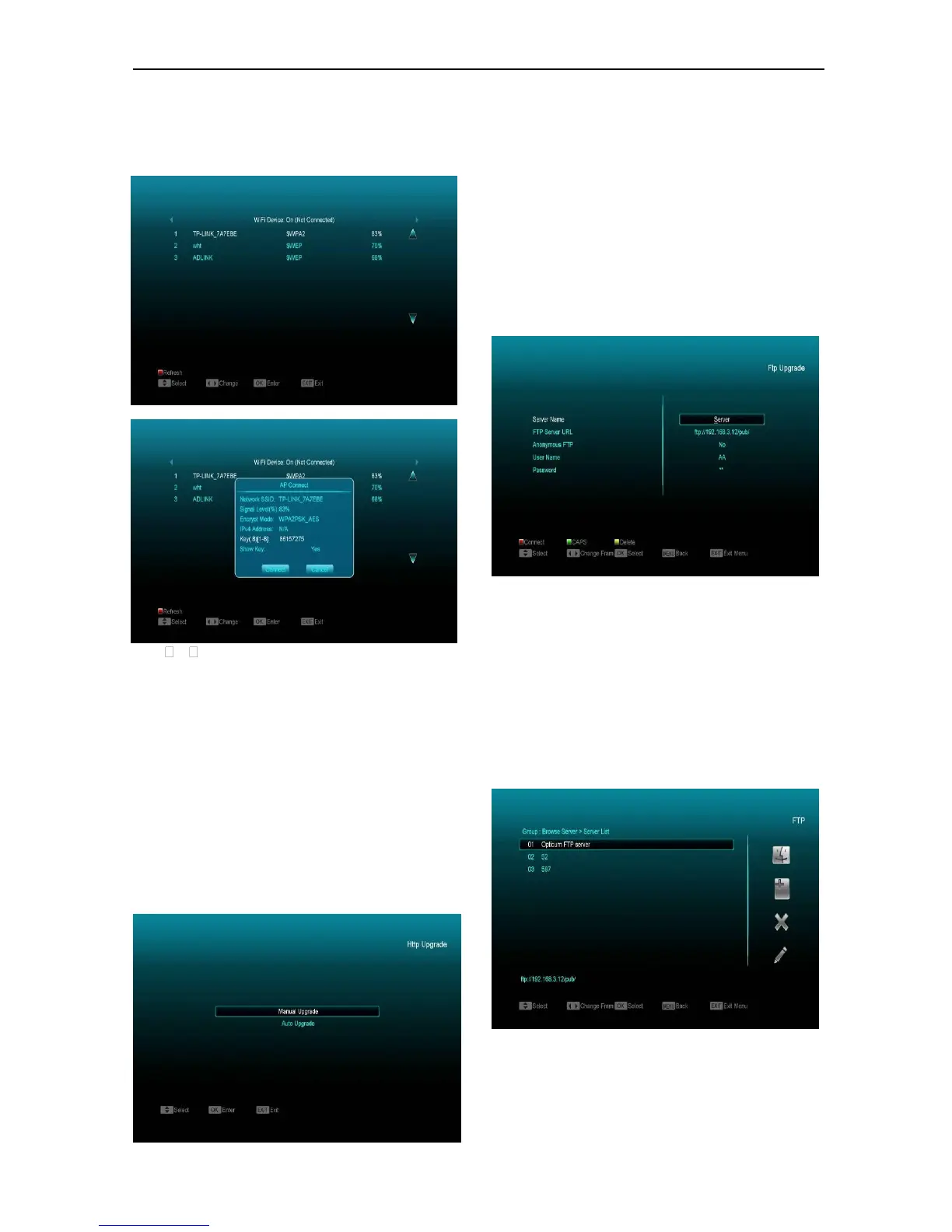
b. Press [red] button & the wireless LAN network
list will appear select you Wi-Fi network and
press [ok] button, then input password.
c. Press [OK] button on Connect item to start
connecting.
2. In this menu you may assign a dynamic IP
address to the digital receiver. To do so, select
DHCP On.
3. If you have a static IP address, unselect the
DHCP Enable, then the IP Address, Subnet Mask,
Gateway and DNS options become enabled. You
have to set these options according to your IP
address.
15.2 Http Upgrade
When connected to the Internet, the receiver can
manually or automatically make software update
from file from server.
Note:
This function depends on connection with external
server. In case of no software on server, this
function will not work.
15.3 FTP Upgrade
When connected to the Internet, receiver can
make software update from file from FTP server.
Note:
This function depends on connection with external
server. In case of no software on server, this
function will not work.
15.4 FTP
When connected to the Internet, receiver can
download files, such as software, MP3 or Image
files from FTP server.
Note:


 To Next Page