CONNEX
TM
User Guide
19
Chapter 2, Setting Up CONNEX
TM
This chapter describes how to setup and connect the CONNEX Air Unit and the
CONNEX Ground Unit. This chapter contains the following sections:
• Setting Up the CONNEX Air Unit, page 19
• Setting Up the CONNEX Ground Unit, page 26
Setting Up the CONNEX Air Unit
Set up the CONNEX Air Unit (transmitter) and connect it to the aircraft, as described in
this section.
We highly recommend that you use the provided Amimon cables. If an alternate cable
is used, make sure that it is of the highest quality.
X To set up the CONNEX Air Unit:
1 Assemble the Air Unit/aircraft mounting plate:
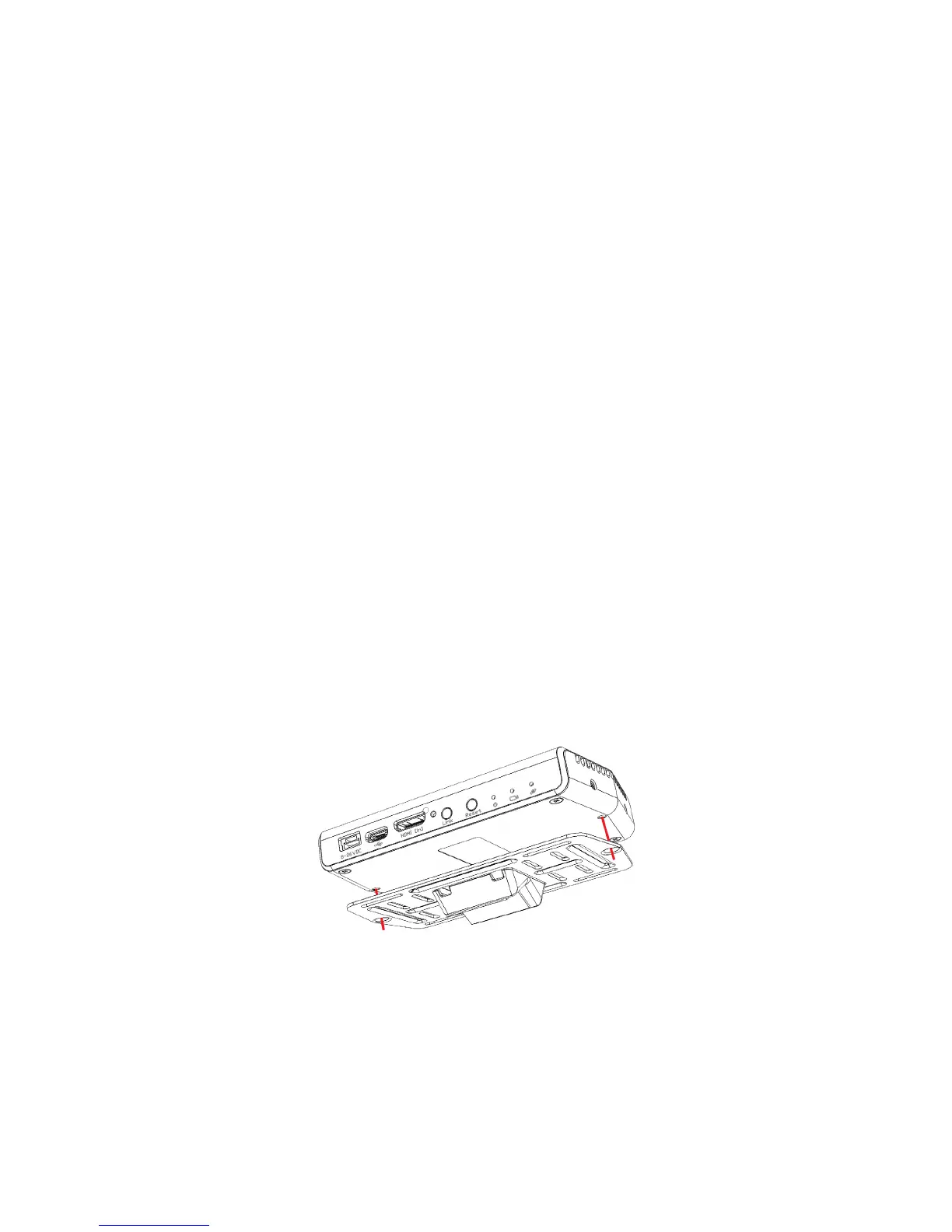
If attaching the Air Unit to a flat surface on the aircraft, then perform the
following:
• Place the Air Unit in the center of the provided mounting plate on the side with
the mounting plate bumps protruding.
• Use screws or plastic ties to hold the Air Unit to the mounting plate. You can
thread the plastic ties through any of the holes on the mounting plate.
Figure 18: Attaching the Air Unit to the Mounting Plate



 To Next Page